MCP server · Analytics
BirdNET-Go MCP server
by zax0rz
Ask your AI about the birds your backyard microphone heard, with times, confidence scores and audio clips.
This is a small helper that connects your AI assistant to a BirdNET-Go bird monitoring station. BirdNET-Go is software that listens to a microphone in your garden and identifies bird calls. If you already run one of those stations, this lets you simply ask your AI what has been singing instead of clicking around a dashboard.
What is an MCP server? The 30-second version
On its own, your AI can only chat with you. An MCP server is a small helper program that gives it one extra skill, in this case a connection to your BirdNET-Go station. Once it is set up, your AI can look up recent bird detections, check whether the microphone is healthy, or fetch a recording, and then tell you about it in normal words. You never touch the technical parts yourself; you just ask a question in the chat.
What this MCP server does
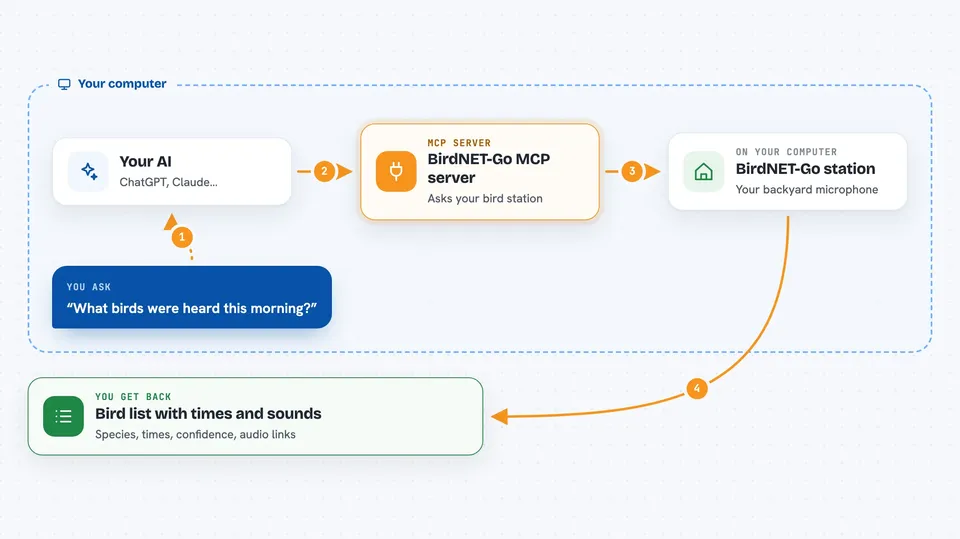
You ask your AI something like which birds were heard this morning. The AI passes that request to this helper program, which talks to your BirdNET-Go station over your home network. The station replies with detection records, and the helper tidies them into a short answer. Your AI then reads that back to you in the chat, with species names, times, confidence scores and links to the audio clips.
 Click to zoom
What you can do with it
- List the most recent bird detections with times and confidence scores
- Search past detections by date, species or minimum confidence
- Summarise today's activity, including total count and top visitors
- Spot species heard for the first time this season or year
- Check whether the microphone stream and detector host are healthy
- Get the web link to a specific audio clip
- Fetch a short audio clip so a model that can hear audio can listen to it
Try asking your AI
- “What birds were detected in the last hour?”
- “Show me today's summary of my bird station.”
- “Has anything new shown up this season?”
- “Is my microphone stream healthy right now?”
What it gives back to you
You get back short, readable answers in the chat: species names, common names, timestamps, confidence percentages and clip links. Summaries come as counts and top-species lists. If you ask for a clip, you either get a web link or the audio itself passed to a model that can listen to it. Everything is read-only, so nothing on your station is changed.
Before you start
What you need
- A running BirdNET-Go station on your network
- Its web address, for example http://192.168.1.50:8080
- The web address of your audio clips folder, usually on port 8091
- Node.js if you want to run it with npx, or the ready-made binary
Good to know
The audio-fetching tool can use up a huge amount of your AI's memory budget in one go, so use it sparingly and not in automatic routines.
Install it with your AI
Add BirdNET-Go MCP server to your AI, no technical skills needed
You don't install anything by hand. You copy one prompt, paste it into an AI that can work on your computer, and it checks, installs and connects the server for you, asking you when it needs something.
Sign in to get the install prompt
Members get a ready-made prompt that lets the Claude desktop app check BirdNET-Go MCP server, install it and connect it for them, step by step. You don't need any technical skills: you copy, paste and answer a few questions. Your connected AI can also find and install any of the 4,361 MCP servers here for you.
Who it's for
Backyard bird watchers, nature hobbyists and anyone already running a BirdNET-Go station who wants to chat with their own data.