MCP server · Analytics
Agentic MIKE+ MCP server
by Zhonghao1995
Let your AI inspect, edit, run and read DHI MIKE+ urban water models without opening the MIKE+ program.
This is a helper that connects your AI assistant to DHI MIKE+, the software engineers use to model city water and drainage networks. It lets the AI look at a model, change settings, run a simulation and read the results for you, all by describing what you want in plain words. It is handy for water engineers, modellers and students who already work with MIKE+ files and want to skip the clicking.
What is an MCP server? The 30-second version
On its own, your AI can only chat. An MCP server is a small helper program that gives your AI a new skill or a connection to another piece of software. This one connects your AI to DHI MIKE+, so when you ask a question about a model, the AI can actually open it, change it, run it and read the output. You still ask in normal language. The helper does the technical work behind the scenes.
What this MCP server does
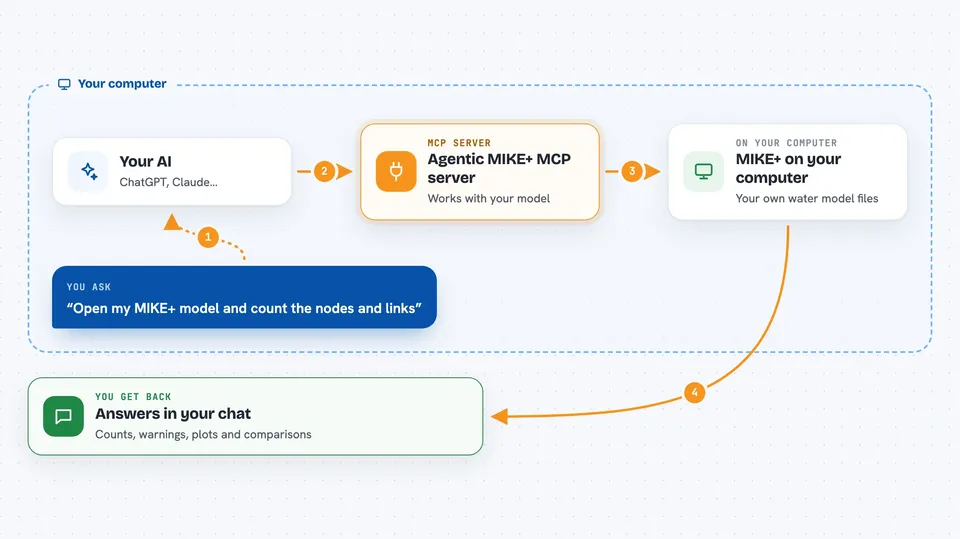
You tell your AI what you want, for example to check a model or run a scenario. The AI reads a set of written instructions that come with this server, then calls the right actions. Each action runs in its own small worker program that talks to the MIKE+ tools on your computer. The worker opens the model, reads or changes what you asked, or starts a simulation. When it is done, it sends the answer back and the AI shows it to you in the chat.
 Click to zoom
What you can do with it
- Get an overview of a model, including simulations, scenarios and element counts
- Read or change parameters such as a pipe diameter
- Run a simulation and get a quality-check status with errors and warnings
- List and read result files, including peaks and single time series
- Find which nodes flood by comparing peak water level to ground level
- Compare a baseline run against a scenario and rank the differences
- Make plots such as rain and flow charts, network maps and profiles
- Import an EPA SWMM or EPANET file into a new MIKE+ model
Try asking your AI
- “Open my MIKE+ model and tell me how many nodes and links it has”
- “Change the diameter of pipe P123 to 0.6 metres and save it”
- “Run the current scenario and tell me if there were any errors or warnings”
- “Which nodes flooded in the last run, ranked by how far the water went above ground”
- “Compare the baseline run with the new scenario and show me the change in peak flow”
What it gives back to you
You get answers in the chat: lists of simulations, scenarios and elements, numbers such as peak water levels or volumes, and short summaries of what changed. For runs, you get a status that says completed, plus any errors or warnings. For plots, you get image files you can open. For comparisons, you get tables of differences, RMSE and NSE values. It can also write a record file that lists the model, inputs, edits, run status, results and figures.
Before you start
What you need
- Python 3.11 (64-bit) installed on your computer
- A MIKE+ 2026 licence from DHI if you want to run or edit models (reading and plotting do not need one)
- Windows if you want to run or edit models (reading and plotting work on other systems too)
- The repository files and the Python packages listed in its requirements
Good to know
Running or editing models needs a valid DHI MIKE+ licence and Windows, and changes you ask for are written into the model, so keep a copy of important files before letting the AI edit them.
Install it with your AI
Add Agentic MIKE+ MCP server to your AI, no technical skills needed
You don't install anything by hand. You copy one prompt, paste it into an AI that can work on your computer, and it checks, installs and connects the server for you, asking you when it needs something.
Sign in to get the install prompt
Members get a ready-made prompt that lets the Claude desktop app check Agentic MIKE+ MCP server, install it and connect it for them, step by step. You don't need any technical skills: you copy, paste and answer a few questions. Your connected AI can also find and install any of the 4,361 MCP servers here for you.
Who it's for
Water engineers, urban drainage modellers, researchers and students who already use DHI MIKE+ and want to automate model checks, runs and result reading.