MCP server · Analytics
Agentic SWMM stormwater workflow
by Zhonghao1995
Lets your AI build, run, and check EPA SWMM stormwater models for you, with a clear record of every step.
This is a helper for people who work with EPA SWMM, the free program engineers use to model how rainwater moves through a city. It lets your AI assistant set up models, run them, check the results, and write up what happened, all from a plain sentence you type. It is handy for stormwater engineers, hydrologists, and students who want the boring setup work handled while keeping full control.
What is an MCP server? The 30-second version
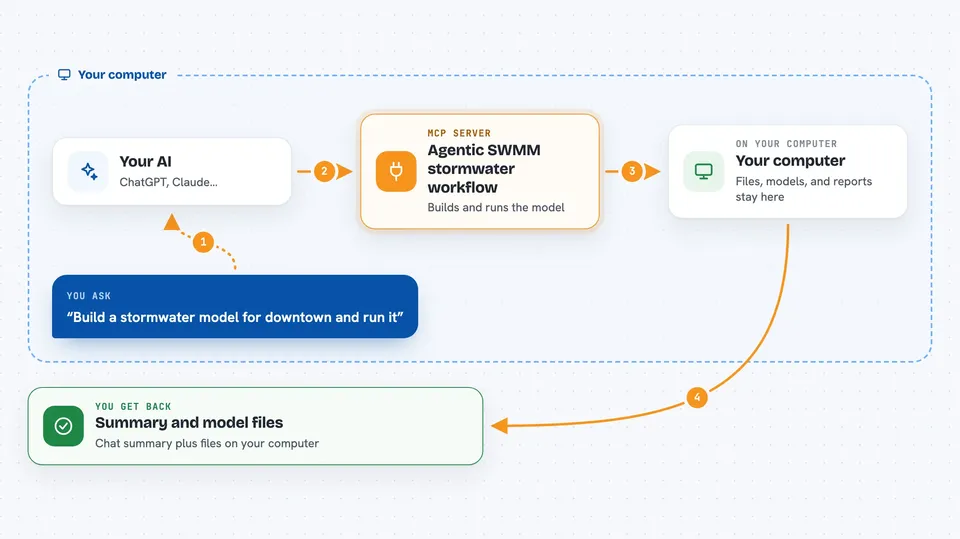
On its own, your AI can only chat. An MCP server is a small helper program that gives your AI a new skill or a connection to another tool. This one connects your AI to the Agentic SWMM workflow, which talks to EPA SWMM and QGIS on your computer. So when you ask for a model to be built or a simulation to be run, the AI passes the job to this helper, and the helper does the real work in SWMM.
What this MCP server does
You describe what you want in normal words, like building a stormwater model for an area or running a simulation. Your AI sends that request to this helper. The helper then prepares the model files, runs EPA SWMM, checks the results for problems, and saves everything as files you can open. When it is done, you get back a summary in the chat plus the actual model files, reports, and pictures on your computer.
 Click to zoom
What you can do with it
- Build a SWMM model from GIS data or from scratch
- Run SWMM simulations and get the results
- Check model output for errors and inconsistencies
- Calibrate model parameters against observed data
- Create rainfall-runoff plots and calibration charts
- Test climate change scenarios and uncertainty
- Write an audit note and a Word report of the run
Try asking your AI
- “Build a SWMM model for downtown Victoria using the latest storm network data and run it for a storm event.”
- “Run the Tecnopolo demo and show me the peak flow results.”
- “Check the model output for any errors and give me a summary.”
- “Calibrate the model using the rainfall and flow data in the project folder.”
What it gives back to you
You get a summary in the chat that tells you what was done and what the key numbers are, like peak flows or calibration scores. It also creates files on your computer: the SWMM input file, the report and output files, plots as images, and an audit note. Those files are yours to open, share, or reuse.
Before you start
What you need
- A computer with Python 3.10 or newer (or Docker)
- EPA SWMM installed (the free stormwater modelling program)
- An API key for an AI provider, or a local AI setup (the installer helps you choose)
- About 5 to 10 minutes to run the installer and setup
Good to know
This tool can create, change, and delete model files and run simulations that use your computer's resources, so always check the results and keep backups of important work.
Install it with your AI
Add Agentic SWMM stormwater workflow to your AI, no technical skills needed
You don't install anything by hand. You copy one prompt, paste it into an AI that can work on your computer, and it checks, installs and connects the server for you, asking you when it needs something.
Sign in to get the install prompt
Members get a ready-made prompt that lets the Claude desktop app check Agentic SWMM stormwater workflow, install it and connect it for them, step by step. You don't need any technical skills: you copy, paste and answer a few questions. Your connected AI can also find and install any of the 4,361 MCP servers here for you.
Who it's for
Stormwater engineers, hydrologists, urban drainage planners, and students who use EPA SWMM and want to save time on model setup and runs.