AI agent for program managers
100-Day Plan Tracker Agent
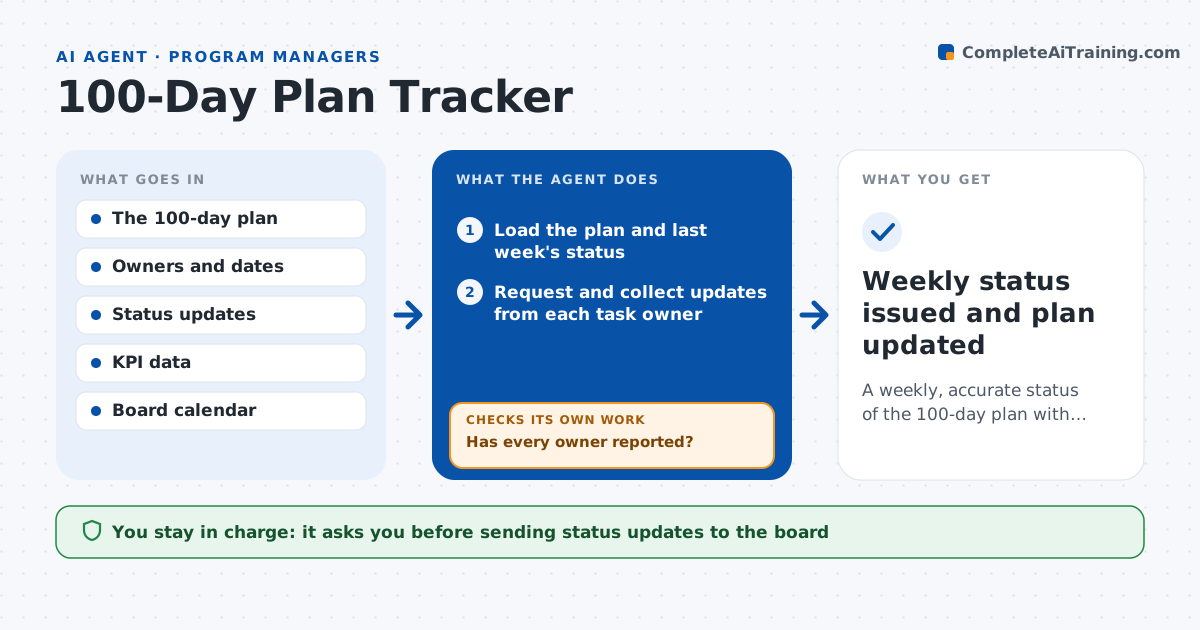
A weekly, accurate status of the 100-day plan with slips flagged early and recovery options tested
What it does
After a deal closes, the 100-day plan sets out dozens of actions, from finance hires to pricing changes, each with an owner and a target. In the first weeks everyone follows it. By day 40, updates are late, and the board hears about slips at the meeting. This agent turns the plan into a task list with owners, dates and the metric each task should move. Each week it collects status from the owners by message or from shared trackers, compares progress with targets and the calendar, and flags tasks that are behind or blocked. For each slip it proposes recovery steps, such as adding resources or resequencing, and reruns the schedule to see if the plan still lands at day 100. The deal lead approves updates sent to the board. Edge case: one task blocks six others, so the agent ranks it first.
How it works
Follow the arrows from top to bottom. The orange dashed arrow is the loop: when a check fails, the agent goes back and tries again.
Read the steps as a list
- Weekly status cycle begins
- Load the plan and last week's status
- Request and collect updates from each task owner
- Has every owner reported?If not: send a reminder and use the shared tracker data for any who stay silent. Back to step 3.
- Compare progress with dates and KPI targets
- Flag late or blocked tasks and map dependencies
- Propose recovery steps and rerun the schedule
- Does the revised schedule still reach the day 100 targets?If not: test another recovery option or mark the target at risk. Back to step 7.
- Write the weekly status with a red, amber and green view
- Deal lead approves updates sent to the boardThe agent waits here for your OK.
- Weekly status issued and plan updated
How it decides
It flags a task when its progress lags the planned date by a set margin or when it blocks other tasks, and it ranks recovery steps by their effect on the day 100 outcome.
- Mark amber when a task is 5 days behind and red at 10 days
- Rank tasks that block others first
- Reminders go out 2 days before the status deadline
- Mark a KPI at risk if the trend misses target for two weeks
Make it yours
Every agent is a starting point. You choose these settings for your own situation.
- Status day and time
- Amber and red thresholds (default 5 and 10 days)
- KPIs tracked
- Board report format
What keeps you in control
It always asks you first
- Sending status updates to the board
- Changes to the plan's targets
Hard limits
- Never changes owners or targets itself
- Does not contact portfolio staff without approval of the first message
- Marks estimates as estimates
It stops when
- Done: day 100 reached
- Stop: plan data is unavailable
Set it up
We guide you through the set-up, step by step
Members get the full set-up guide for this agent. No technical skills needed: you copy, paste and upload.
- One set of instructions to paste into your AI, with the clicks for ChatGPT, Claude, Microsoft 365 Copilot, Gemini and Grok
- The agent then walks you through connecting your own data, one source at a time
- A downloadable copy with the flow chart, the rules and the full guide