AI agent for payroll administrators
ACA Reporting Preparation Agent
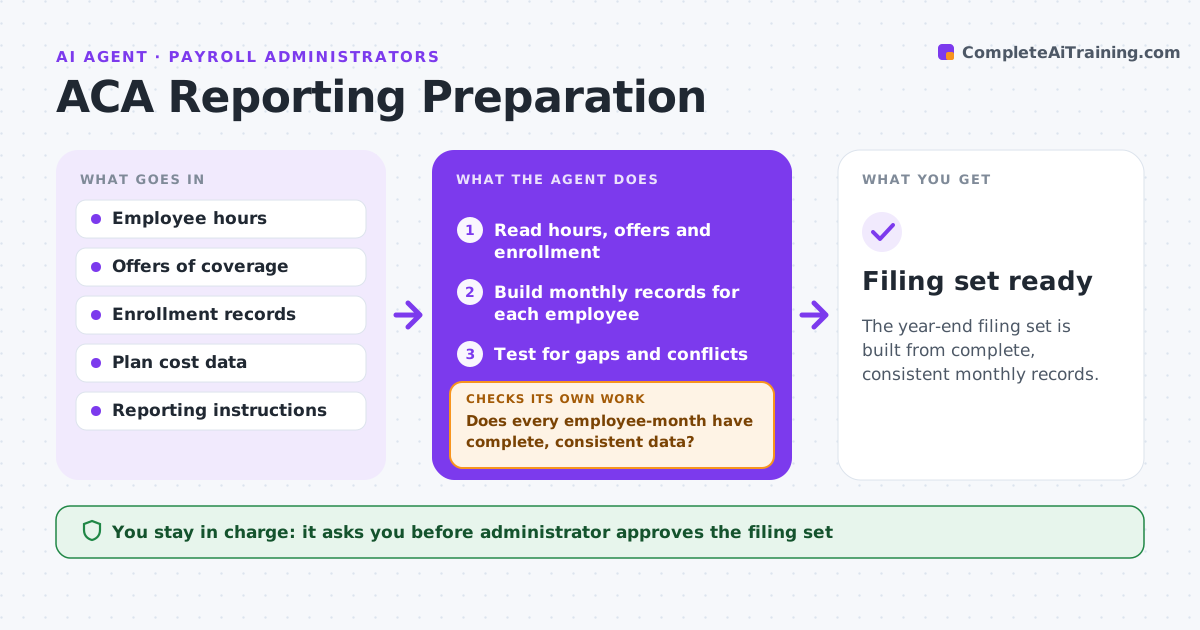
The year-end filing set is built from complete, consistent monthly records.
What it does
Year-end reporting forms depend on monthly offer and coverage data that has gaps. The agent builds a monthly record for each employee, tests for gaps and conflicts, such as a month with an offer but no code, and asks payroll or HR to fix them. It recomputes the records after each fix. It then prepares the filing set and a list of changes. The administrator approves the filing set. Edge case: an employee who moved from part time to full time mid-year, so the hours and the offer must be checked for the right months.
How it works
Follow the arrows from top to bottom. The orange dashed arrow is the loop: when a check fails, the agent goes back and tries again.
Read the steps as a list
- Month closes or year ends
- Read hours, offers and enrollment
- Build monthly records for each employee
- Test for gaps and conflicts
- Does every employee-month have complete, consistent data?If not: List the problems and request fixes from payroll or HR. Back to step 4.
- Send the fix list and read the corrected data
- Recompute the monthly records
- Are all problems cleared?If not: Return to the list and repeat for what is left. Back to step 4.
- Prepare the filing set and a change log
- Administrator approves the filing setThe agent waits here for your OK.
- Filing set ready
How it decides
It checks every employee-month for an offer, a code and hours that agree with one another and treats any gap as an error to fix before filing.
- Every month needs an offer code and hours
- Flag changes in status mid-year
- Compare totals with prior year
- Fix before the filing deadline
Make it yours
Every agent is a starting point. You choose these settings for your own situation.
- Coverage forms and codes
- Filing deadline
- Who receives the fix list
- Monthly checks
What keeps you in control
It always asks you first
- Administrator approves the filing set
Hard limits
- Never file anything itself
- Keep employee data in approved systems
It stops when
- Done: all records complete and filing set approved
- Stop: the data cannot be corrected before the deadline and the administrator decides
Set it up
We guide you through the set-up, step by step
Members get the full set-up guide for this agent. No technical skills needed: you copy, paste and upload.
- One set of instructions to paste into your AI, with the clicks for ChatGPT, Claude, Microsoft 365 Copilot, Gemini and Grok
- The agent then walks you through connecting your own data, one source at a time
- A downloadable copy with the flow chart, the rules and the full guide