AI agent for recruitment coordinators
Aging Requisition Review Agent
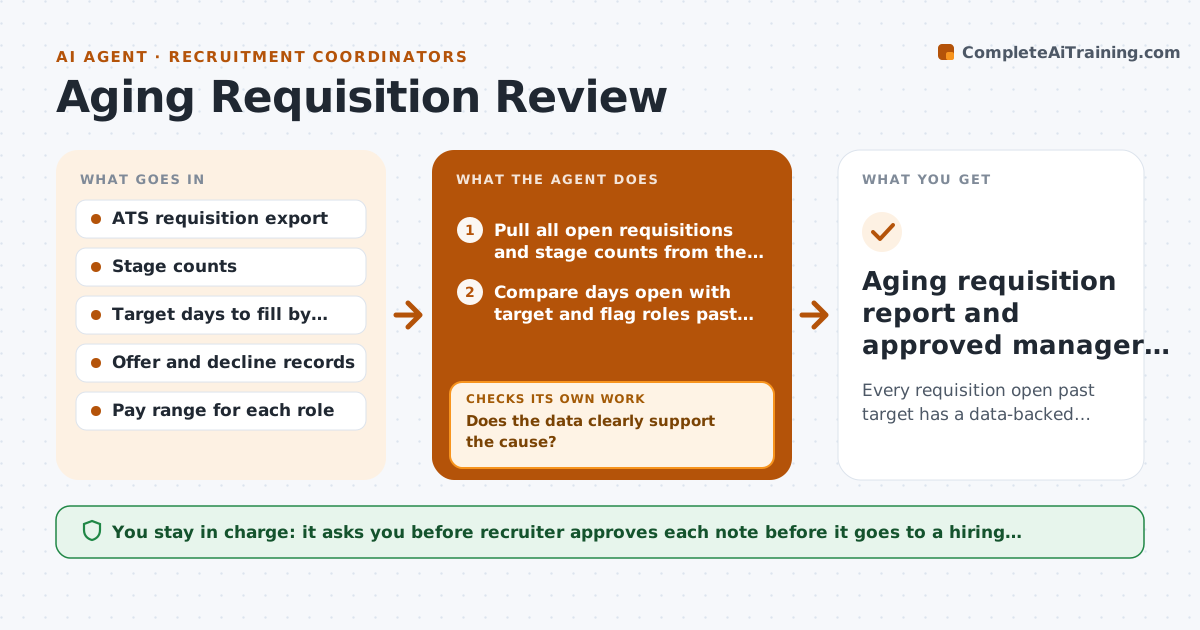
Every requisition open past target has a data-backed cause and a recommended fix ready for the hiring manager.
What it does
Every Monday you scan the ATS and find roles open for 90 days that nobody has discussed. This agent does the first pass. It pulls every open requisition, compares days open with the target for that level, and reads the pipeline counts at each stage. It then picks the most likely cause: too few applicants, slow manager feedback, a pay gap, or offers declined. For each stalled role it drafts one recommended fix. After drafting, it checks whether the data supports the diagnosis. If stage counts are thin or missing, it pulls extra reports such as source and rejection reasons and diagnoses again. You approve what goes to hiring managers. Edge case: a role with plenty of applicants but zero interviews points to slow feedback, not sourcing, so the agent recommends a manager nudge instead of a new job ad.
How it works
Follow the arrows from top to bottom. The orange dashed arrow is the loop: when a check fails, the agent goes back and tries again.
Read the steps as a list
- Monday weekly run
- Pull all open requisitions and stage counts from the ATS
- Compare days open with target and flag roles past target
- Pick a likely cause for each flagged role from stage data
- Does the data clearly support the cause?If not: Pull source, rejection reason and offer reports for that role, then re-diagnose. Back to step 2.
- Draft one recommended fix per role
- Save drafts to a review list, not the ATS
- Does every flagged role have a cause and a fix?If not: Return to diagnosis for the missing roles. Back to step 4.
- Recruiter approves which fixes go to hiring managersThe agent waits here for your OK.
- Aging requisition report and approved manager notes
How it decides
It maps the stage where candidates stop moving to a cause: no applicants means sourcing or pay, applicants but no interviews means feedback speed, late declines means offer terms.
- Flag a role when days open exceed target by 20% or more
- If a role has fewer than 10 applicants after 21 days, treat it as a sourcing or pay problem
- If applicants exist but no interview was scheduled in 14 days, treat it as slow feedback
- If 2 or more offers were declined, review pay and terms first
Make it yours
Every agent is a starting point. You choose these settings for your own situation.
- Target days to fill per job level (default 60 for professional roles)
- Overdue threshold (default 20% past target)
- Which stage counts as stuck (default 14 days with no movement)
- Report format and recipients
What keeps you in control
It always asks you first
- Recruiter approves each note before it goes to a hiring manager
- Recruiter approves any suggested pay discussion
Hard limits
- Never email hiring managers or candidates without approval
- Never change requisition data in the ATS
It stops when
- Done: every flagged role has an approved note or a reason to wait
- Stop: ATS data missing for more than a third of roles
Set it up
We guide you through the set-up, step by step
Members get the full set-up guide for this agent. No technical skills needed: you copy, paste and upload.
- One set of instructions to paste into your AI, with the clicks for ChatGPT, Claude, Microsoft 365 Copilot, Gemini and Grok
- The agent then walks you through connecting your own data, one source at a time
- A downloadable copy with the flow chart, the rules and the full guide