AI agent for paramedics
Ambulance Equipment Repair Tracking Agent
Every faulty device is fixed, tested and back in service, with a loaner in place meanwhile
What it does
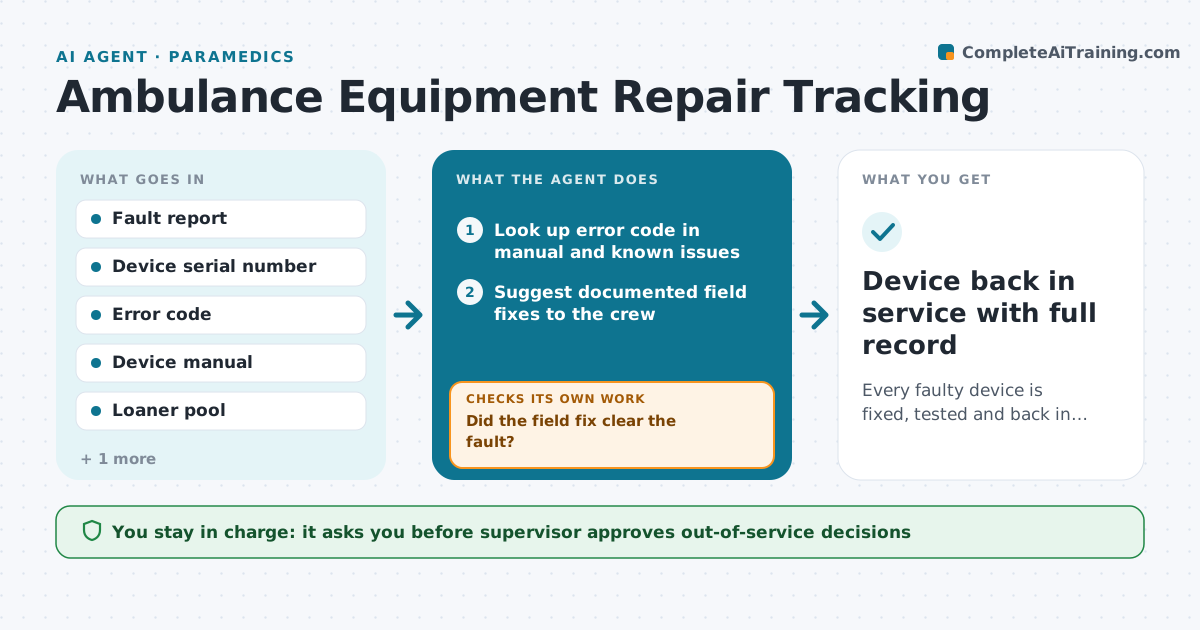
When a cardiac monitor throws an error or a power stretcher fails mid-shift, crews need a replacement now and the repair tracked to the end. This agent takes a fault report from the crew's end-of-call note or a short form. It reads the error code against the device manual and known issues, suggests simple field fixes like a battery swap, and if the fault stays, opens a repair ticket with the vendor or biomed team. It finds a loaner and tells the supervisor which unit is out of service. When the device returns, it checks that a functional test was done and logged before the unit goes back into service. If the test is missing, it holds the device. Edge case: a monitor failure during a cardiac arrest call also triggers an incident report draft, because patient care may have been affected.
How it works
Follow the arrows from top to bottom. The orange dashed arrow is the loop: when a check fails, the agent goes back and tries again.
Read the steps as a list
- Crew reports a device fault
- Look up error code in manual and known issues
- Suggest documented field fixes to the crew
- Did the field fix clear the fault?If not: take the device out of service and continue. Back to step 3.
- Open a repair ticket and assign a loaner
- Supervisor approves taking the unit out of serviceThe agent waits here for your OK.
- Track the repair with vendor or biomed
- Is a functional test logged after repair?If not: hold the device and request the test. Back to step 7.
- Device back in service with full record
How it decides
It tries documented field fixes first, then opens a repair if the fault remains, and never releases a device without a logged functional test.
- Any fault during patient care also drafts an incident report
- Two field-fix attempts at most before removal
- No loaner available means the supervisor is told within 15 minutes
- Repairs open longer than 5 days are escalated
Make it yours
Every agent is a starting point. You choose these settings for your own situation.
- Field-fix attempts before removal (default 2)
- Repair escalation time (default 5 days)
- Device types tracked
- Who signs off functional tests
What keeps you in control
It always asks you first
- Supervisor approves out-of-service decisions
- Biomed signs off the functional test
Hard limits
- Never returns a device to service without a logged test
- Never advises crews to bypass safety alarms
- Keeps an audit trail for each device
It stops when
- Done: device tested and back in service
- Stop: device condemned; hand to fleet for replacement
Set it up
We guide you through the set-up, step by step
Members get the full set-up guide for this agent. No technical skills needed: you copy, paste and upload.
- One set of instructions to paste into your AI, with the clicks for ChatGPT, Claude, Microsoft 365 Copilot, Gemini and Grok
- The agent then walks you through connecting your own data, one source at a time
- A downloadable copy with the flow chart, the rules and the full guide