AI agent for animators
Animation Curve Polish Check Agent
A shot free of technical curve glitches before it goes to dailies
What it does
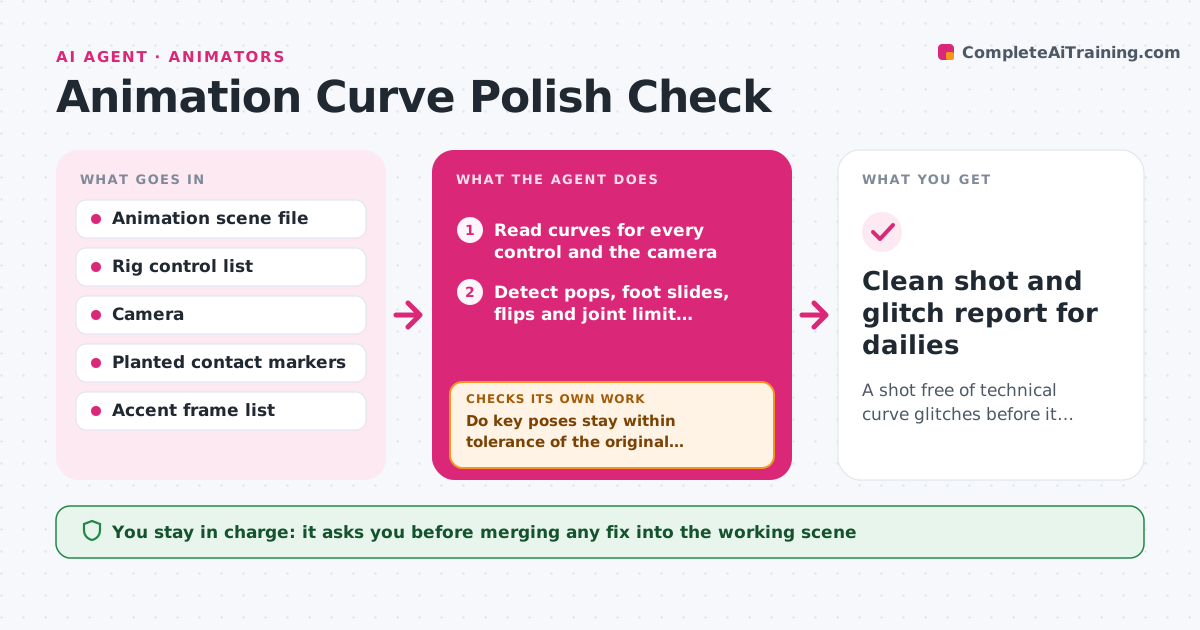
Before a shot goes to dailies, animators scrub through it hunting for technical glitches that distract reviewers from the acting. This agent reads the animation curves on every control and looks for problems: sudden value jumps between frames, feet that move while marked as planted, rotations that flip by close to 180 degrees, and keys that overshoot joint limits. It ranks findings by how visible they are in the camera view. For simple pops it drafts a fix on a copy, such as a euler filter or a smoothed key, and replays the affected frames to check the fix did not change the pose on key frames. Acting choices are never touched. You review each proposed fix and approve before it lands in your scene. Edge case: an intentional snap in cartoony animation looks like a pop, so it reads your marked accent frames first.
How it works
Follow the arrows from top to bottom. The orange dashed arrow is the loop: when a check fails, the agent goes back and tries again.
Read the steps as a list
- Shot marked ready for dailies
- Read curves for every control and the camera
- Detect pops, foot slides, flips and joint limit overshoots
- Skip frames on the accent list and rank findings by visibility in camera
- Draft fixes on a copy of the scene
- Do key poses stay within tolerance of the original after the fix?If not: drop the fix for that control and mark it for manual work. Back to step 5.
- Playblast affected frames and re-run detection
- Are all visible glitches gone?If not: try the next fix type for remaining issues, up to three tries. Back to step 3.
- Animator approves fixes into the working sceneThe agent waits here for your OK.
- Clean shot and glitch report for dailies
How it decides
It flags value changes larger than a set multiple of the curve's normal frame-to-frame change, planted contacts that move more than the slide limit, and rotations that jump near 180 degrees.
- Flag a pop when a frame change is over 4x the median change on that curve
- Flag foot slide when a planted contact moves more than 0.5 cm
- Only flag issues visible from the shot camera as high priority
- Never change values on key poses by more than 1%
Make it yours
Every agent is a starting point. You choose these settings for your own situation.
- Pop sensitivity multiplier (default 4x)
- Foot slide limit (default 0.5 cm)
- Accent frames to ignore
- Which controls to check
- Report format (notes or overlay)
What keeps you in control
It always asks you first
- Merging any fix into the working scene
Hard limits
- Never alter acting or timing choices
- Never overwrite the working scene without approval
It stops when
- Done: no visible glitches remain
- Stop: issues need acting changes, listed for the animator
Set it up
We guide you through the set-up, step by step
Members get the full set-up guide for this agent. No technical skills needed: you copy, paste and upload.
- One set of instructions to paste into your AI, with the clicks for ChatGPT, Claude, Microsoft 365 Copilot, Gemini and Grok
- The agent then walks you through connecting your own data, one source at a time
- A downloadable copy with the flow chart, the rules and the full guide