AI agent for notaries
Apostille and Legalization Route Agent
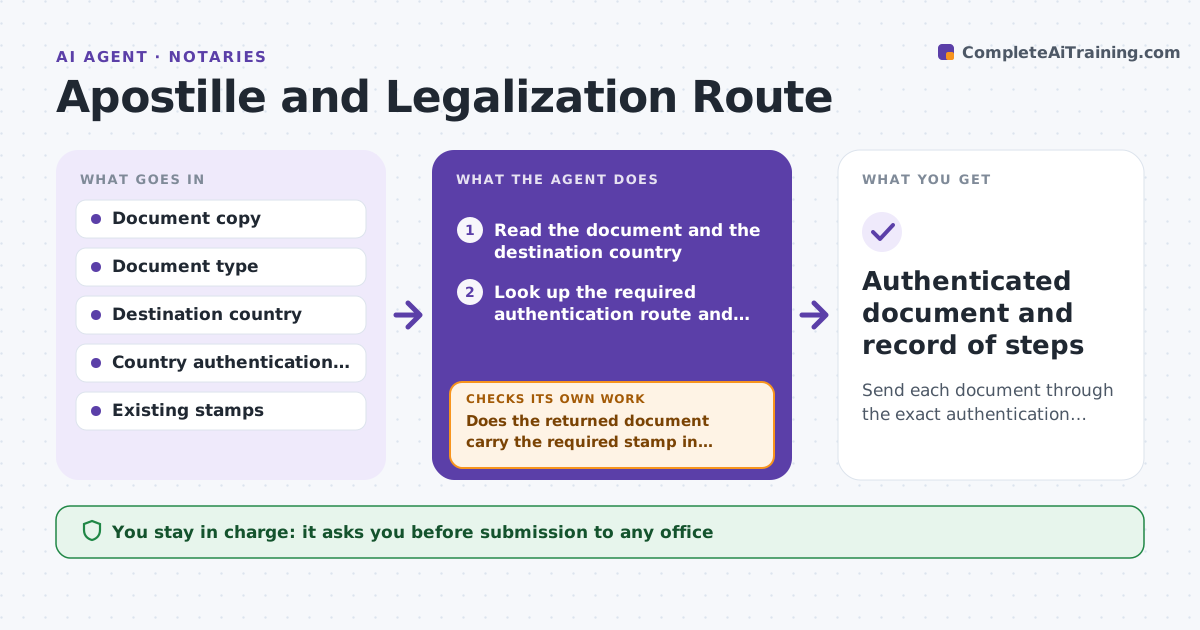
Send each document through the exact authentication route in the correct order.
What it does
A document for use abroad needs the right chain of stamps: notarization, county or state certification, an apostille or a consular legalization. Which one depends on the document and the destination country. The wrong route means weeks of delay and fees. This agent reads the document and the destination, finds the required steps, checks which stamps and seals are already on the document, and builds the order of steps. Each time the document comes back from an office, it rechecks that the stamp is present and in the right form before the next step. The person approves submission. Edge case: a destination that does not accept apostilles gets the full consular chain, with the embassy's requirements listed.
How it works
Follow the arrows from top to bottom. The orange dashed arrow is the loop: when a check fails, the agent goes back and tries again.
Read the steps as a list
- A document for use abroad is received
- Read the document and the destination country
- Look up the required authentication route and fees
- Check which stamps and seals are already on the document
- Build the ordered list of steps with offices and times
- Person approves the plan and submissionThe agent waits here for your OK.
- Track each submission and return
- Does the returned document carry the required stamp in the correct form?If not: Describe the problem and resubmit or repair the step before moving on. Back to step 6.
- Are all steps in the route complete?If not: Move to the next step and update the timeline. Back to step 6.
- Authenticated document and record of steps
How it decides
Looks up the route by document type and destination, and treats a step as complete only when the stamp or seal is verified on the returned document.
- Apostille route only if the destination is a Hague Convention member
- Otherwise use consular legalization
- A step must be verified on the document before the next
- Notarization must be current and match the signer
Make it yours
Every agent is a starting point. You choose these settings for your own situation.
- Destination countries handled
- Offices and addresses
- Fee and time estimates
- Client contact
- Checklist per document type
What keeps you in control
It always asks you first
- Submission to any office
- Payment of fees
- Any change of route
Hard limits
- Never submit a document or pay a fee without approval
- Never alter a document
It stops when
- Done: final stamp verified and returned
- Stop: destination rules unclear, ask the embassy
- Stop: client cancels
Set it up
We guide you through the set-up, step by step
Members get the full set-up guide for this agent. No technical skills needed: you copy, paste and upload.
- One set of instructions to paste into your AI, with the clicks for ChatGPT, Claude, Microsoft 365 Copilot, Gemini and Grok
- The agent then walks you through connecting your own data, one source at a time
- A downloadable copy with the flow chart, the rules and the full guide