AI agent for software architects
Architecture Decision Record Agent
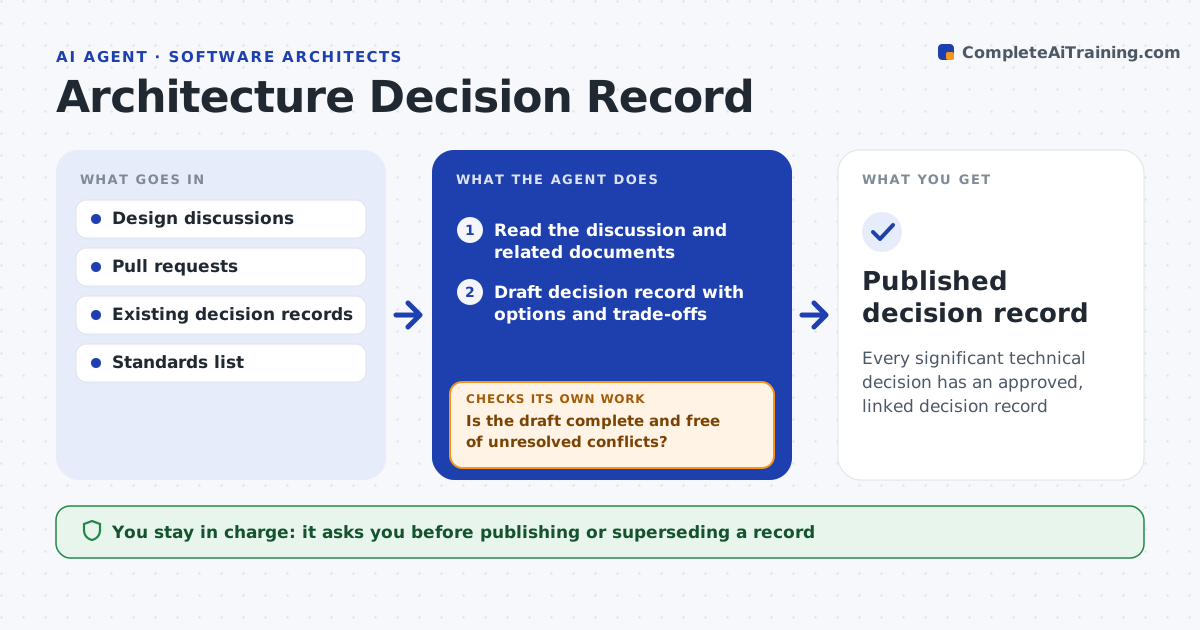
Every significant technical decision has an approved, linked decision record
What it does
Teams make important technical choices in meetings and pull requests but rarely write down the options and reasons, so new people repeat old debates. This agent watches discussions and pull requests labeled as architecture work. It reads the thread and related documents and drafts an Architecture Decision Record with context, options, trade-offs and consequences. Each option needs at least one pro and one con. It then searches existing records and standards for conflicts, such as a new choice that contradicts an earlier standard. If it finds a conflict or a missing option, it adds it to the draft, asks the authors, and redrafts. Superseded records are linked, never deleted. The architect approves before the record is published and linked from the code. Edge case: a decision mentioned only once in chat stays a candidate until someone confirms it.
How it works
Follow the arrows from top to bottom. The orange dashed arrow is the loop: when a check fails, the agent goes back and tries again.
Read the steps as a list
- Architecture-labeled discussion or pull request opened
- Read the discussion and related documents
- Draft decision record with options and trade-offs
- Search existing records and standards for conflicts
- Is the draft complete and free of unresolved conflicts?If not: add the conflict or missing option and ask the authors. Back to step 3.
- Architect approves the recordThe agent waits here for your OK.
- Publish record and link it from the code and discussion
- Published decision record
How it decides
A draft is ready only when each option has at least one pro and con and no unresolved conflict with existing records.
- Unconfirmed decisions stay as candidates
- Superseded records are linked, not deleted
- Each option needs pros and cons
Make it yours
Every agent is a starting point. You choose these settings for your own situation.
- Record template
- Labels that trigger it
- Where records live
- Who can approve
What keeps you in control
It always asks you first
- Publishing or superseding a record
Hard limits
- Never merges code
- Never deletes records
It stops when
- Done: record published
- Stop: authors cannot agree, schedule a decision meeting
Set it up
We guide you through the set-up, step by step
Members get the full set-up guide for this agent. No technical skills needed: you copy, paste and upload.
- One set of instructions to paste into your AI, with the clicks for ChatGPT, Claude, Microsoft 365 Copilot, Gemini and Grok
- The agent then walks you through connecting your own data, one source at a time
- A downloadable copy with the flow chart, the rules and the full guide