AI agent for headteachers
Attendance and Truancy Letter Escalation Agent
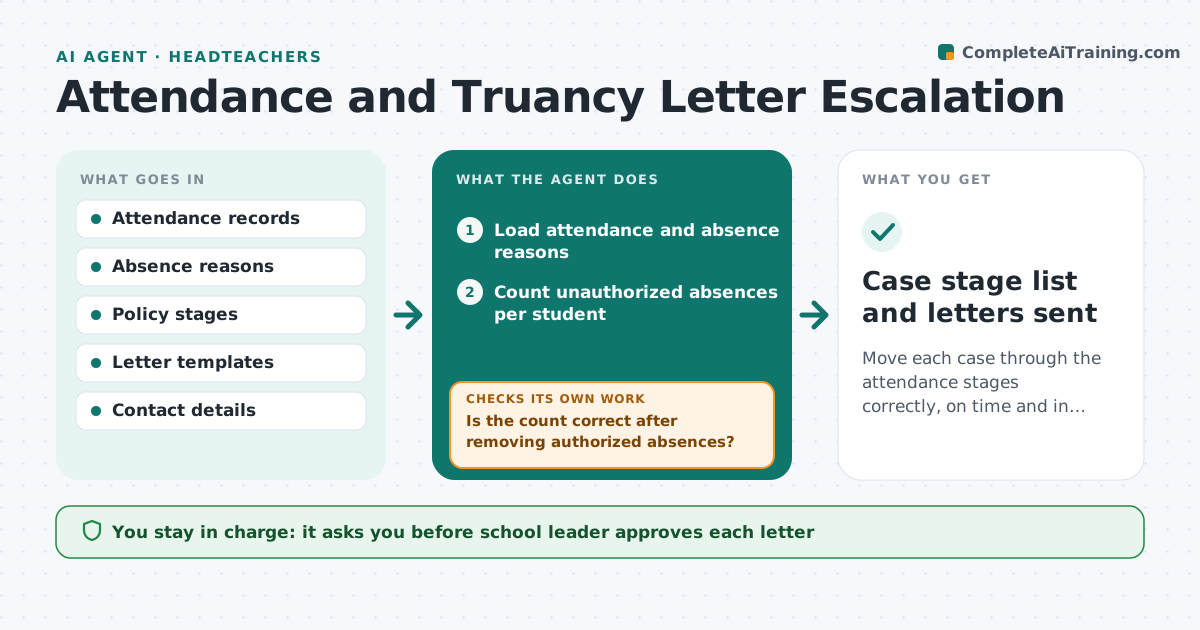
Move each case through the attendance stages correctly, on time and in the right order.
What it does
School attendance processes move in stages: a letter after a set number of absences, a meeting later, then referral. The letters and meetings must go out in the right order and on time. The agent tracks each student's absences, checks which stage they are at under the policy, drafts the next letter or meeting invite, and confirms delivery. It resets when attendance improves. It also checks whether absences are authorized, so letters do not go out in error. The school leader approves each letter. Edge case: a student has 10 absences, but 4 are approved medical, so the count is 6 and the stage does not change.
How it works
Follow the arrows from top to bottom. The orange dashed arrow is the loop: when a check fails, the agent goes back and tries again.
Read the steps as a list
- Weekly attendance run
- Load attendance and absence reasons
- Count unauthorized absences per student
- Match each student to the policy stage
- Is the count correct after removing authorized absences?If not: Check the reason codes and recount. Back to step 3.
- Draft the next letter or meeting invite
- School leader approves each letterThe agent waits here for your OK.
- Send and record the delivery
- Was the letter delivered and did attendance improve?If not: Resend by another route, or reset the stage if attendance improved. Back to step 4.
- Case stage list and letters sent
How it decides
It counts unauthorized absences against the policy thresholds. A student moves to the next stage when the threshold is passed and the previous step is complete.
- Authorized absences are not counted
- Move to the next stage only after the earlier step is done
- Reset after 4 weeks of attendance above 95 percent
- Check delivery within 3 days
Make it yours
Every agent is a starting point. You choose these settings for your own situation.
- Absence thresholds per stage
- Reason codes counted as authorized
- Reset rule
- Delivery routes
What keeps you in control
It always asks you first
- School leader approves each letter
Hard limits
- Never sends a letter without approval
- Never labels a family or student
It stops when
- Done: attendance improved or the case moves to referral
- Stop: the leader closes the case
Set it up
We guide you through the set-up, step by step
Members get the full set-up guide for this agent. No technical skills needed: you copy, paste and upload.
- One set of instructions to paste into your AI, with the clicks for ChatGPT, Claude, Microsoft 365 Copilot, Gemini and Grok
- The agent then walks you through connecting your own data, one source at a time
- A downloadable copy with the flow chart, the rules and the full guide