AI agent for bloggers
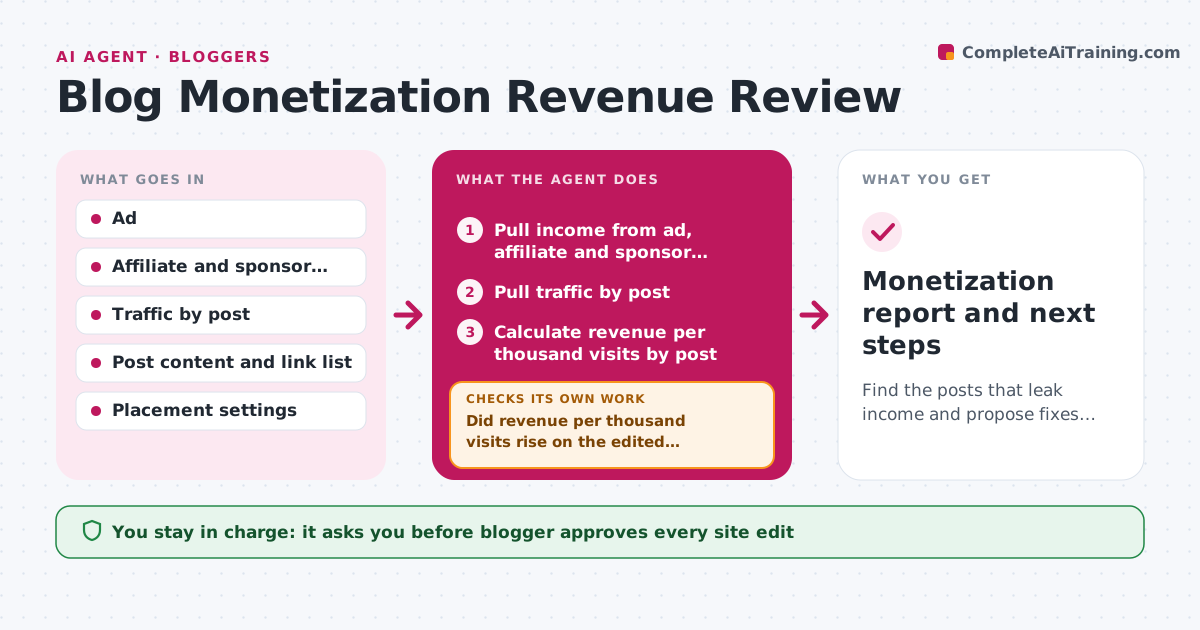
Blog Monetization Revenue Review Agent
Find the posts that leak income and propose fixes that raise revenue.
What it does
A blog earns from ads, affiliate links and sponsors, each in a separate dashboard, so it is hard to tell which posts really pay. Each month this agent pulls income from every source, ties it to posts and traffic, and finds posts with high traffic and low revenue. It tests whether a placement or link problem explains the gap, such as a broken affiliate link, an ad slot that does not load, or a link far down the page. It proposes changes with an estimate of the extra income. After the blogger approves and edits go live, it checks the next month to see if revenue rose. The blogger approves all site edits.
How it works
Follow the arrows from top to bottom. The orange dashed arrow is the loop: when a check fails, the agent goes back and tries again.
Read the steps as a list
- Month closes
- Pull income from ad, affiliate and sponsor reports
- Pull traffic by post
- Calculate revenue per thousand visits by post
- Flag posts with high traffic and low revenue
- Test each flagged post for broken links, missing ad slots and weak placement
- Propose fixes with an estimate of extra income
- Blogger approves site editsThe agent waits here for your OK.
- Compare revenue after the edits
- Did revenue per thousand visits rise on the edited posts?If not: try a different placement or offer and re-estimate. Back to step 6.
- Monetization report and next steps
How it decides
It compares revenue per thousand visits across posts and tests the likely causes of low earners starting with broken links.
- Flag posts with traffic in the top 20 percent and revenue in the bottom 40
- Check link health before changing placement
- Estimate gain from the site median revenue per thousand visits
- Allow 30 days before judging an edit
Make it yours
Every agent is a starting point. You choose these settings for your own situation.
- Income sources
- High traffic and low revenue cutoffs
- Review period
- Estimate method
What keeps you in control
It always asks you first
- Blogger approves every site edit
Hard limits
- Never edits the site
- Marks estimates as estimates
It stops when
- Done: report delivered and edits tracked
- Stop: income data missing for one source
Set it up
We guide you through the set-up, step by step
Members get the full set-up guide for this agent. No technical skills needed: you copy, paste and upload.
- One set of instructions to paste into your AI, with the clicks for ChatGPT, Claude, Microsoft 365 Copilot, Gemini and Grok
- The agent then walks you through connecting your own data, one source at a time
- A downloadable copy with the flow chart, the rules and the full guide