AI agent for freight brokers
Carrier Insurance and Authority Watch Agent
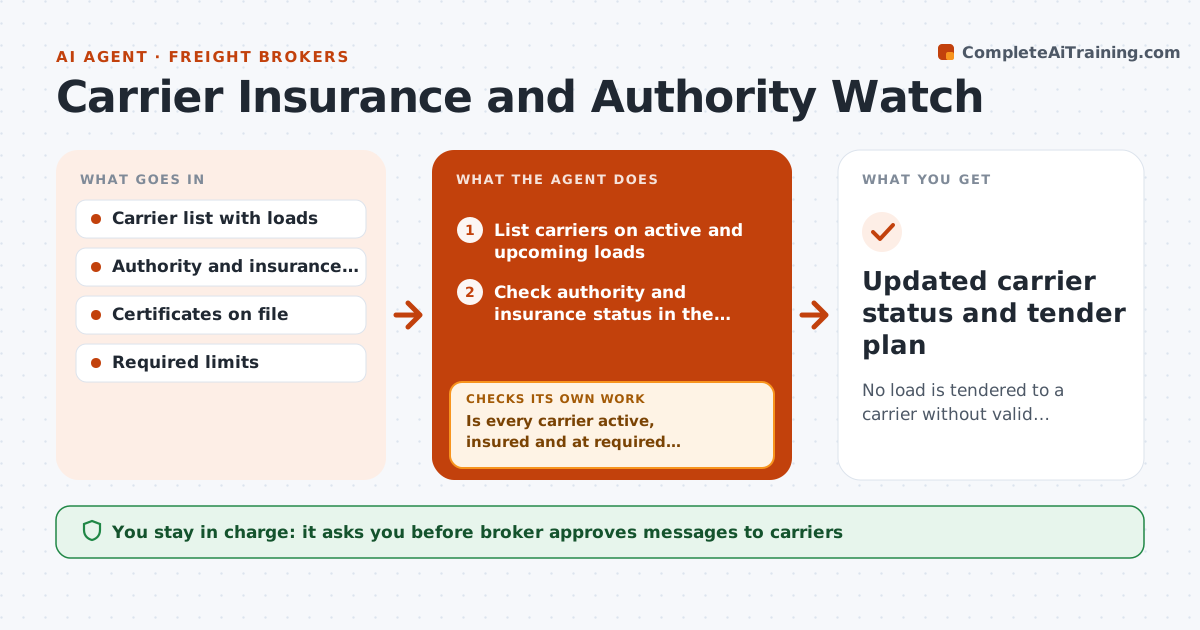
No load is tendered to a carrier without valid authority and insurance
What it does
A carrier can lose its operating authority or let insurance lapse overnight, and a load might still be tendered to that carrier. The broker then carries the risk. Each day this agent checks authority and insurance status for every carrier on active and upcoming loads. It compares the results with the previous day, and flags lapses, cancelled policies, lower limits and name changes. It removes flagged carriers from the draft tender plan and asks the carrier for updated documents. When documents arrive, it checks policy dates, limits and holder name before marking the carrier clear. The broker approves reinstatement. Edge case: the carrier's insurance renewed but the registry shows a delay, so the agent asks for a certificate before reinstating.
How it works
Follow the arrows from top to bottom. The orange dashed arrow is the loop: when a check fails, the agent goes back and tries again.
Read the steps as a list
- Daily check begins
- List carriers on active and upcoming loads
- Check authority and insurance status in the registry
- Compare with yesterday and with required limits
- Is every carrier active, insured and at required limits?If not: remove the carrier from the draft tender plan and flag the loads. Back to step 2.
- Draft a request to the carrier for updated documents
- Broker approves the requestThe agent waits here for your OK.
- Send, then check any returned certificate against dates, limits and holder
- Do the new documents meet all requirements?If not: reject and ask for a corrected certificate. Back to step 5.
- Broker approves reinstatementThe agent waits here for your OK.
- Updated carrier status and tender plan
How it decides
A carrier is clear only when authority is active, insurance is in force and limits meet the requirement. Any change triggers a hold in the plan.
- Hold a carrier on any lapse or cancelled policy
- Require a certificate when the registry lags
- Treat lower limits as a failure
- Check daily, and again just before tender
Make it yours
Every agent is a starting point. You choose these settings for your own situation.
- Required limits
- Check time of day
- Which loads are in scope
- Alert recipients
What keeps you in control
It always asks you first
- Broker approves messages to carriers
- Broker approves any reinstatement
Hard limits
- Never tender a load
- Do not reinstate without approval
- Keep a record of each check
It stops when
- Done: all loads have clear carriers
- Stop: a load already moved with a flagged carrier goes to the broker
Set it up
We guide you through the set-up, step by step
Members get the full set-up guide for this agent. No technical skills needed: you copy, paste and upload.
- One set of instructions to paste into your AI, with the clicks for ChatGPT, Claude, Microsoft 365 Copilot, Gemini and Grok
- The agent then walks you through connecting your own data, one source at a time
- A downloadable copy with the flow chart, the rules and the full guide