AI agent for police officers
Case File Organization Agent
A complete, consistent case file ready for the prosecutor
What it does
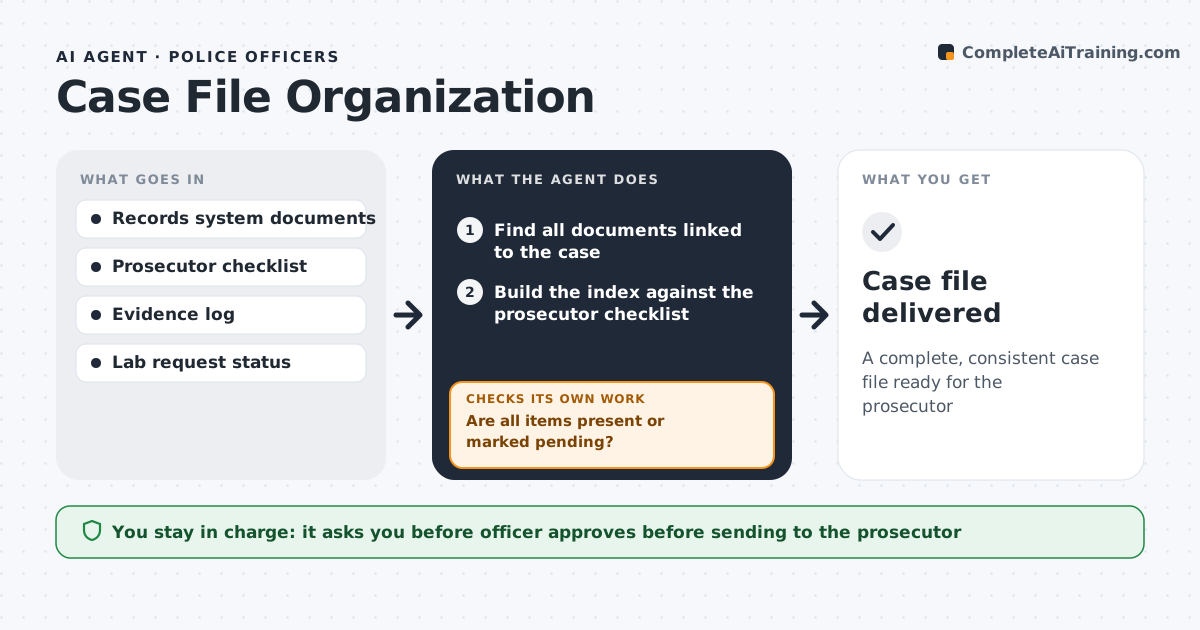
Before a case goes to the prosecutor, the file must hold reports, supplements, statements, evidence lists, lab results and video logs. Missing pieces lead to rejected charges or delays. This agent finds every document linked to the case and builds an index against the prosecutor's checklist. If an item is missing, it assigns a task to the right officer or unit and waits. Pending lab work is allowed if it is marked with an expected date. Next it compares names, dates and charges across all documents. Any inconsistency blocks delivery and goes to the assigned officer to resolve. The officer approves the final packet. Edge case: if a lab result is pending, the file is marked 'pending' with the expected date so the prosecutor knows what is coming.
How it works
Follow the arrows from top to bottom. The orange dashed arrow is the loop: when a check fails, the agent goes back and tries again.
Read the steps as a list
- Case marked for charging review
- Find all documents linked to the case
- Build the index against the prosecutor checklist
- Are all items present or marked pending?If not: assign tasks for missing items and wait. Back to step 2.
- Compare names, dates and charges across documents
- Are details consistent?If not: list conflicts for the assigned officer to resolve. Back to step 5.
- Officer approves the packet for the prosecutorThe agent waits here for your OK.
- Case file delivered
How it decides
A file is complete when every checklist item is present or marked pending with a date, and key details match across documents.
- Prosecutor checklist sets required items
- Pending lab work is allowed with a date
- Inconsistencies block delivery
Make it yours
Every agent is a starting point. You choose these settings for your own situation.
- Prosecutor checklist by case type
- Task routing rules
- Fields to compare
- Reminder frequency
What keeps you in control
It always asks you first
- Officer approves before sending to the prosecutor
Hard limits
- Does not decide charges
- Shares files only through approved channels
It stops when
- Done: packet delivered
- Stop: case closed without charges
Set it up
We guide you through the set-up, step by step
Members get the full set-up guide for this agent. No technical skills needed: you copy, paste and upload.
- One set of instructions to paste into your AI, with the clicks for ChatGPT, Claude, Microsoft 365 Copilot, Gemini and Grok
- The agent then walks you through connecting your own data, one source at a time
- A downloadable copy with the flow chart, the rules and the full guide