AI agent for insurance risk analysts
Catastrophe Event Exposure Agent
Fast, updated estimates of exposed policies and losses for an event
What it does
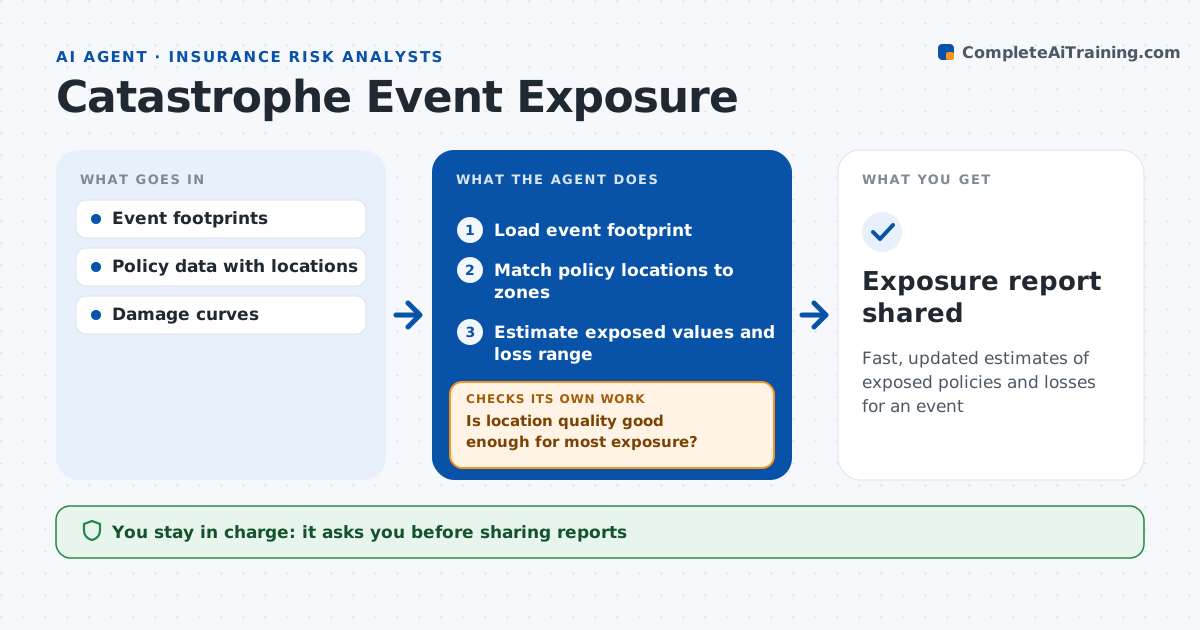
When a hurricane, flood or wildfire hits, management needs to know within hours how much of the book is exposed. This agent maps the event footprint against the policy book. It loads the latest footprint from official sources, matches policy locations to zones, and counts policies, insured values and likely losses by zone. It checks location quality first. If too many policies have poor addresses, it fixes what it can from address data and marks the rest as low accuracy with a range. It estimates exposed values and an early loss range. Each time the footprint updates, it reruns. Exposure over a set limit triggers an alert to leadership. The analyst approves before the report is shared with claims and management. Edge case: many rural policies have only a ZIP code, so the agent shows their losses as a range.
How it works
Follow the arrows from top to bottom. The orange dashed arrow is the loop: when a check fails, the agent goes back and tries again.
Read the steps as a list
- Event forecast or occurs
- Load event footprint
- Match policy locations to zones
- Is location quality good enough for most exposure?If not: fix addresses where possible and mark the rest as low accuracy. Back to step 3.
- Estimate exposed values and loss range
- Analyst approves the reportThe agent waits here for your OK.
- Exposure report shared
How it decides
It matches policies to footprint zones and applies damage rates by zone and building type.
- Location only to ZIP: low accuracy, show range
- Footprint updated: rerun
- Exposure over set limit: alert leadership
Make it yours
Every agent is a starting point. You choose these settings for your own situation.
- Event sources
- Damage rates
- Alert limit
- Report layout
What keeps you in control
It always asks you first
- Sharing reports
Hard limits
- Never sets reserves
- Never contacts policyholders
It stops when
- Done: report shared
- Stop: footprint not available
Set it up
We guide you through the set-up, step by step
Members get the full set-up guide for this agent. No technical skills needed: you copy, paste and upload.
- One set of instructions to paste into your AI, with the clicks for ChatGPT, Claude, Microsoft 365 Copilot, Gemini and Grok
- The agent then walks you through connecting your own data, one source at a time
- A downloadable copy with the flow chart, the rules and the full guide