AI agent for production planners
Changeover Sequencing Agent
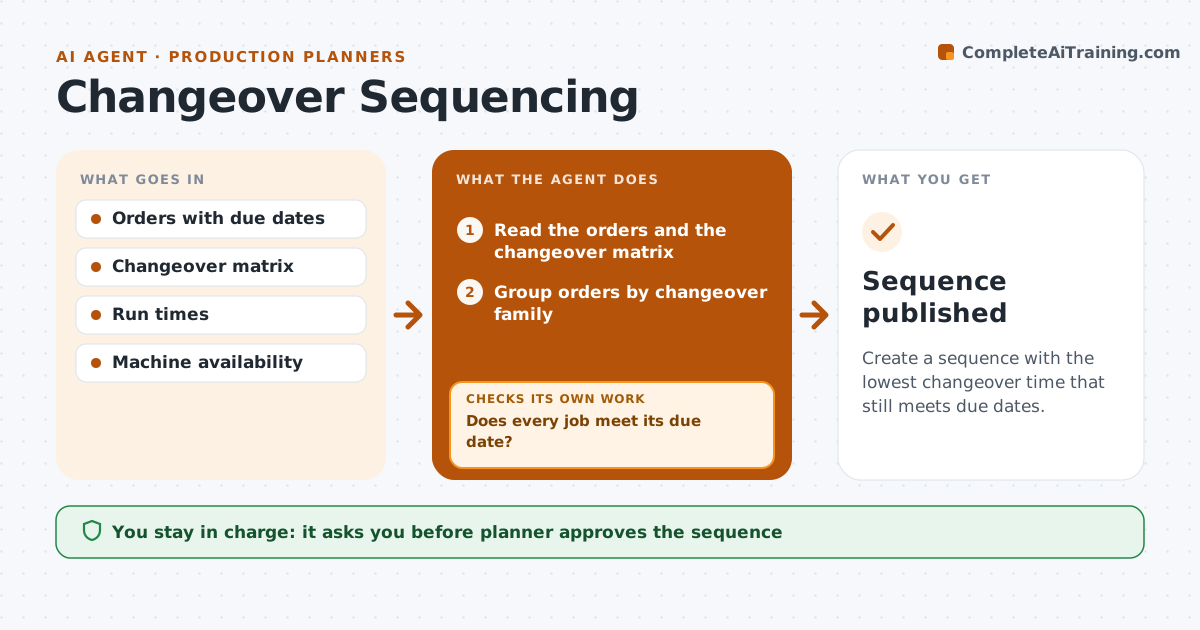
Create a sequence with the lowest changeover time that still meets due dates.
What it does
Poor sequencing means long changeovers and idle machines. This agent groups orders by the time needed to change from one product to the next, then builds a sequence that cuts the total changeover time. It checks due dates and adjusts the order if any job is late. If a sequence misses a due date, it reorders the jobs and recalculates changeover time. The planner approves the final sequence. It always shows the saving next to the risk, so the planner can see what each choice costs in hours. The sequence is retested whenever a job is added or an order moves. Edge case: an urgent order that does not fit the best sequence is moved up and the added changeover cost is shown.
How it works
Follow the arrows from top to bottom. The orange dashed arrow is the loop: when a check fails, the agent goes back and tries again.
Read the steps as a list
- Schedule is built or changed
- Read the orders and the changeover matrix
- Group orders by changeover family
- Build a sequence that minimizes changeover time
- Calculate completion time for each job
- Does every job meet its due date?If not: Reorder the late jobs and recalculate changeover time. Back to step 3.
- Compare the total changeover time with the current plan
- Is the total lower than the current plan?If not: Try another grouping or keep the current plan. Back to step 3.
- Planner approves the sequenceThe agent waits here for your OK.
- Sequence published
How it decides
It minimizes total changeover time subject to due dates, and weighs lateness before saving time.
- Never trade a late order for saved changeover time without approval
- Group by color, size or material family
- Put urgent orders first and show the extra changeover
- Recalculate after every reorder
Make it yours
Every agent is a starting point. You choose these settings for your own situation.
- Changeover matrix
- Due date priority rules
- Maximum lateness allowed (default none)
- Line and shift
What keeps you in control
It always asks you first
- Planner approves the sequence
Hard limits
- Never publish a sequence without approval
- Never ignore due dates
It stops when
- Done: an approved sequence meets due dates
- Stop: due dates cannot be met and the planner decides
Set it up
We guide you through the set-up, step by step
Members get the full set-up guide for this agent. No technical skills needed: you copy, paste and upload.
- One set of instructions to paste into your AI, with the clicks for ChatGPT, Claude, Microsoft 365 Copilot, Gemini and Grok
- The agent then walks you through connecting your own data, one source at a time
- A downloadable copy with the flow chart, the rules and the full guide