AI agent for animators
Character Rig Version Compatibility Agent
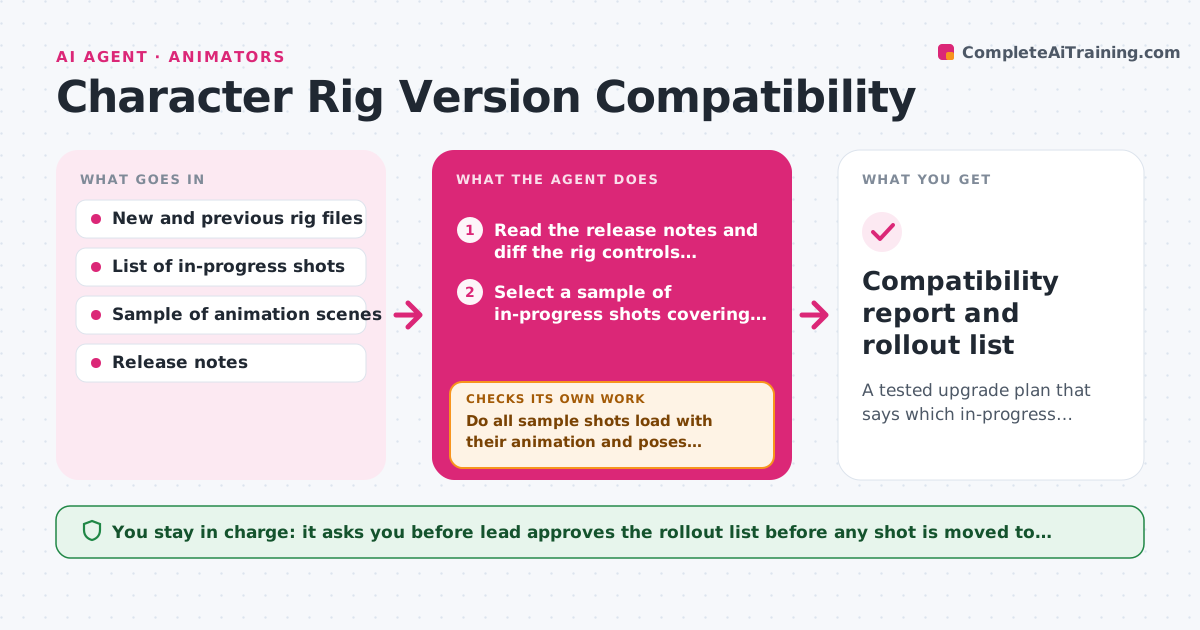
A tested upgrade plan that says which in-progress shots can move to the new rig version and which must stay
What it does
A rigger publishes version 2.4 of a character and, a day later, three animators discover their shots no longer load the controls or poses they animated. This agent runs the compatibility test before anyone upgrades. When a new rig version is published, it opens a sample of in-progress shots against the new version, checks for missing controls, renamed attributes and changed poses, and logs which shots break and why. It then tries proposed fixes on the sample, such as remapping a renamed control, and re-runs the test, repeating until the sample passes or no fix works. It reports which shots can upgrade safely and which should stay on the old version. The lead approves the rollout. Edge case: a shot that passes but shifts a finger pose by a few degrees is flagged separately for review.
How it works
Follow the arrows from top to bottom. The orange dashed arrow is the loop: when a check fails, the agent goes back and tries again.
Read the steps as a list
- New rig version published
- Read the release notes and diff the rig controls against the previous version
- Select a sample of in-progress shots covering each character action type
- Open each sample shot against the new rig
- Check for missing controls, renamed attributes and changed poses
- Do all sample shots load with their animation and poses intact?If not: Try a remap or fix for the failure on a copy of the shot, then open it again. Back to step 4.
- Classify each shot as safe to upgrade, upgrade with a fix, or stay on the old version
- Lead approves the rollout planThe agent waits here for your OK.
- Upgrade the approved shots on copies and re-run the load test
- Do the upgraded shots match the old poses within tolerance?If not: Roll the shot back and list the pose differences for the animator. Back to step 8.
- Compatibility report and rollout list
How it decides
A shot passes when every animated control still exists and poses stay within the allowed pose difference after loading; everything else is logged as a break with the cause.
- Sample at least 20 percent of in-progress shots, minimum 5
- A control missing in the new rig means the shot cannot upgrade without a remap
- Allow pose differences up to 2 degrees on any joint
- Never upgrade a shot that is within 3 days of delivery without lead approval
Make it yours
Every agent is a starting point. You choose these settings for your own situation.
- Sample size and selection
- Pose tolerance in degrees
- Shots excluded because of near deadlines
- Folder structure for rigs and shots
- Who approves rollouts
What keeps you in control
It always asks you first
- Lead approves the rollout list before any shot is moved to the new rig
Hard limits
- Always test on copies, never on production shot files
- Never publish or switch the shared rig version
It stops when
- Done: Every in-progress shot is classified and approved shots upgrade cleanly
- Stop: The sample fails with no working fix, so the agent recommends staying on the old rig
Set it up
We guide you through the set-up, step by step
Members get the full set-up guide for this agent. No technical skills needed: you copy, paste and upload.
- One set of instructions to paste into your AI, with the clicks for ChatGPT, Claude, Microsoft 365 Copilot, Gemini and Grok
- The agent then walks you through connecting your own data, one source at a time
- A downloadable copy with the flow chart, the rules and the full guide