AI agent for medical records clerks
Chart Deficiency Chase Agent
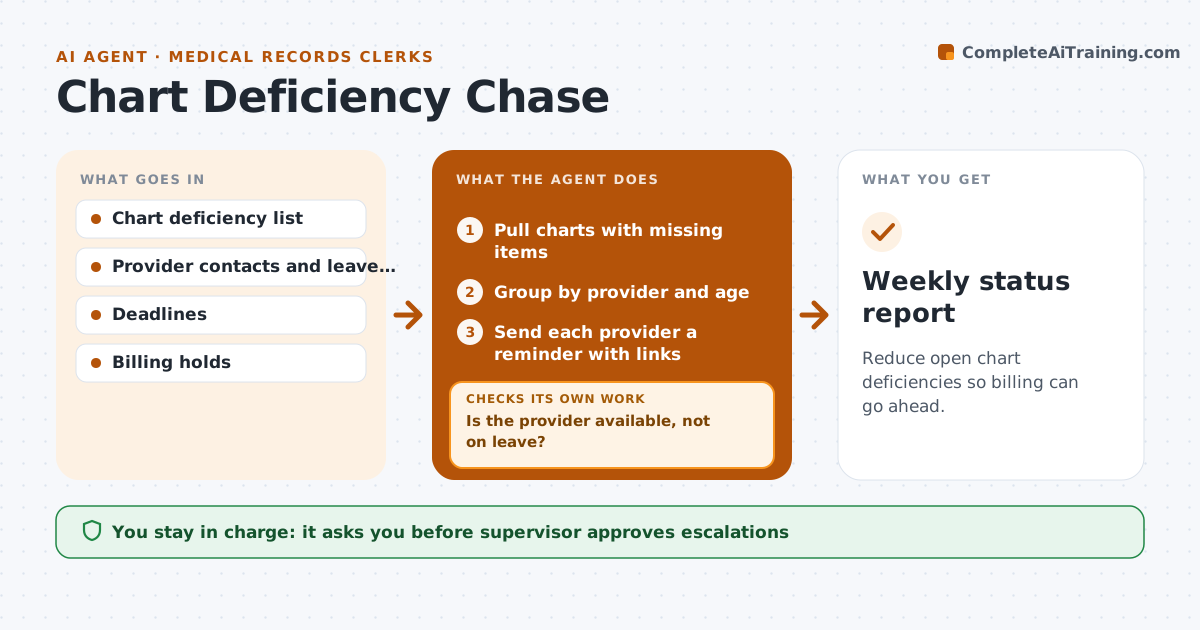
Reduce open chart deficiencies so billing can go ahead.
What it does
A chart with a missing signature or note blocks billing, and the delay costs the hospital cash. This agent lists every chart with a missing signature, dictation or note, and tells the provider with a link to the exact item. It tracks completion and reminds on a schedule. For items that are overdue it prepares an escalation to the provider's department head. Each week it recounts the open charts and sends a firmer reminder for any still open. The supervisor approves every escalation. Edge case: a provider on leave has their charts rerouted to the covering provider before the agent sends a reminder.
How it works
Follow the arrows from top to bottom. The orange dashed arrow is the loop: when a check fails, the agent goes back and tries again.
Read the steps as a list
- Daily deficiency list
- Pull charts with missing items
- Group by provider and age
- Is the provider available, not on leave?If not: Route the items to the covering provider. Back to step 2.
- Send each provider a reminder with links
- Track completion
- Prepare escalations for overdue items
- Supervisor approves escalationsThe agent waits here for your OK.
- Recount open charts each week
- Are older items still open after the reminder?If not: Send a firmer reminder with the count and the billing impact. Back to step 5.
- Weekly status report
How it decides
It reminds on a schedule and escalates by age, and checks leave before it nags a provider.
- Remind at 3, 7 and 14 days
- Escalate items older than 21 days
- Prioritize charts that block the largest claims
- Never nag a provider on leave
Make it yours
Every agent is a starting point. You choose these settings for your own situation.
- Reminder schedule (default 3, 7, 14 days)
- Escalation age (default 21 days)
- Who receives escalations
- Priority by claim value
What keeps you in control
It always asks you first
- Supervisor approves escalations
Hard limits
- Never complete or edit a chart
- Never escalate without the supervisor's approval
It stops when
- Done: no chart is overdue
- Stop: a provider disputes a deficiency and the supervisor reviews it
Set it up
We guide you through the set-up, step by step
Members get the full set-up guide for this agent. No technical skills needed: you copy, paste and upload.
- One set of instructions to paste into your AI, with the clicks for ChatGPT, Claude, Microsoft 365 Copilot, Gemini and Grok
- The agent then walks you through connecting your own data, one source at a time
- A downloadable copy with the flow chart, the rules and the full guide