AI agent for insurance risk analysts
Claims Severity Spike Investigator Agent
Explain a claims severity spike with tested evidence within a day or two.
What it does
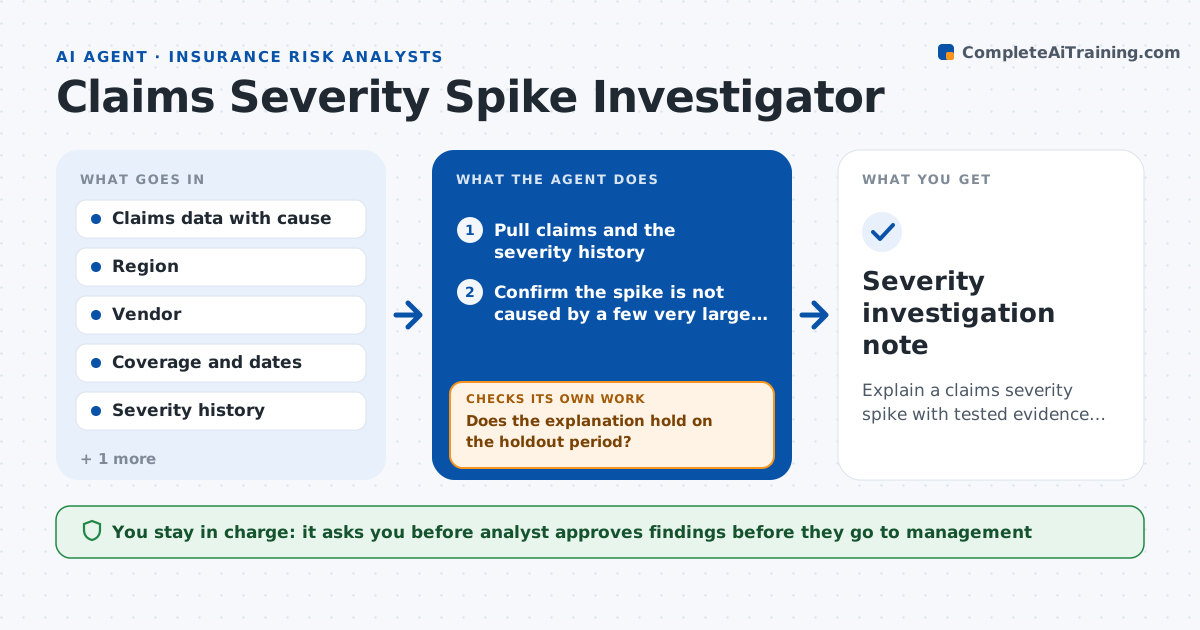
Average claim cost jumps one quarter and management asks why, but the answer takes weeks of digging. This agent monitors average severity and flags a spike when it passes a set level. It splits the jump by cause of loss, region, vendor, product and accident period, and tests each possible explanation against the data, such as a few large claims, a new repair vendor, inflation in parts or a change in coverage mix. It rechecks the strongest explanation on a holdout period to see if it holds. If it does not hold, it moves to the next. It drafts findings and what to do next. The analyst approves before they go to management.
How it works
Follow the arrows from top to bottom. The orange dashed arrow is the loop: when a check fails, the agent goes back and tries again.
Read the steps as a list
- Severity alert fires
- Pull claims and the severity history
- Confirm the spike is not caused by a few very large claims
- Split the increase by cause, region, vendor, product and period
- Test each possible explanation against the data
- Rank explanations by share of increase explained
- Test the top explanation on a holdout period
- Does the explanation hold on the holdout period?If not: drop it and test the next ranked explanation. Back to step 6.
- Draft findings with evidence and suggested actions
- Analyst approves before the findings go to managementThe agent waits here for your OK.
- Severity investigation note
How it decides
It ranks explanations by how much of the increase they account for, and keeps one only if it also holds on data it did not use to find it.
- Alert when severity is 10 percent above the 12 month average
- Treat claims above $250,000 separately
- Accept an explanation covering at least 50 percent of the increase
- Test every explanation on a holdout period
Make it yours
Every agent is a starting point. You choose these settings for your own situation.
- Alert threshold (default 10 percent)
- Large claim cutoff
- Dimensions to split by
- Holdout period length
What keeps you in control
It always asks you first
- Analyst approves findings before they go to management
Hard limits
- Never changes reserves or claims
- Reports an unexplained part honestly
It stops when
- Done: explanation confirmed or stated as not found
- Stop: claims data for the period is incomplete
Set it up
We guide you through the set-up, step by step
Members get the full set-up guide for this agent. No technical skills needed: you copy, paste and upload.
- One set of instructions to paste into your AI, with the clicks for ChatGPT, Claude, Microsoft 365 Copilot, Gemini and Grok
- The agent then walks you through connecting your own data, one source at a time
- A downloadable copy with the flow chart, the rules and the full guide