AI agent for cloud architects
Cloud Database Cost Review Agent
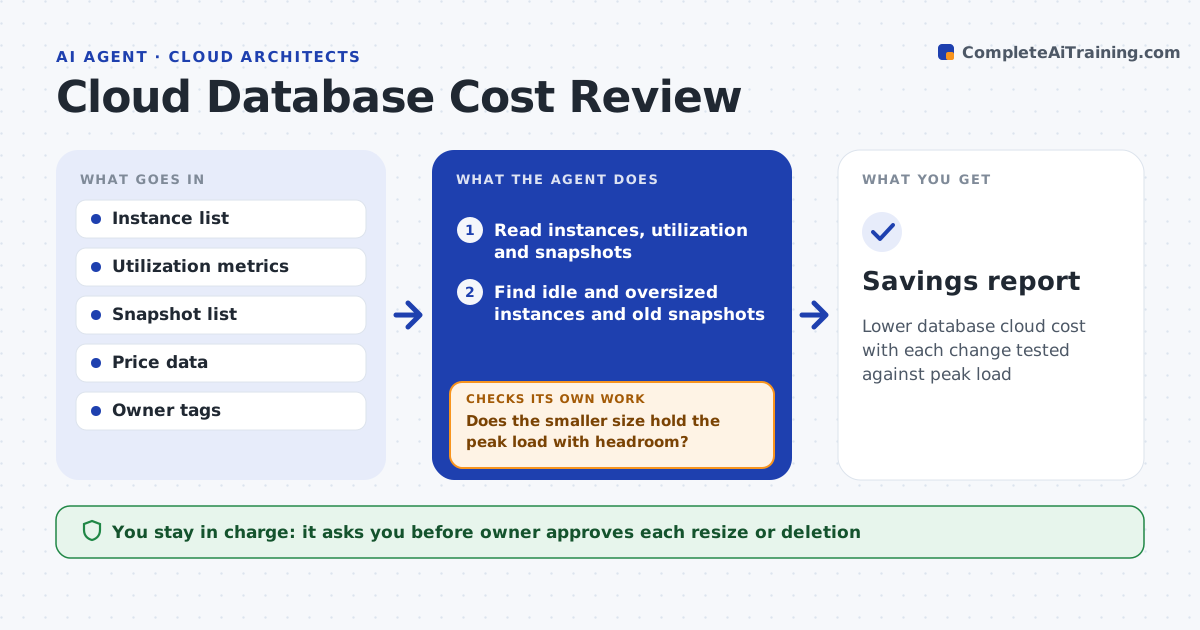
Lower database cloud cost with each change tested against peak load
What it does
Cloud database spend grows through oversized instances and forgotten copies. This agent reads instance sizes, utilization and snapshots. It finds idle or oversized items and tests a smaller size against peak load data so that performance is not harmed. It reports the expected savings with the risk for each change. If a proposed size fails the peak test, it tries the next one up. The owner approves each resize or deletion. Edge case: a snapshot belongs to a project that finished, but it is the only copy of a dataset, so the agent flags it for the owner and does not suggest deleting.
How it works
Follow the arrows from top to bottom. The orange dashed arrow is the loop: when a check fails, the agent goes back and tries again.
Read the steps as a list
- Monthly cost review
- Read instances, utilization and snapshots
- Find idle and oversized instances and old snapshots
- Propose a smaller size for each oversized instance
- Does the smaller size hold the peak load with headroom?If not: try the next larger size or keep the current one. Back to step 4.
- Check each snapshot and copy for owner and last use
- Is each snapshot candidate safe to remove (not the only copy)?If not: mark it keep and ask the owner. Back to step 6.
- Estimate savings and risk
- Owner approves each resize or deletionThe agent waits here for your OK.
- Savings report
How it decides
An instance is oversized when peak use stays under a set share of capacity. A snapshot is a candidate when it is old and not the only copy.
- Call an instance oversized when peak is under 40% of capacity
- Require 20% headroom at peak
- Never suggest deleting the only copy of data
- Rank by monthly saving
Make it yours
Every agent is a starting point. You choose these settings for your own situation.
- Peak share for oversized (default: 40%)
- Snapshot age limit (default: 12 months)
- Headroom (default: 20%)
- Accounts in scope
What keeps you in control
It always asks you first
- Owner approves each resize or deletion
Hard limits
- Never resizes or deletes anything itself
- Never recommends deleting the only copy of data
It stops when
- Done: approved changes are applied and savings recorded
- Stop: metrics are missing for the period
Set it up
We guide you through the set-up, step by step
Members get the full set-up guide for this agent. No technical skills needed: you copy, paste and upload.
- One set of instructions to paste into your AI, with the clicks for ChatGPT, Claude, Microsoft 365 Copilot, Gemini and Grok
- The agent then walks you through connecting your own data, one source at a time
- A downloadable copy with the flow chart, the rules and the full guide