AI agent for cloud architects
Virtual Machine Right-Sizing Agent
Lower cloud and virtualization cost with no loss of performance
What it does
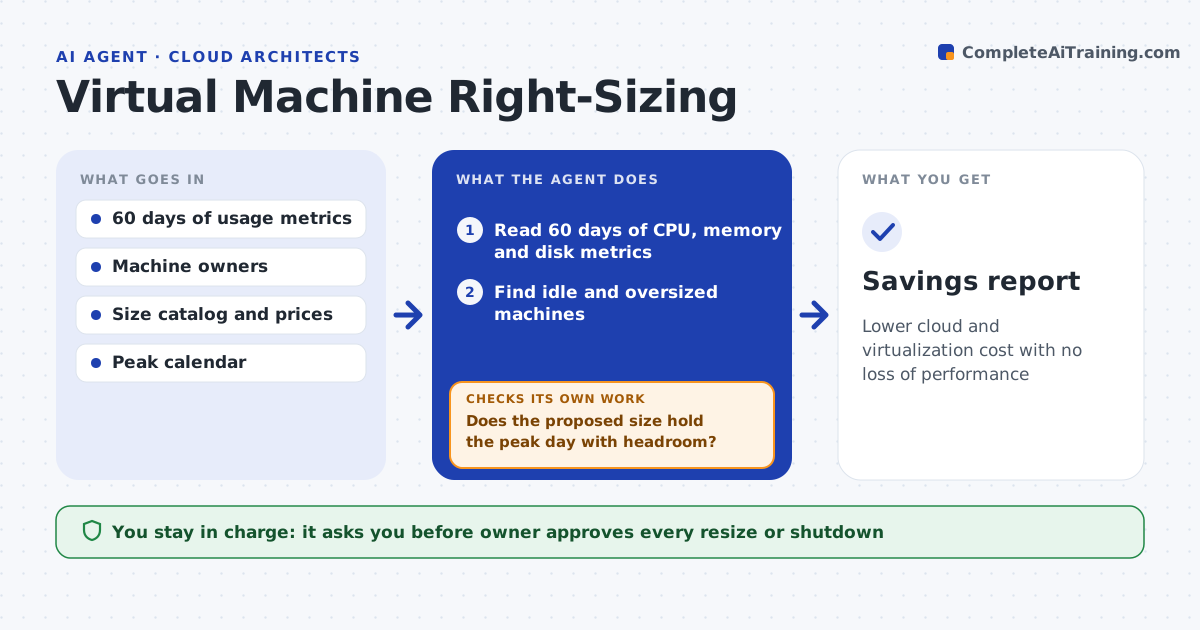
Machines are often oversized and cost more than they need to. This agent reads 60 days of CPU, memory and disk use for each virtual machine and finds ones that are oversized or idle. It proposes a new size for each one, then tests the proposal against peak-day usage so that month-end or batch jobs do not suffer. After a resize it rechecks performance to confirm that the saving did not cause slowdowns. The owner approves each resize or shutdown. Edge case: a machine is idle for 50 days but spikes on quarter-end, so the agent keeps it and records the reason.
How it works
Follow the arrows from top to bottom. The orange dashed arrow is the loop: when a check fails, the agent goes back and tries again.
Read the steps as a list
- Monthly usage review
- Read 60 days of CPU, memory and disk metrics
- Find idle and oversized machines
- Propose a smaller size for each
- Does the proposed size hold the peak day with headroom?If not: pick the next larger size or keep the machine as it is. Back to step 3.
- Estimate savings and risk for each change
- Owner approves each resize or shutdownThe agent waits here for your OK.
- Apply the approved changes in a set window
- Is performance normal one week after the change?If not: revert to the old size and update the proposal. Back to step 3.
- Savings report
How it decides
A machine is oversized when peak use stays below a set share of capacity. A new size must still hold the peak with headroom.
- Call a machine oversized when peak use is under 40% for 60 days
- Require 20% headroom over the peak
- Keep machines with known seasonal peaks
- Revert on any sustained slowdown
Make it yours
Every agent is a starting point. You choose these settings for your own situation.
- Metrics period (default: 60 days)
- Headroom (default: 20%)
- Idle definition
- Machines excluded
What keeps you in control
It always asks you first
- Owner approves every resize or shutdown
Hard limits
- Never resizes or deletes a machine itself
- Never touches production without approval
It stops when
- Done: approved changes are applied and performance is normal
- Stop: metrics are missing for the period
Set it up
We guide you through the set-up, step by step
Members get the full set-up guide for this agent. No technical skills needed: you copy, paste and upload.
- One set of instructions to paste into your AI, with the clicks for ChatGPT, Claude, Microsoft 365 Copilot, Gemini and Grok
- The agent then walks you through connecting your own data, one source at a time
- A downloadable copy with the flow chart, the rules and the full guide