AI agent for medical practice managers
Compliance Training Completion Agent
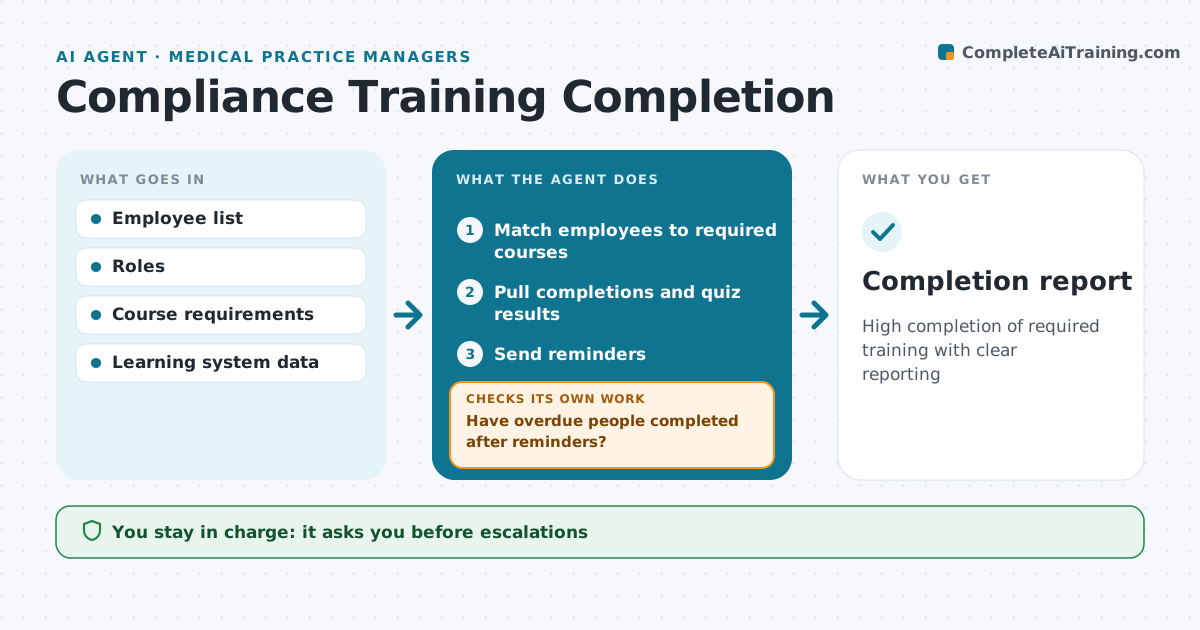
High completion of required training with clear reporting
What it does
Required compliance training slips when reminders are manual and nobody tracks who keeps ignoring them. This agent matches employees to required courses by role and location, checks completion in the learning system, and lists who is due or overdue. It sends reminders on a set schedule. After each reminder it checks completions again. Anyone overdue by 14 days gets a reminder with their manager copied, and repeat non-completers are listed for escalation. The compliance officer approves every escalation. It also reads quiz results and flags topics where more than 30 percent fail, so the content can be improved rather than blaming staff. It prepares a completion report for leadership. Edge case: a new hire has 30 days from their start date, so they are not counted as overdue before then.
How it works
Follow the arrows from top to bottom. The orange dashed arrow is the loop: when a check fails, the agent goes back and tries again.
Read the steps as a list
- Weekly training check
- Match employees to required courses
- Pull completions and quiz results
- Send reminders
- Have overdue people completed after reminders?If not: copy managers or escalate repeat non-completers. Back to step 3.
- Compliance officer approves escalationsThe agent waits here for your OK.
- Completion report
How it decides
It matches requirements to roles and escalates based on days overdue.
- New hire within 30 days: not overdue
- Overdue 14 days: copy manager
- Quiz fail rate over 30%: flag content
Make it yours
Every agent is a starting point. You choose these settings for your own situation.
- Reminder schedule
- Escalation rules
- Courses by role
- Report format
What keeps you in control
It always asks you first
- Escalations
Hard limits
- Never disciplines staff
- Never changes course content
It stops when
- Done: report shared
- Stop: HR data stale
Set it up
We guide you through the set-up, step by step
Members get the full set-up guide for this agent. No technical skills needed: you copy, paste and upload.
- One set of instructions to paste into your AI, with the clicks for ChatGPT, Claude, Microsoft 365 Copilot, Gemini and Grok
- The agent then walks you through connecting your own data, one source at a time
- A downloadable copy with the flow chart, the rules and the full guide