AI agent for contract administrators
Contract Intake Triage Agent
A complete request with the right template, risk tier and reviewer from the start
What it does
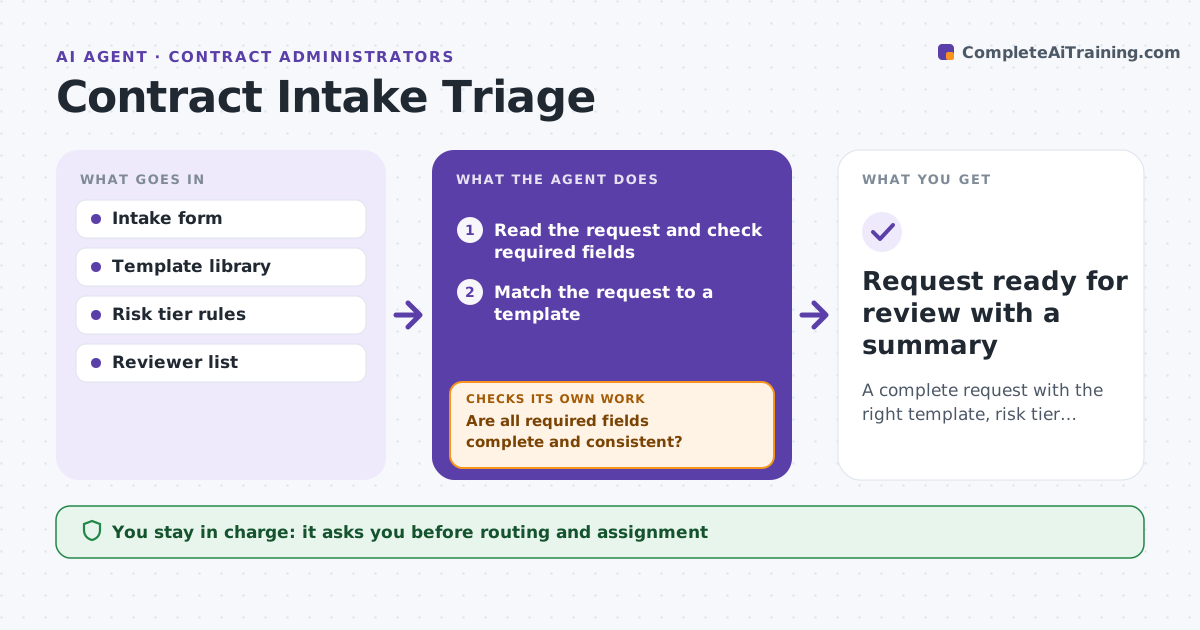
A contract request arrives without the counterparty, value or term, and it goes to the wrong lawyer. This agent reads each request and checks it for required fields: parties, value, term, type, business owner and deadline. It finds the right template and sets a risk tier from the value, data involved, jurisdiction and unusual terms. If anything is missing, it asks the requester a specific question and waits. After the reply, it rechecks the form and risk tier and updates the routing. It then proposes the right reviewer and priority. The administrator approves the routing before the request is assigned. Edge case: a low-value request involves personal data and moves to a higher tier.
How it works
Follow the arrows from top to bottom. The orange dashed arrow is the loop: when a check fails, the agent goes back and tries again.
Read the steps as a list
- Contract request is submitted
- Read the request and check required fields
- Match the request to a template
- Set a risk tier from value, data and jurisdiction
- Are all required fields complete and consistent?If not: ask the requester a specific question and wait for the reply. Back to step 2.
- Recheck the form and update the risk tier
- Does the new information change the tier or the template?If not: update the template and tier and recheck. Back to step 3.
- Propose the reviewer and priority
- Administrator approves the routingThe agent waits here for your OK.
- Assign the request in the contract system
- Request ready for review with a summary
How it decides
The risk tier is raised by value, personal data, cross-border terms or non-standard clauses. A request is complete only when all required fields are filled.
- Raise the tier if personal data is involved
- Raise the tier above $250,000
- Ask one question per message and list all missing fields at once
- Route cross-border contracts to the specialist reviewer
Make it yours
Every agent is a starting point. You choose these settings for your own situation.
- Required fields
- Tier thresholds
- Reviewer list
- Wait time before a reminder (default 3 days)
What keeps you in control
It always asks you first
- Routing and assignment
Hard limits
- Never signs or changes contract terms
- Never assigns without approval
It stops when
- Done: request complete, routed and assigned
- Stop: the requester does not reply in 5 days
Set it up
We guide you through the set-up, step by step
Members get the full set-up guide for this agent. No technical skills needed: you copy, paste and upload.
- One set of instructions to paste into your AI, with the clicks for ChatGPT, Claude, Microsoft 365 Copilot, Gemini and Grok
- The agent then walks you through connecting your own data, one source at a time
- A downloadable copy with the flow chart, the rules and the full guide