AI agent for contract administrators
Contract Metadata Cleanup Agent
A repository whose parties, dates and values match the signed documents
What it does
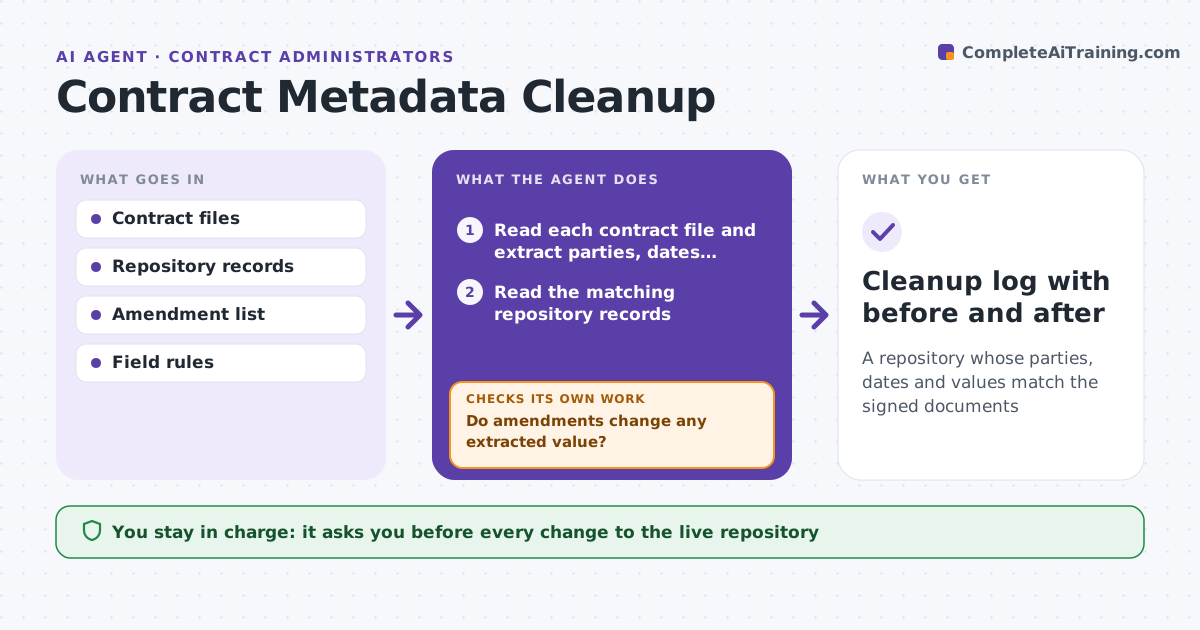
A contract repository can drift for years: a renamed company, a wrong renewal date, a value typed with a missing zero. Reports and alerts then run on bad data. This agent reads each contract file and extracts the parties, effective date, term, renewal terms, notice period and value. It compares these with the repository record and lists every difference, ranked by how much it matters, for example a wrong renewal date above a typo in a title. It drafts a correction for each one with the page and clause as source. After the administrator approves the changes in the live repository, it rereads the record and checks that it now matches the document. If not, it repeats the fix. Edge case: an amendment changes the term, so the original contract no longer holds the right date.
How it works
Follow the arrows from top to bottom. The orange dashed arrow is the loop: when a check fails, the agent goes back and tries again.
Read the steps as a list
- Batch of contracts is selected for cleanup
- Read each contract file and extract parties, dates, term and value
- Read the matching repository records
- Compare each field and list differences by importance
- Do amendments change any extracted value?If not: apply the amendment terms and extract again. Back to step 2.
- Draft a correction for each difference with the page and clause source
- Administrator approves each change to the live repositoryThe agent waits here for your OK.
- Apply the approved changes
- Reread the records and compare them with the documents
- Does every record now match its document?If not: repeat the fix for the records that still differ. Back to step 6.
- Cleanup log with before and after
How it decides
The latest signed document, including amendments, decides the correct value. Differences in dates and values rank above spelling.
- Use the latest signed amendment as the source
- Rank date and value differences above name typos
- Flag a missing file instead of guessing
- Do not change records with an open dispute
Make it yours
Every agent is a starting point. You choose these settings for your own situation.
- Fields to check
- Batch size
- Importance ranking
- Folders it reads
What keeps you in control
It always asks you first
- Every change to the live repository
Hard limits
- Never changes the live repository without approval
- Never alters the contract file
It stops when
- Done: all records match the documents
- Stop: a contract file is unreadable or unsigned
Set it up
We guide you through the set-up, step by step
Members get the full set-up guide for this agent. No technical skills needed: you copy, paste and upload.
- One set of instructions to paste into your AI, with the clicks for ChatGPT, Claude, Microsoft 365 Copilot, Gemini and Grok
- The agent then walks you through connecting your own data, one source at a time
- A downloadable copy with the flow chart, the rules and the full guide