AI agent for interior designers
Contractor Site Issue Agent
Every site issue answered, fixed and closed before handover
What it does
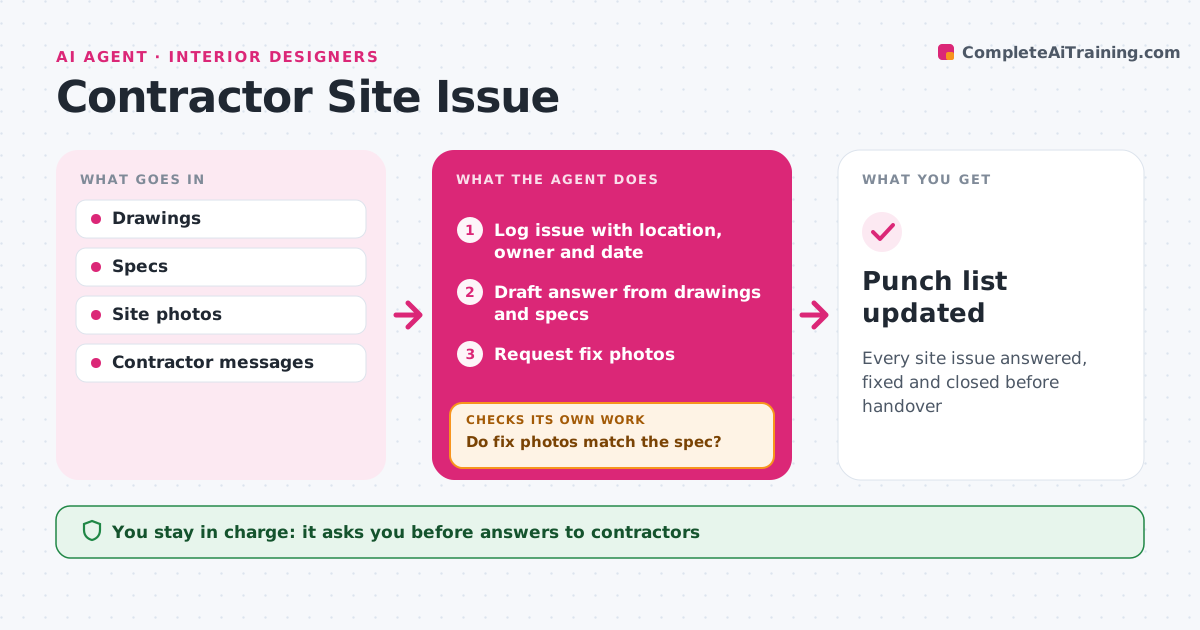
During a renovation, contractor questions come by text, email and phone, and answers get lost. This agent collects contractor questions, site photos and the designer's visit notes into one issue log. Each issue gets a location, owner and due date. Where the drawings and specs give a clear answer, it drafts one and cites the sheet. Unclear questions go straight to the designer. Before each site visit it lists the open issues. After a fix, it asks for photos and checks them against the spec, such as tile layout, paint color or fixture height. Items that do not match stay open and the contractor is asked to correct them. The designer approves answers and closes items. Edge case: a question whose answer would change cost is turned into a change order request instead of a simple reply.
How it works
Follow the arrows from top to bottom. The orange dashed arrow is the loop: when a check fails, the agent goes back and tries again.
Read the steps as a list
- Site issue reported
- Log issue with location, owner and date
- Draft answer from drawings and specs
- Designer approves answersThe agent waits here for your OK.
- Request fix photos
- Do fix photos match the spec?If not: keep open and ask for correction. Back to step 5.
- Designer closes the itemThe agent waits here for your OK.
- Punch list updated
How it decides
It answers from drawings when clear and escalates when the answer changes design or cost.
- Cost changes become change orders
- Photos required to close items
- Open items listed before each visit
Make it yours
Every agent is a starting point. You choose these settings for your own situation.
- Issue fields
- Photo requirements
- Visit schedule
- Channels
What keeps you in control
It always asks you first
- Answers to contractors
- Closing items
- Change orders
Hard limits
- Never instructs contractors without approval
- Never approves costs
It stops when
- Done: punch list clear
- Stop: contract ends
Set it up
We guide you through the set-up, step by step
Members get the full set-up guide for this agent. No technical skills needed: you copy, paste and upload.
- One set of instructions to paste into your AI, with the clicks for ChatGPT, Claude, Microsoft 365 Copilot, Gemini and Grok
- The agent then walks you through connecting your own data, one source at a time
- A downloadable copy with the flow chart, the rules and the full guide