AI agent for editors
Corrections and Updates Tracker Agent
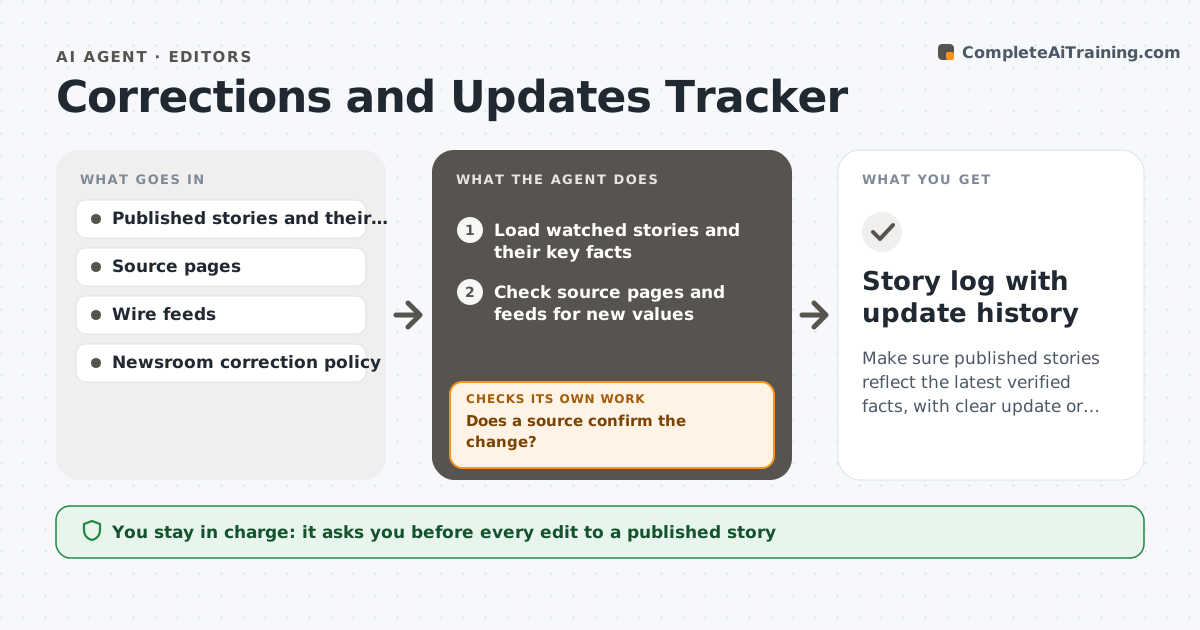
Make sure published stories reflect the latest verified facts, with clear update or correction notes.
What it does
A published story can go stale or wrong within hours: a death toll changes, an official reverses a statement, a court filing adds a detail. This agent keeps a list of published stories under watch, with their key facts. It checks official updates, wire services, agency pages and the story's own sources for new facts, and compares them with the facts in the story. When something differs, it flags the story, drafts an update or correction note with the old and new fact and a source, and checks whether the change is already in the live version. After the editor edits, it rechecks the story and the headline, summary and social text. It never changes a published story. The editor approves any change. Edge case: an official figure that is later revised is noted as updated, not as an error by the reporter.
How it works
Follow the arrows from top to bottom. The orange dashed arrow is the loop: when a check fails, the agent goes back and tries again.
Read the steps as a list
- Scheduled check
- Load watched stories and their key facts
- Check source pages and feeds for new values
- Compare new values with the story
- Does a source confirm the change?If not: look for a second source and hold the flag as unconfirmed. Back to step 3.
- Classify as update or correction using the policy
- Draft the note with the old fact, the new fact and the source
- Editor approves the change and noteThe agent waits here for your OK.
- Read the live story, headline and summary
- Is the change applied everywhere the fact appears?If not: list the places still showing the old fact. Back to step 8.
- Story log with update history
How it decides
It flags a change when a source it already relies on gives a different value for a key fact. It separates an update from a correction by whether the original was wrong when published.
- Flag a changed fact when a trusted source differs from the story
- Classify as a correction when the original was wrong at publication
- Hold unconfirmed changes until a second source appears
- Check headline, summary and social text, not only the body
Make it yours
Every agent is a starting point. You choose these settings for your own situation.
- Watch period for each story
- Check interval
- Source list per beat
- Note wording
- Correction policy
What keeps you in control
It always asks you first
- Every edit to a published story
- The correction or update note
Hard limits
- Never change a published story
- Never label an update as a correction without the policy test
It stops when
- Done: story current and notes approved
- Stop: story is retired from watch
Set it up
We guide you through the set-up, step by step
Members get the full set-up guide for this agent. No technical skills needed: you copy, paste and upload.
- One set of instructions to paste into your AI, with the clicks for ChatGPT, Claude, Microsoft 365 Copilot, Gemini and Grok
- The agent then walks you through connecting your own data, one source at a time
- A downloadable copy with the flow chart, the rules and the full guide