AI agent for general managers
Creative Talent Review Preparation Agent
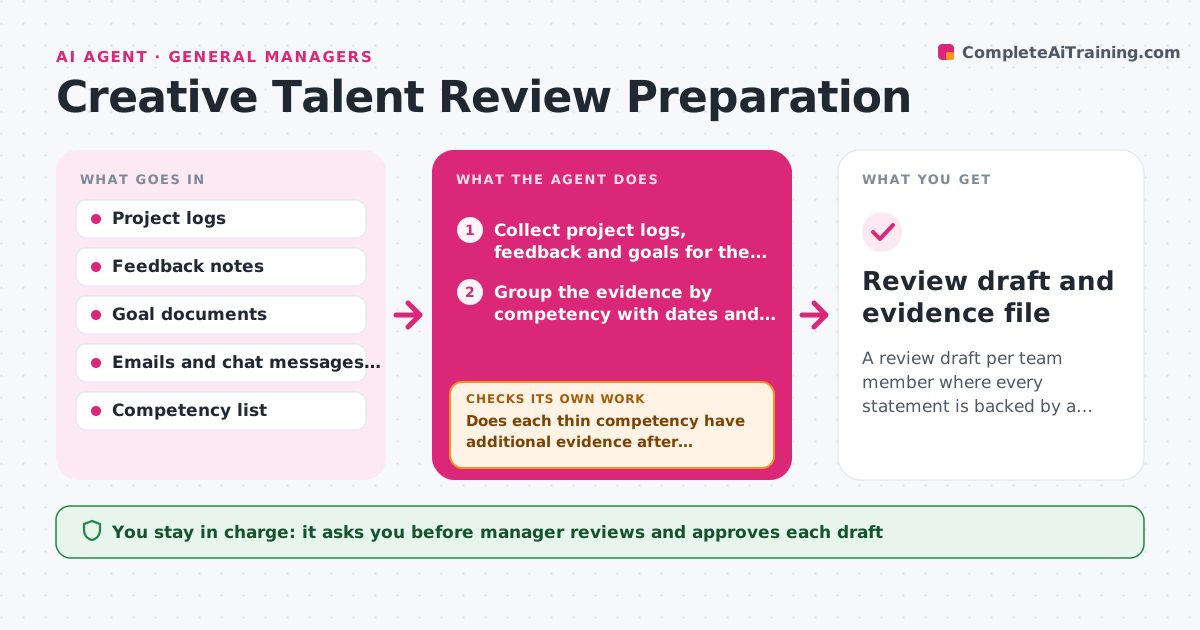
A review draft per team member where every statement is backed by a dated source and thin areas are visible
What it does
A manager with eight reports has two weeks to write reviews and no clear record of what happened in March. This agent gathers each team member's project logs, feedback notes, goals and thank-you messages for the review period. It groups the evidence by the competencies the company uses, such as craft, collaboration and ownership, and flags thin areas where there is little or no evidence. It then checks each claim in the draft against a dated source and removes or marks anything it cannot back. If a competency has too little evidence, it loops back to look in more sources, or asks the manager to add a note. The manager reviews and approves the draft before it is shared. Edge case: a praise note found in an email thread without a date is not used until the manager confirms it.
How it works
Follow the arrows from top to bottom. The orange dashed arrow is the loop: when a check fails, the agent goes back and tries again.
Read the steps as a list
- Review cycle opens
- Collect project logs, feedback and goals for the team member
- Group the evidence by competency with dates and sources
- Flag competencies with fewer than 2 examples as thin
- Does each thin competency have additional evidence after searching more sources?If not: Search older logs and messages, or ask the manager for a note. Back to step 2.
- Draft the review summary from the grouped evidence
- Is every claim in the draft tied to a dated source?If not: Remove the claim or mark it as needing the manager's confirmation. Back to step 6.
- List open questions for the manager
- Manager reviews and approves the draft before it is sharedThe agent waits here for your OK.
- Review draft and evidence file
How it decides
It keeps only claims tied to a dated source, groups them by competency, and marks a competency as thin when it has fewer than 2 supporting examples.
- Use only evidence from the review period
- A competency is thin below 2 supporting examples
- Never state a rating, only evidence and suggested themes
- Mark any undated item as unconfirmed
Make it yours
Every agent is a starting point. You choose these settings for your own situation.
- Competency list
- Review period dates
- Minimum examples per competency (default 2)
- Which sources to search
- Draft format
What keeps you in control
It always asks you first
- Manager reviews and approves each draft
- Manager decides on every rating or decision about the person
Hard limits
- Never decide ratings, pay or promotion
- Keep all evidence inside the manager's own files and share nothing outside them
It stops when
- Done: Drafts are complete with evidence for each claim and approved by the manager
- Stop: Evidence is too thin for a fair review, so the agent tells the manager which areas need more input
Set it up
We guide you through the set-up, step by step
Members get the full set-up guide for this agent. No technical skills needed: you copy, paste and upload.
- One set of instructions to paste into your AI, with the clicks for ChatGPT, Claude, Microsoft 365 Copilot, Gemini and Grok
- The agent then walks you through connecting your own data, one source at a time
- A downloadable copy with the flow chart, the rules and the full guide