AI agent for influencer marketing managers
Creator Ad Whitelisting Access Agent
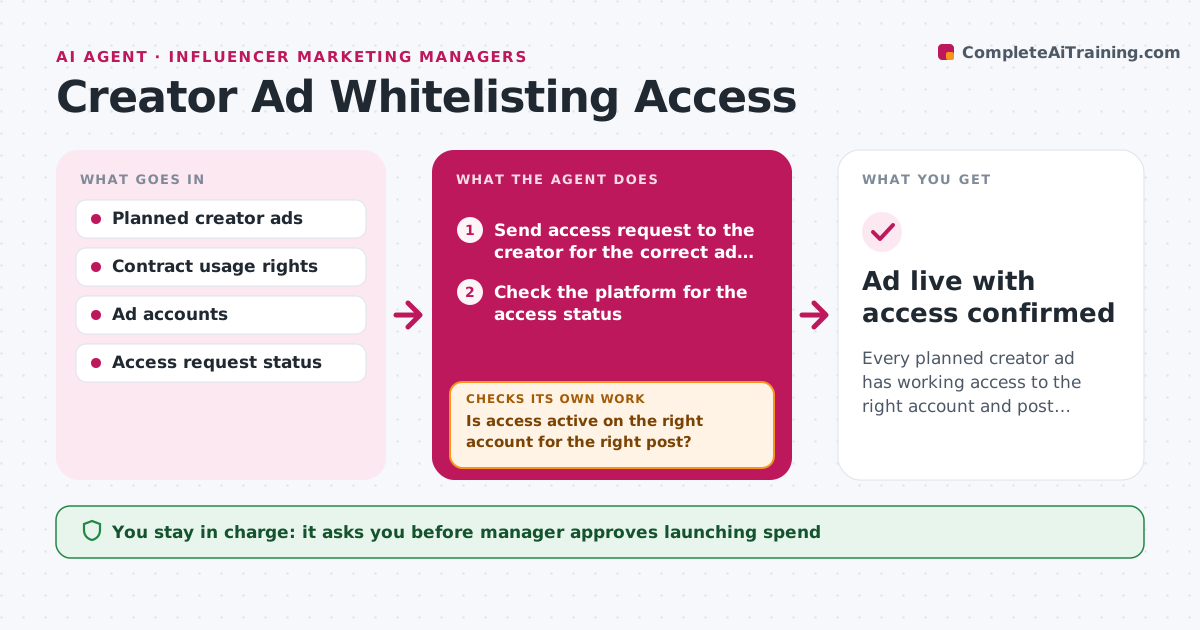
Every planned creator ad has working access to the right account and post, within the contract's usage rights.
What it does
Running a creator's post as an ad needs the creator to grant access, and that access often expires or goes to the wrong ad account. This agent lists the creator posts planned as ads and sends the access requests. It then checks inside the ad platform that the right account has access and that the right post is linked. It compares expiry dates with the usage rights period in the contract. If access fails, expires soon or is on the wrong account, it retries or escalates to the manager. The manager approves launching spend. Edge case: a creator accepted access for the business manager but not the ad account, so the post shows as unavailable.
How it works
Follow the arrows from top to bottom. The orange dashed arrow is the loop: when a check fails, the agent goes back and tries again.
Read the steps as a list
- Post planned as a creator ad
- Send access request to the creator for the correct ad account
- Check the platform for the access status
- Is access active on the right account for the right post?If not: resend the request with step-by-step instructions, recheck, and escalate after 2 failures. Back to step 2.
- Compare the access expiry with the usage rights period
- Does access cover the whole planned run?If not: request an extension from the creator and check the contract terms. Back to step 2.
- Link the post to the planned campaign draft
- Prepare the launch summary with budget and dates
- Manager approves launching spendThe agent waits here for your OK.
- Recheck access every 3 days while the ad runs
- Ad live with access confirmed
How it decides
It marks an ad ready only when access is active on the correct account, the correct post is linked and the expiry falls after the planned end date.
- Mark ready only when account, post and expiry all pass.
- Escalate after 2 failed access attempts.
- Never run an ad past the contract's usage rights end date.
- Flag expiry within 7 days of the planned end.
Make it yours
Every agent is a starting point. You choose these settings for your own situation.
- Platforms covered
- Expiry warning window (default 7 days)
- Escalation threshold (default 2 failures)
- Recheck frequency
What keeps you in control
It always asks you first
- Manager approves launching spend
Hard limits
- Never launch spend without approval
- Only link posts the contract allows to be used as ads
It stops when
- Done: ad running with valid access.
- Stop: usage rights end or the creator withdraws.
Set it up
We guide you through the set-up, step by step
Members get the full set-up guide for this agent. No technical skills needed: you copy, paste and upload.
- One set of instructions to paste into your AI, with the clicks for ChatGPT, Claude, Microsoft 365 Copilot, Gemini and Grok
- The agent then walks you through connecting your own data, one source at a time
- A downloadable copy with the flow chart, the rules and the full guide