AI agent for executive directors
Crisis Communications Readiness Drill Agent
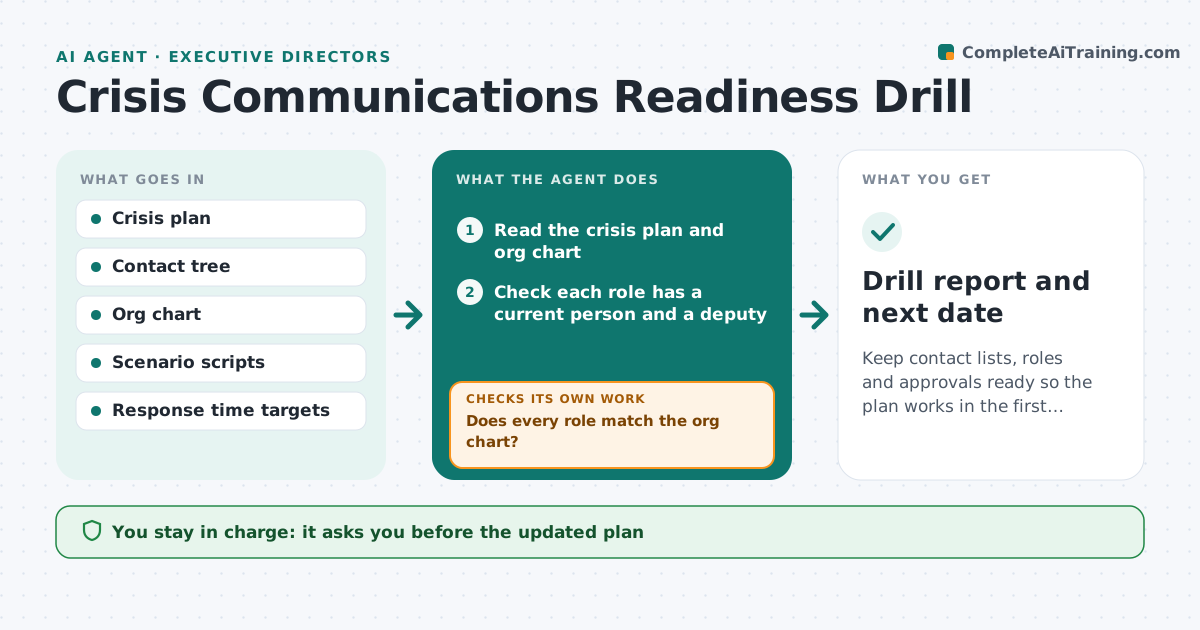
Keep contact lists, roles and approvals ready so the plan works in the first hour of a crisis.
What it does
A crisis plan is only as good as its contact list and approval chain. When a real incident happens, people have changed jobs, phones and roles. This agent tests the contact tree on a schedule. It checks each role against the org chart, sends test messages, and records who answers and how fast. It then runs a scenario, such as a data breach, step by step with the team, recording response times at each stage. It flags gaps, such as an approver on leave or a missing deputy. After fixes it runs again. The executive approves the updated plan. Edge case: a role with no deputy and no reply within 15 minutes is marked as a single point of failure.
How it works
Follow the arrows from top to bottom. The orange dashed arrow is the loop: when a check fails, the agent goes back and tries again.
Read the steps as a list
- Quarterly drill is scheduled
- Read the crisis plan and org chart
- Check each role has a current person and a deputy
- Does every role match the org chart?If not: List mismatches and ask the owner to update the plan. Back to step 3.
- Send test messages down the contact tree
- Record who answers and the time taken
- Run the scenario step by step and record each response time
- Did every step meet its response target?If not: Flag the slow steps and suggest fixes such as a deputy or a new channel. Back to step 3.
- Executive approves the updated planThe agent waits here for your OK.
- Drill report and next date
How it decides
Compares each role in the plan with the org chart, measures reply times against targets, and flags any role with no valid contact or no reply in time.
- Role without a deputy is a single point of failure
- Reply slower than 15 minutes is a failure
- Approver on leave needs a named substitute
- Test messages are marked clearly as a drill
Make it yours
Every agent is a starting point. You choose these settings for your own situation.
- Drill frequency (default quarterly)
- Response targets
- Scenarios to run
- Channels to test
- Who is included
What keeps you in control
It always asks you first
- The updated plan
- Any change in who approves what
- Sending the drill messages
Hard limits
- Never send drill messages without approval
- Mark every drill message as a test
It stops when
- Done: drill passes
- Stop: real incident begins
- Stop: drill postponed
Set it up
We guide you through the set-up, step by step
Members get the full set-up guide for this agent. No technical skills needed: you copy, paste and upload.
- One set of instructions to paste into your AI, with the clicks for ChatGPT, Claude, Microsoft 365 Copilot, Gemini and Grok
- The agent then walks you through connecting your own data, one source at a time
- A downloadable copy with the flow chart, the rules and the full guide