AI agent for call center supervisors
Customer Call Callback Queue Aging Agent
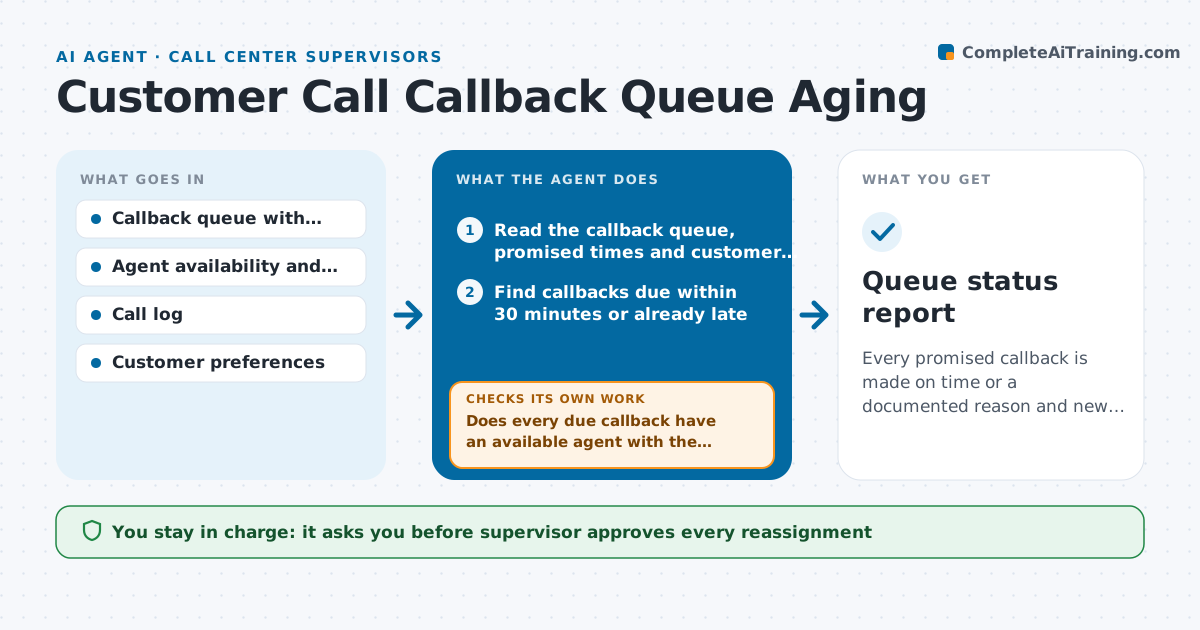
Every promised callback is made on time or a documented reason and new time exists
What it does
A customer was promised a callback by 3 pm, and at 5 pm nobody has called because the agent went on break and the ticket sat unassigned. This agent reads the callback queue each few minutes, compares each promised time with the current time and workload, and flags callbacks at risk. It checks which agents are available, their skills and their current calls, and proposes reassignments. When a call is completed, it rechecks the queue to make sure the callback is logged and the customer was reached, and if not it loops back with a retry plan. It also warns about patterns, such as many callbacks due at the same time. The supervisor approves reassignments. Edge case: a customer who asked for a callback 'after 5' is not flagged as late at 4 pm.
How it works
Follow the arrows from top to bottom. The orange dashed arrow is the loop: when a check fails, the agent goes back and tries again.
Read the steps as a list
- Queue check runs
- Read the callback queue, promised times and customer preferences
- Find callbacks due within 30 minutes or already late
- Read agent availability, skills and current calls
- Does every due callback have an available agent with the right skills assigned?If not: Find the best available agent and prepare a reassignment. Back to step 2.
- Supervisor approves the reassignmentsThe agent waits here for your OK.
- Update assignments and read the call log after the due time
- Was each callback completed and logged with the customer reached?If not: Plan a retry within 30 minutes and flag the case if two attempts fail. Back to step 2.
- Report patterns such as many callbacks due at once
- Queue status report
How it decides
It flags a callback when the promised time is within 30 minutes and no available agent is assigned, and picks the agent with matching skills and the shortest queue.
- Flag a callback at 30 minutes before the promised time
- Respect the customer's stated time window
- Retry after 30 minutes if the customer was not reached, up to 2 times
- Escalate to the supervisor if a callback is more than 15 minutes late
Make it yours
Every agent is a starting point. You choose these settings for your own situation.
- Warning time before the due callback (default 30 minutes)
- Retry count and timing
- Skills used for matching
- Check frequency (default 10 minutes)
- Escalation limit
What keeps you in control
It always asks you first
- Supervisor approves every reassignment
Hard limits
- Never contact customers directly
- Never reassign without the supervisor's approval
It stops when
- Done: All due callbacks are completed or have a new agreed time
- Stop: No agent is available, so the agent alerts the supervisor
Set it up
We guide you through the set-up, step by step
Members get the full set-up guide for this agent. No technical skills needed: you copy, paste and upload.
- One set of instructions to paste into your AI, with the clicks for ChatGPT, Claude, Microsoft 365 Copilot, Gemini and Grok
- The agent then walks you through connecting your own data, one source at a time
- A downloadable copy with the flow chart, the rules and the full guide