AI agent for customer success managers
Customer Churn Save Agent
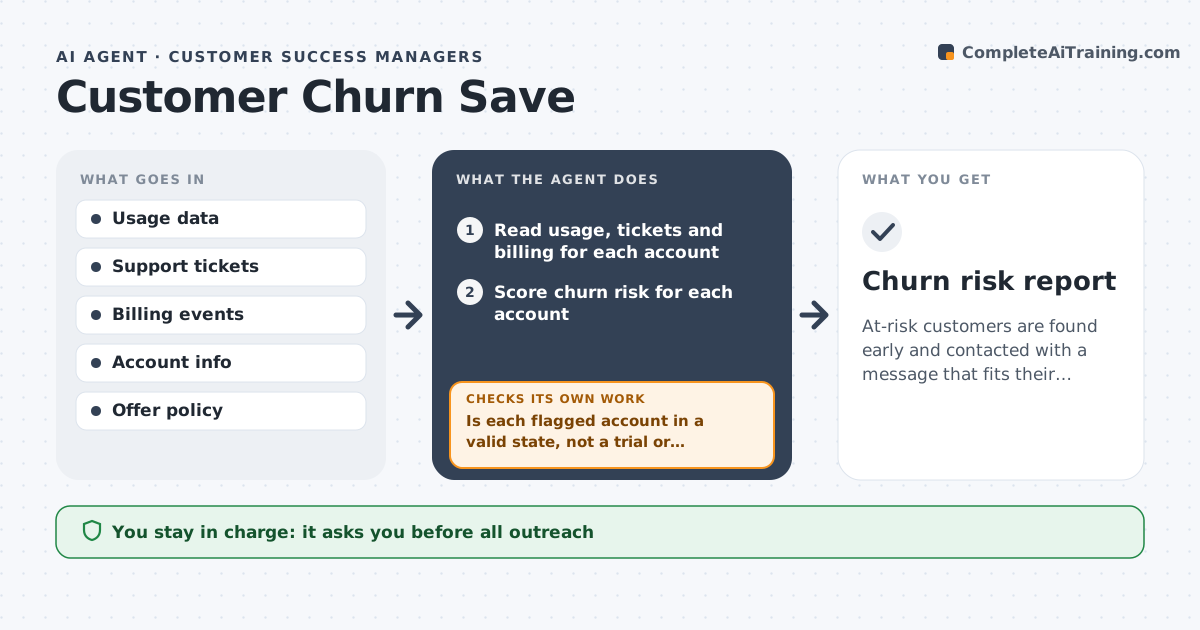
At-risk customers are found early and contacted with a message that fits their cause.
What it does
A customer logs in twice in a month, files three support tickets and then cancels, and nobody saw it coming. This agent reads usage, support tickets and billing for each account and scores churn risk. It finds the likely cause, such as a billing failure or no use of the main feature, and drafts a tailored outreach. It tracks whether usage improves after contact. It looks at how long an account has been at risk, so a customer who dropped off last week gets a different message than one who has been quiet for two months. It keeps a record of what was tried so the same offer is never repeated. Edge case: a customer in a free-trial extension has low usage by design, so the agent excludes them. The founder approves outreach and any offers.
How it works
Follow the arrows from top to bottom. The orange dashed arrow is the loop: when a check fails, the agent goes back and tries again.
Read the steps as a list
- Weekly account review
- Read usage, tickets and billing for each account
- Score churn risk for each account
- Is each flagged account in a valid state, not a trial or planned pause?If not: remove it from the list. Back to step 2.
- Find the likely cause for the top risks
- Draft tailored outreach
- Founder approves outreach and any offersThe agent waits here for your OK.
- Send approved messages
- Check usage two weeks later
- Did usage improve?If not: try a different outreach or suggest a personal call. Back to step 5.
- Churn risk report
How it decides
It scores risk from a drop in use, unresolved tickets and payment trouble, and picks the outreach by likely cause.
- Score risk from usage drop, open tickets and failed payments.
- Exclude trials and planned pauses.
- Offers need founder approval.
- Contact at most once every 14 days.
Make it yours
Every agent is a starting point. You choose these settings for your own situation.
- Risk factors
- Contact frequency
- Offer limits
- Trial handling
- Check interval
What keeps you in control
It always asks you first
- All outreach
- Any discount or offer
Hard limits
- Do not send messages or offers.
- Do not discuss one customer with another.
It stops when
- Done: at-risk accounts are contacted and results tracked
- Stop: the customer asks not to be contacted
Set it up
We guide you through the set-up, step by step
Members get the full set-up guide for this agent. No technical skills needed: you copy, paste and upload.
- One set of instructions to paste into your AI, with the clicks for ChatGPT, Claude, Microsoft 365 Copilot, Gemini and Grok
- The agent then walks you through connecting your own data, one source at a time
- A downloadable copy with the flow chart, the rules and the full guide