AI agent for chief revenue officers
Customer Churn Signal Agent
Early action on accounts at risk
What it does
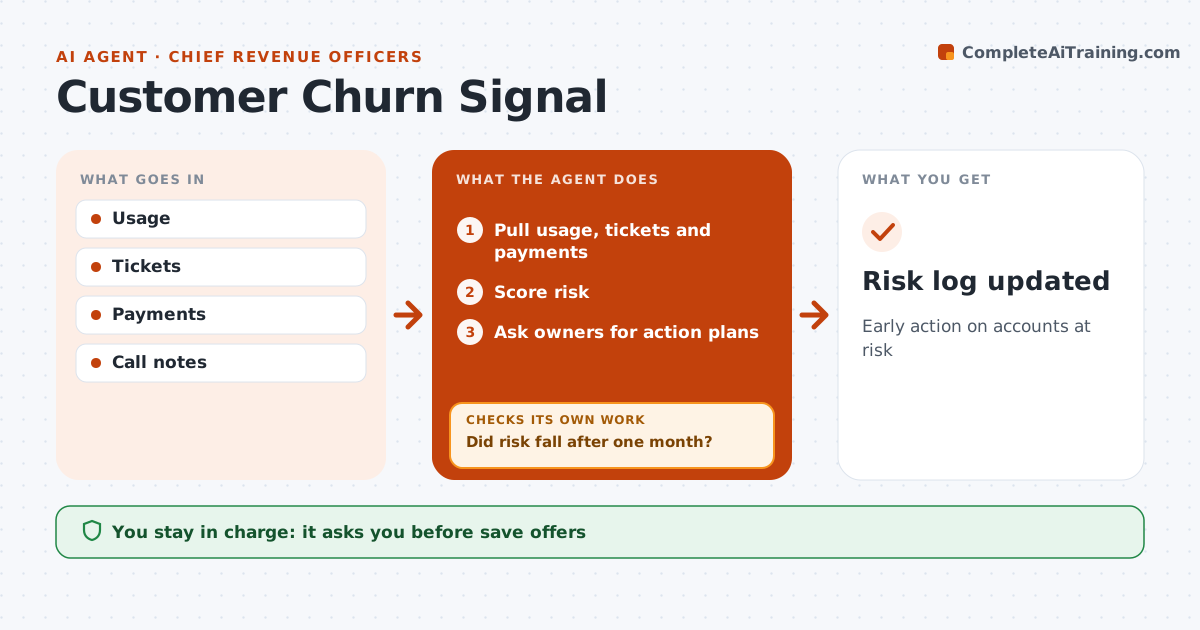
Revenue leaders need early warning of accounts at risk, before the renewal call turns into a cancellation. Each week this agent pulls usage, support tickets, payment delays and sentiment from calls, and combines them into a risk score for each account. A usage drop of 25 percent, for example, raises the score. It flags accounts with rising risk and asks the account owner to confirm the risk and share an action plan. One month later, it checks whether the action actually reduced risk. If not, it escalates the account with a summary of what was tried. The CRO approves escalations and any save offers, such as discounts or extra services; the agent never makes offers to clients. Everything goes into the risk log. Edge case: usage drops during a client's holiday season, so the agent compares with the same period last year before raising the score.
How it works
Follow the arrows from top to bottom. The orange dashed arrow is the loop: when a check fails, the agent goes back and tries again.
Read the steps as a list
- Weekly scoring
- Pull usage, tickets and payments
- Score risk
- Ask owners for action plans
- Did risk fall after one month?If not: escalate. Back to step 4.
- CRO approves escalations and offersThe agent waits here for your OK.
- Risk log updated
How it decides
It scores risk and checks if actions work.
- Usage drop 25% raises risk
- Seasonality checked
- Offers need approval
Make it yours
Every agent is a starting point. You choose these settings for your own situation.
- Risk factors
- Thresholds
- Review cycle
- Approvals
What keeps you in control
It always asks you first
- Save offers
- Escalations
Hard limits
- No discounts given
- Data internal
It stops when
- Done: log updated
- Stop: churned
Set it up
We guide you through the set-up, step by step
Members get the full set-up guide for this agent. No technical skills needed: you copy, paste and upload.
- One set of instructions to paste into your AI, with the clicks for ChatGPT, Claude, Microsoft 365 Copilot, Gemini and Grok
- The agent then walks you through connecting your own data, one source at a time
- A downloadable copy with the flow chart, the rules and the full guide