AI agent for logistics coordinators
Daily Load and Route Planning Agent
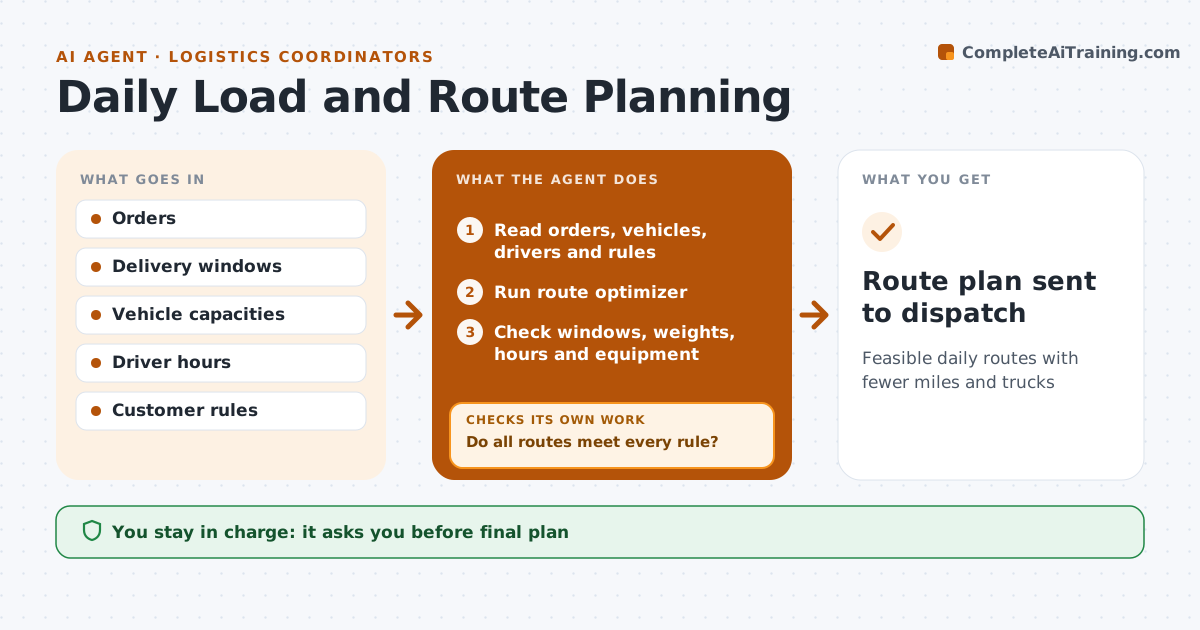
Feasible daily routes with fewer miles and trucks
What it does
Each day orders must be grouped into loads and routes that respect delivery windows, truck capacity, driver hours and customer rules like no deliveries before 7 am. At the order cutoff, this agent reads the orders, vehicles, drivers and rules and runs a route optimizer that minimizes total cost. It then checks the result for broken time windows, overweight trucks, driver hours over the legal limit and customers who need special equipment. Driver hours and customer windows are hard limits. If any route fails, it adjusts constraints or splits loads and reruns. It compares cost and miles with the previous plan. The planner approves before the plan goes to dispatch. Rush orders use spare capacity first. Edge case: a rush order added after planning is inserted without breaking any existing window.
How it works
Follow the arrows from top to bottom. The orange dashed arrow is the loop: when a check fails, the agent goes back and tries again.
Read the steps as a list
- Order cutoff for next day
- Read orders, vehicles, drivers and rules
- Run route optimizer
- Check windows, weights, hours and equipment
- Do all routes meet every rule?If not: adjust constraints or split loads and rerun. Back to step 3.
- Compare cost and miles with the previous plan
- Planner approves the planThe agent waits here for your OK.
- Route plan sent to dispatch
How it decides
It minimizes total cost while keeping every hard rule; any broken window or hours rule forces a rerun.
- Driver hours rules are hard limits
- Customer time windows are hard limits unless the customer agrees
- Rush orders use spare capacity first
Make it yours
Every agent is a starting point. You choose these settings for your own situation.
- Cost weights
- Rules per customer
- Cutoff time
- Vehicle types
What keeps you in control
It always asks you first
- Final plan
- Any change to customer windows
Hard limits
- Never sends routes to drivers itself
- Never overrides hours rules
It stops when
- Done: plan approved
- Stop: orders exceed fleet capacity, propose a contract carrier
Set it up
We guide you through the set-up, step by step
Members get the full set-up guide for this agent. No technical skills needed: you copy, paste and upload.
- One set of instructions to paste into your AI, with the clicks for ChatGPT, Claude, Microsoft 365 Copilot, Gemini and Grok
- The agent then walks you through connecting your own data, one source at a time
- A downloadable copy with the flow chart, the rules and the full guide