AI agent for data engineers
Data Contract Breach Agent
Breaches caught at the door, affected loads held, and clean data released only after a verified fix
What it does
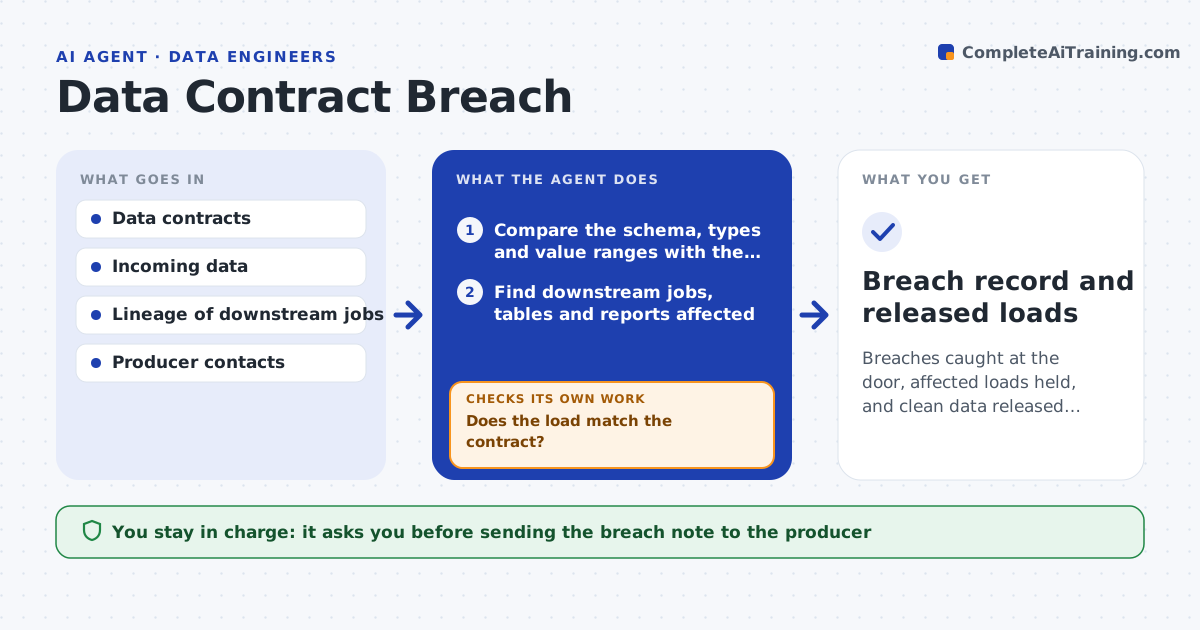
A column renamed upstream can quietly empty a dashboard for a week. This agent compares each incoming feed with its data contract: expected fields, types, ranges and freshness. When it finds a break, it works out which downstream jobs, tables and reports use the broken field. It drafts a clear note to the producing team with the evidence, such as 'column amount now arrives as text for 3 percent of rows'. It then holds the affected loads, so bad data does not spread. After the producer fixes the issue, the agent checks the feed again and only then offers to release the held loads. The engineer approves the release. Edge case: a value range shift that fits a real business change, such as a price increase, is flagged as a question, not a breach.
How it works
Follow the arrows from top to bottom. The orange dashed arrow is the loop: when a check fails, the agent goes back and tries again.
Read the steps as a list
- New load arrives from an upstream team
- Compare the schema, types and value ranges with the contract
- Does the load match the contract?If not: hold the load, record each breach and continue to impact analysis. Back to step 2.
- Find downstream jobs, tables and reports affected
- Draft a note to the producer with the evidence
- Engineer approves sending the noteThe agent waits here for your OK.
- Check the next delivery after the producer's reply
- Is the new delivery clean?If not: keep the loads held and list what still fails. Back to step 6.
- Engineer approves releasing the held loadsThe agent waits here for your OK.
- Breach record and released loads
How it decides
A breach is a missing field, a type change, a range outside the contract or late delivery beyond the limit. A load is released only after a clean check.
- Hold loads for any missing field or type change
- Treat nulls above the contract threshold as a breach
- Raise range shifts under 20 percent as questions, not breaches
- Escalate if a feed stays broken for 2 deliveries
Make it yours
Every agent is a starting point. You choose these settings for your own situation.
- Null threshold (default 1 percent)
- Freshness limit per feed
- Which downstream jobs are held automatically
- Producer contact for each feed
What keeps you in control
It always asks you first
- Sending the breach note to the producer
- Releasing held loads
Hard limits
- Never edits the producer's data
- Never releases a held load without approval
It stops when
- Done: held loads released after a clean delivery
- Stop: the contract is missing for the feed
Set it up
We guide you through the set-up, step by step
Members get the full set-up guide for this agent. No technical skills needed: you copy, paste and upload.
- One set of instructions to paste into your AI, with the clicks for ChatGPT, Claude, Microsoft 365 Copilot, Gemini and Grok
- The agent then walks you through connecting your own data, one source at a time
- A downloadable copy with the flow chart, the rules and the full guide