AI agent for global head of its
Data Governance Ownership Agent
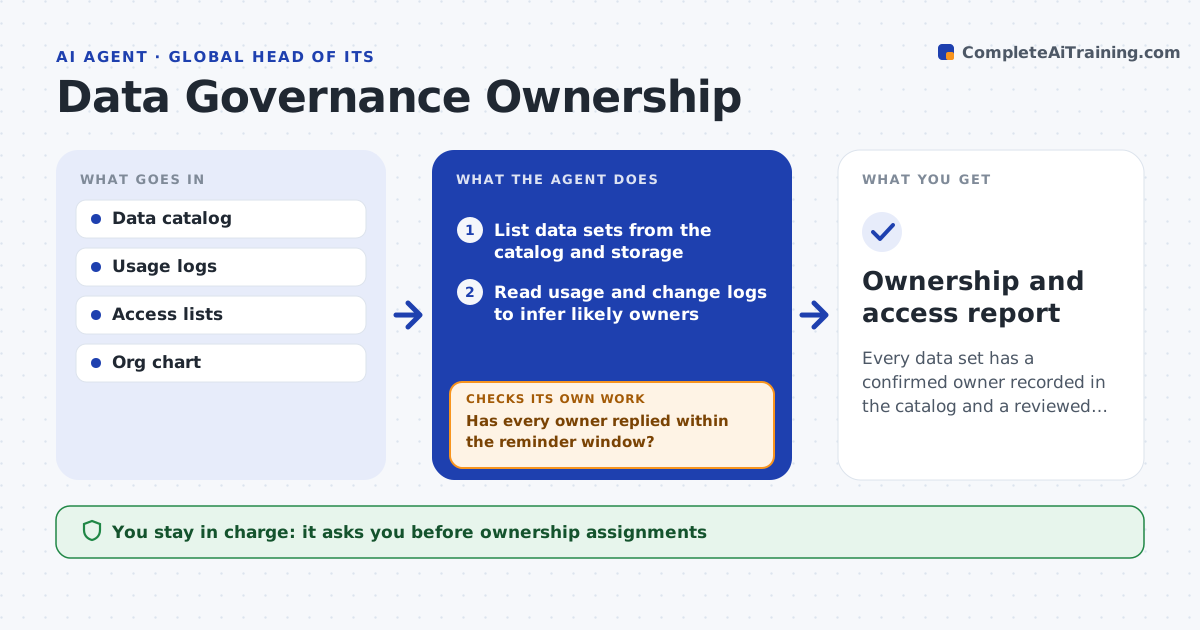
Every data set has a confirmed owner recorded in the catalog and a reviewed access list
What it does
An auditor asks who owns the customer table and nobody knows. This agent lists data sets from the catalog, warehouses and storage, and infers a likely owner for each from who created, uses and changes it. It sends each proposed owner a short request to confirm or redirect, and tracks replies over time. For no answer after the reminder window, it escalates to the owner's manager. When an owner confirms, it records that in the catalog with the date. It also checks the access list for each data set against the owner's view, flagging people who no longer need access. Gaps and conflicts go to the leader. Every month it repeats for new data sets. Edge case: two teams both claim a data set.
How it works
Follow the arrows from top to bottom. The orange dashed arrow is the loop: when a check fails, the agent goes back and tries again.
Read the steps as a list
- Monthly review runs or a new data set appears
- List data sets from the catalog and storage
- Read usage and change logs to infer likely owners
- Send each owner a request to confirm or redirect
- Track replies over time
- Has every owner replied within the reminder window?If not: remind once, then escalate to the owner's manager. Back to step 4.
- Record confirmed owners in the catalog
- Compare each data set's access list with the owner's view
- Does every person with access still need it?If not: list the extra access and ask the owner to confirm removal. Back to step 7.
- Leader approves ownership assignments and access changesThe agent waits here for your OK.
- Ownership and access report
How it decides
A data set's likely owner is the main person or team that creates and changes it. An owner counts as confirmed only after they reply.
- Infer the owner from the main creator and editor
- Escalate after one reminder at 7 days
- Flag a data set with two claimed owners to the leader
- Flag access unused for 90 days
Make it yours
Every agent is a starting point. You choose these settings for your own situation.
- Reminder window (default 7 days)
- Unused access limit (default 90 days)
- Data sources it lists
- Review frequency
What keeps you in control
It always asks you first
- Ownership assignments
- Access removals
Hard limits
- Never removes access itself
- Never assigns an owner without a reply or leader approval
It stops when
- Done: all data sets owned and access reviewed
- Stop: the catalog cannot be read
Set it up
We guide you through the set-up, step by step
Members get the full set-up guide for this agent. No technical skills needed: you copy, paste and upload.
- One set of instructions to paste into your AI, with the clicks for ChatGPT, Claude, Microsoft 365 Copilot, Gemini and Grok
- The agent then walks you through connecting your own data, one source at a time
- A downloadable copy with the flow chart, the rules and the full guide