AI agent for scrum masters
Definition of Done Audit Agent
Make sure items marked done really meet the agreed definition
What it does
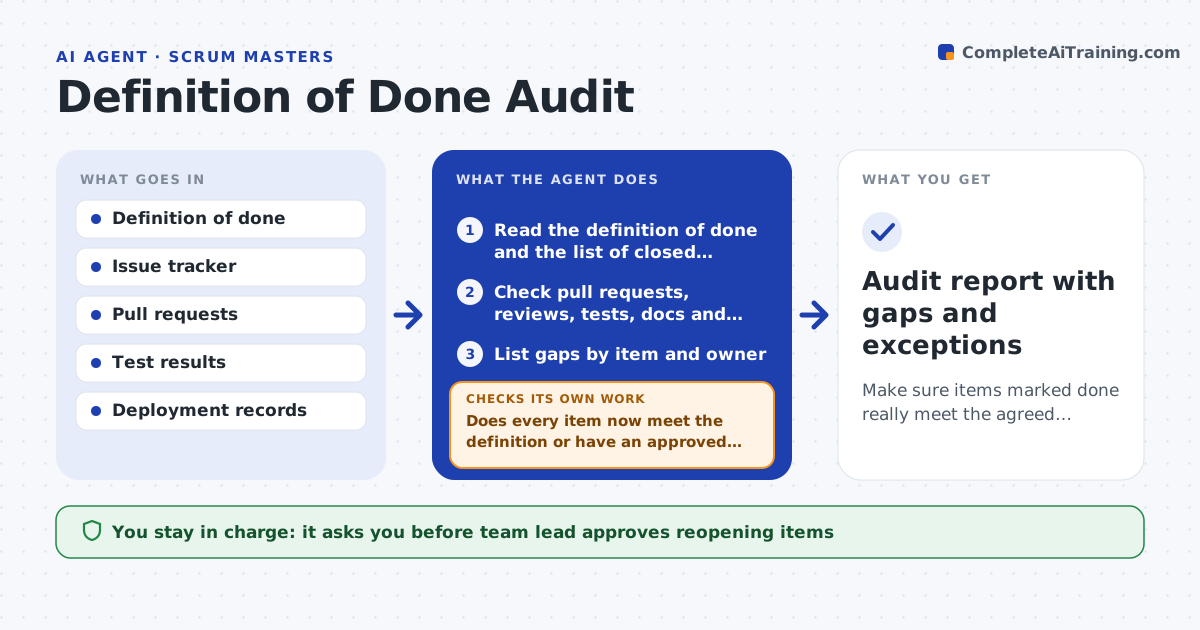
A story is marked done, but the pull request had no review, the tests were skipped and the docs were never updated. Each sprint this agent checks every closed item against the team's definition of done, using the issue tracker and the code system. It checks for a merged and reviewed pull request, passing tests, updated documentation, a deployment record and any other agreed items. It reopens items with gaps and tells the owners exactly what is missing. It follows up after they respond and checks again. Genuine exceptions are listed for the team lead to approve. Edge case: a spike story has no code but a written outcome, so the agent applies the spike version of the definition.
How it works
Follow the arrows from top to bottom. The orange dashed arrow is the loop: when a check fails, the agent goes back and tries again.
Read the steps as a list
- Sprint ending
- Read the definition of done and the list of closed items
- Check pull requests, reviews, tests, docs and deployment for each item
- List gaps by item and owner
- Team lead approves reopening and messages to ownersThe agent waits here for your OK.
- Reopen items and message the owners with the missing lines
- Recheck the items after the owners respond
- Does every item now meet the definition or have an approved exception?If not: remind owners and escalate gaps remaining at the review. Back to step 6.
- Audit report with gaps and exceptions
How it decides
It checks each closed item against every line of the definition, by item type, and reopens it when any line has no evidence.
- Apply a different definition to spikes and bug fixes
- Require a review from someone other than the author
- Require passing tests on the merged commit
- Escalate gaps remaining on the review day
Make it yours
Every agent is a starting point. You choose these settings for your own situation.
- Definition of done by item type
- Exception approval rule
- Days of grace before escalation
- Systems checked
- Report format
What keeps you in control
It always asks you first
- Team lead approves reopening items
- Team lead approves exceptions
Hard limits
- Never mark items done itself
- Never message owners without lead approval
It stops when
- Done: all items meet the definition or have approved exceptions
- Stop: the definition is unclear and the team must revise it
Set it up
We guide you through the set-up, step by step
Members get the full set-up guide for this agent. No technical skills needed: you copy, paste and upload.
- One set of instructions to paste into your AI, with the clicks for ChatGPT, Claude, Microsoft 365 Copilot, Gemini and Grok
- The agent then walks you through connecting your own data, one source at a time
- A downloadable copy with the flow chart, the rules and the full guide