AI agent for software engineers
Dependency Upgrade Rehearsal Agent
Dependencies stay current through tested, reviewable upgrade patches.
What it does
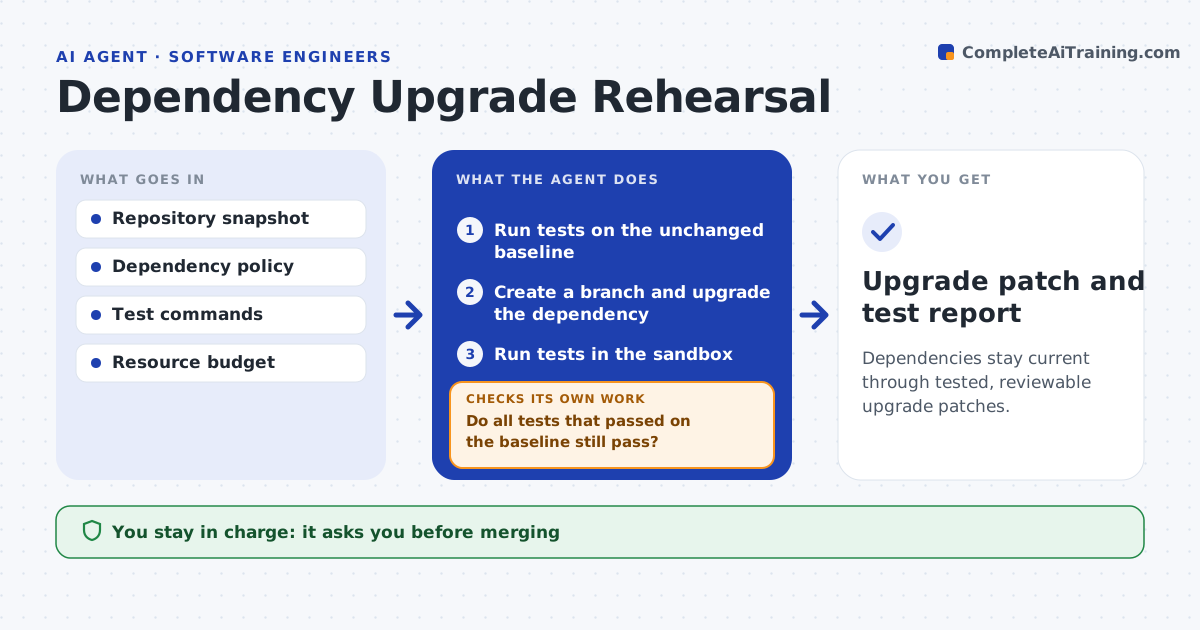
Dependency updates pile up because testing each one is tedious, and old versions become a security risk. When a new version is released, or once a week, this agent first runs the test suite on the unchanged code to record a baseline. It then creates an isolated branch, upgrades one permitted dependency and runs the tests again. It compares results with the baseline, so tests that were already failing do not count against the upgrade. If something new breaks and the cause is clear, it tries a permitted compatibility patch, up to two times. Otherwise it reverts and reports the blocker. An engineer reviews and merges. Edge case: an upgrade renames a function used in one module, so the agent patches the call and reruns.
How it works
Follow the arrows from top to bottom. The orange dashed arrow is the loop: when a check fails, the agent goes back and tries again.
Read the steps as a list
- New dependency version or weekly run
- Run tests on the unchanged baseline
- Create a branch and upgrade the dependency
- Run tests in the sandbox
- Do all tests that passed on the baseline still pass?If not: apply a permitted compatibility patch (max 2 tries), or revert and report the blocker. Back to step 4.
- Prepare the patch and test report
- Engineer reviews and mergesThe agent waits here for your OK.
- Upgrade patch and test report
How it decides
It upgrades within policy, attributes test failures by comparing with the baseline, and only patches when the failure is clearly caused by the upgrade.
- Baseline comparison decides what the upgrade broke.
- Patch vs revert: patch only when the cause is clear and within policy.
- Budget: stop after the allotted test runs.
Make it yours
Every agent is a starting point. You choose these settings for your own situation.
- Dependencies the agent may upgrade (default allowlist)
- Maximum patch attempts per upgrade (default 2)
- Schedule of the weekly run
- Test runs budget per upgrade (default 5)
What keeps you in control
It always asks you first
- Merging
- Deployment
- Unapproved dependencies
Hard limits
- Never merges or deploys.
It stops when
- Done: patch ready.
- Blocked: breaking change needs an engineer.
Set it up
We guide you through the set-up, step by step
Members get the full set-up guide for this agent. No technical skills needed: you copy, paste and upload.
- One set of instructions to paste into your AI, with the clicks for ChatGPT, Claude, Microsoft 365 Copilot, Gemini and Grok
- The agent then walks you through connecting your own data, one source at a time
- A downloadable copy with the flow chart, the rules and the full guide