AI agent for urban planners
Development Application Code Review Agent
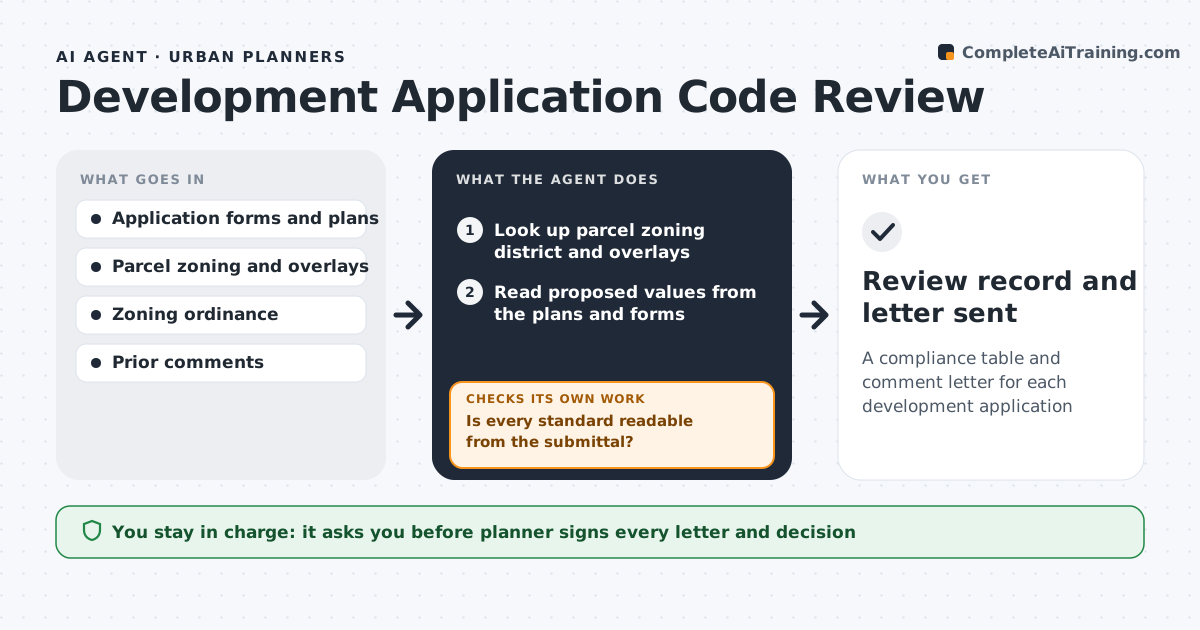
A compliance table and comment letter for each development application
What it does
Every site plan or development application must be checked for setbacks, height, lot coverage, parking, landscaping and permitted uses, and planners juggle many cases at once. This agent looks up the parcel's zoning district and any overlays, reads proposed values from the plans and forms, and builds a compliance table showing required and proposed values for each standard. If a value cannot be read from the submittal, it does not assume one; it drafts a completeness letter and waits for the resubmittal. For standards not met, it drafts a comment letter. On resubmittals it re-checks only what changed. The planner reviews, edits and signs every letter and makes the decision. Edge case: when the parcel sits in an overlay district, overlay rules apply on top of base zoning and conflicts are shown to the planner.
How it works
Follow the arrows from top to bottom. The orange dashed arrow is the loop: when a check fails, the agent goes back and tries again.
Read the steps as a list
- Application submitted
- Look up parcel zoning district and overlays
- Read proposed values from the plans and forms
- Build the compliance table against each standard
- Is every standard readable from the submittal?If not: draft a completeness letter listing missing information and wait for resubmittal. Back to step 3.
- Draft the comment letter for standards not met
- Planner reviews, edits and signs the letterThe agent waits here for your OK.
- Review record and letter sent
How it decides
Each standard is compared with the proposed value. Unreadable values become missing information requests, not assumptions.
- Overlay rules apply in addition to base zoning
- Unclear values are requested, not assumed
- Resubmittals are checked only where changed
Make it yours
Every agent is a starting point. You choose these settings for your own situation.
- Ordinance version and districts
- Letter templates
- Which standards to check
- Review turnaround target
What keeps you in control
It always asks you first
- Planner signs every letter and decision
Hard limits
- Never approves or denies an application
- Never contacts applicants without planner sign-off
It stops when
- Done: all standards met or comments issued
- Stop: application withdrawn
Set it up
We guide you through the set-up, step by step
Members get the full set-up guide for this agent. No technical skills needed: you copy, paste and upload.
- One set of instructions to paste into your AI, with the clicks for ChatGPT, Claude, Microsoft 365 Copilot, Gemini and Grok
- The agent then walks you through connecting your own data, one source at a time
- A downloadable copy with the flow chart, the rules and the full guide