AI agent for vice president of marketings
Digital Channel Spend Reallocation Agent
A weekly, evidence-based budget shift between digital channels
What it does
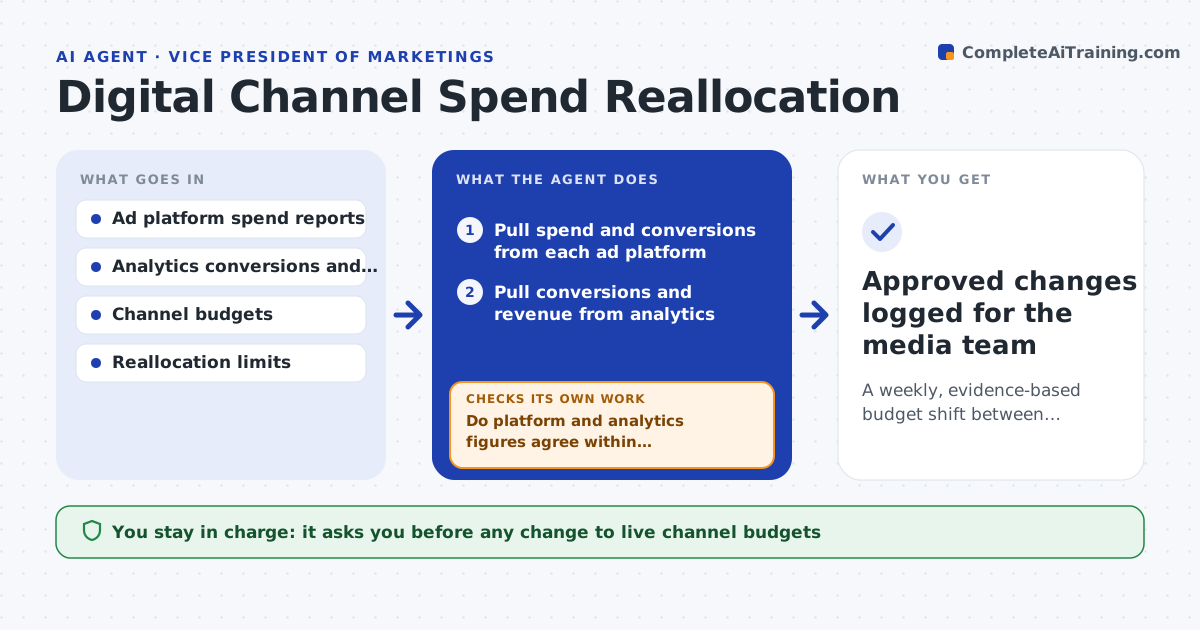
Digital marketing budgets are often fixed per channel for a quarter, even when one channel gets much cheaper or more expensive week to week. Each week this agent pulls spend, conversions and revenue from each ad platform and your analytics tool. It first checks that the two sources agree within your tolerance. If they disagree, it uses the analytics figure and flags the tracking gap. It then calculates cost per acquisition and return by channel and proposes moving budget from the weakest to the strongest channels, within your weekly limit. Before finishing, it checks each receiving channel can actually spend the extra money and caps it if not. You approve any reallocation before budgets change in the ad platforms. Edge case: a channel with good return but limited reach is capped so the proposal does not exceed what it can spend.
How it works
Follow the arrows from top to bottom. The orange dashed arrow is the loop: when a check fails, the agent goes back and tries again.
Read the steps as a list
- Monday weekly review
- Pull spend and conversions from each ad platform
- Pull conversions and revenue from analytics
- Do platform and analytics figures agree within tolerance?If not: use analytics figures, flag the gap and check the tracking setup. Back to step 2.
- Calculate cost per acquisition and return by channel
- Propose budget moves within limits and capacity
- CDO or marketing lead approves the reallocationThe agent waits here for your OK.
- Approved changes logged for the media team
How it decides
Budget moves toward channels with the best return per dollar, limited to the set maximum shift and each channel's spending capacity.
- Never move more than the set share of budget in one week
- Cap channels at their observed spending capacity
- Hold changes during a campaign launch week
Make it yours
Every agent is a starting point. You choose these settings for your own situation.
- Maximum weekly shift (default 10%)
- Channels included
- Tolerance between sources (default 10%)
- Primary measure (cost per acquisition or return)
What keeps you in control
It always asks you first
- Any change to live channel budgets
Hard limits
- Never changes live budgets itself
- Respects the weekly shift limit
It stops when
- Done: proposal approved or rejected
- Stop: data missing for any major channel
Set it up
We guide you through the set-up, step by step
Members get the full set-up guide for this agent. No technical skills needed: you copy, paste and upload.
- One set of instructions to paste into your AI, with the clicks for ChatGPT, Claude, Microsoft 365 Copilot, Gemini and Grok
- The agent then walks you through connecting your own data, one source at a time
- A downloadable copy with the flow chart, the rules and the full guide