AI agent for director of its
Disaster Recovery Test Evidence Agent
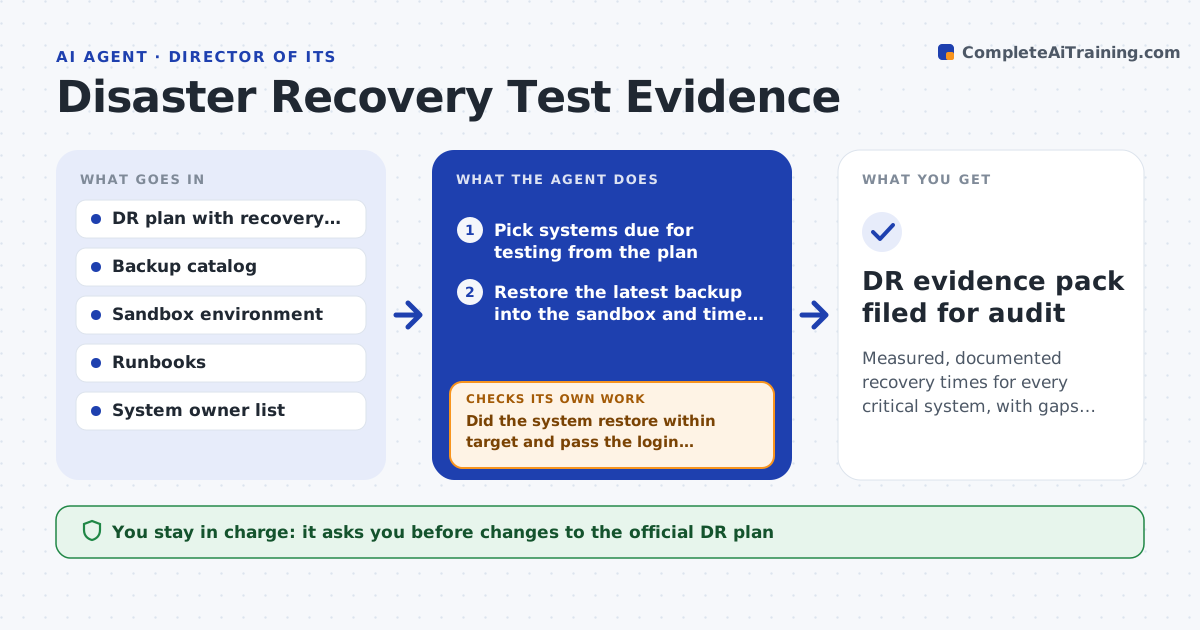
Measured, documented recovery times for every critical system, with gaps turned into tasks
What it does
A disaster recovery plan only matters if restores actually work within the promised time, yet tests are often skipped or not written down. This agent runs the scheduled restore test for each critical system in a sandbox, times each step and compares the result with the recovery time and data loss targets in the plan. After the restore it also tests a real login and a sample transaction, because a restored database is not the same as a working service. If a step fails or runs too long, it records the failing step, retries once with the documented fix and opens a remediation task if it still fails. It then updates the plan with measured times and drafts a summary for management. You approve any plan changes and the summary. Edge case: a database restores fine but the application cannot connect because a secret was rotated.
How it works
Follow the arrows from top to bottom. The orange dashed arrow is the loop: when a check fails, the agent goes back and tries again.
Read the steps as a list
- Quarterly DR test date arrives
- Pick systems due for testing from the plan
- Restore the latest backup into the sandbox and time each step
- Run a test login and a data freshness query
- Did the system restore within target and pass the login test?If not: record the failing step, apply the documented fix and retry once, then open a remediation task. Back to step 3.
- Update the plan with measured times and gaps
- IT manager approves plan changes and summaryThe agent waits here for your OK.
- DR evidence pack filed for audit
How it decides
A system passes only when it restores within its recovery time target, data is no older than its data loss target, and a test login works.
- Pass only when restore time and data age are within target and login works
- Retry a failed restore once before raising a task
- Mark a system as untested if the sandbox lacks capacity, never as passed
Make it yours
Every agent is a starting point. You choose these settings for your own situation.
- Systems in scope and their test frequency
- Recovery time and data loss targets per system
- Sandbox to use
- Who gets the summary
What keeps you in control
It always asks you first
- Changes to the official DR plan
- Sending the summary to management or auditors
Hard limits
- Restores only into the sandbox, never production
- Does not delete backups
It stops when
- Done: all due systems tested and recorded
- Stop: sandbox unavailable or backup catalog cannot be read
Set it up
We guide you through the set-up, step by step
Members get the full set-up guide for this agent. No technical skills needed: you copy, paste and upload.
- One set of instructions to paste into your AI, with the clicks for ChatGPT, Claude, Microsoft 365 Copilot, Gemini and Grok
- The agent then walks you through connecting your own data, one source at a time
- A downloadable copy with the flow chart, the rules and the full guide