AI agent for training instructors
Dispatcher Scenario Training Agent
Build dispatcher skill through scored practice that gets harder only when earned.
What it does
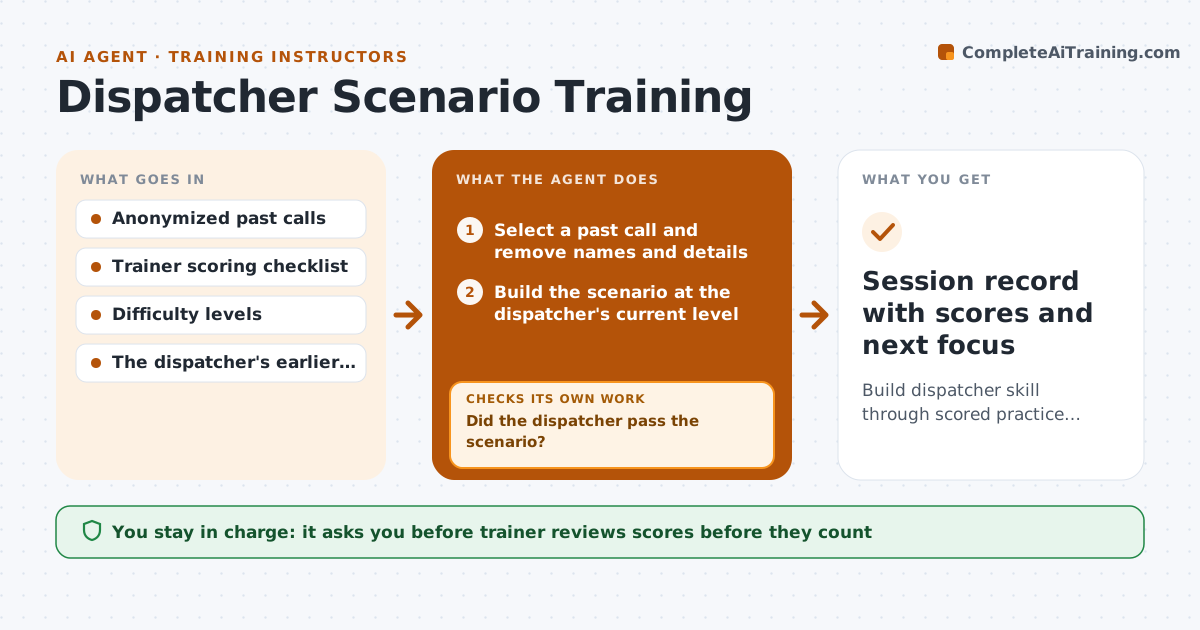
New dispatchers often learn on live calls, which is stressful for them and risky for callers. This agent builds practice scenarios from past calls with the names and details changed. It plays the caller in a text or voice exchange, listens to what the dispatcher asks and decides, and scores the response against the trainer's checklist: right questions, right priority, right unit. It then picks the next scenario to target weak spots. After each round it looks at the trend and only raises the difficulty when the dispatcher passes at the current level. The trainer reviews every score and can override it. Edge case: a dispatcher who passes by luck on one scenario is given a second similar one before moving up.
How it works
Follow the arrows from top to bottom. The orange dashed arrow is the loop: when a check fails, the agent goes back and tries again.
Read the steps as a list
- Trainer opens a practice session
- Select a past call and remove names and details
- Build the scenario at the dispatcher's current level
- Play the caller and respond to the dispatcher
- Score the response against the checklist
- Did the dispatcher pass the scenario?If not: Pick a similar scenario on the weak area and run it again. Back to step 3.
- Have two passes in a row happened at this level?If not: Stay at the level and choose another scenario on a different call type. Back to step 3.
- Trainer reviews scores and any overrideThe agent waits here for your OK.
- Raise the difficulty for the next round
- Session record with scores and next focus
How it decides
It moves up a level only after two passes at the current level and holds or steps back when scores fall.
- Pass mark is 80 percent of checklist points
- Two passes in a row are needed before raising difficulty
- A fall of 15 points over two rounds triggers a step back
- Weak areas are the lowest three checklist items
Make it yours
Every agent is a starting point. You choose these settings for your own situation.
- Pass mark (default 80 percent)
- Passes needed to move up (default 2)
- Call types to practice
- Text or voice format
What keeps you in control
It always asks you first
- Trainer reviews scores before they count
Hard limits
- Never use real names or addresses from past calls
- Never change the trainer's recorded score
It stops when
- Done: the session is scored and the next level is set
- Stop: the trainer ends the session
Set it up
We guide you through the set-up, step by step
Members get the full set-up guide for this agent. No technical skills needed: you copy, paste and upload.
- One set of instructions to paste into your AI, with the clicks for ChatGPT, Claude, Microsoft 365 Copilot, Gemini and Grok
- The agent then walks you through connecting your own data, one source at a time
- A downloadable copy with the flow chart, the rules and the full guide