AI agent for sales development representatives
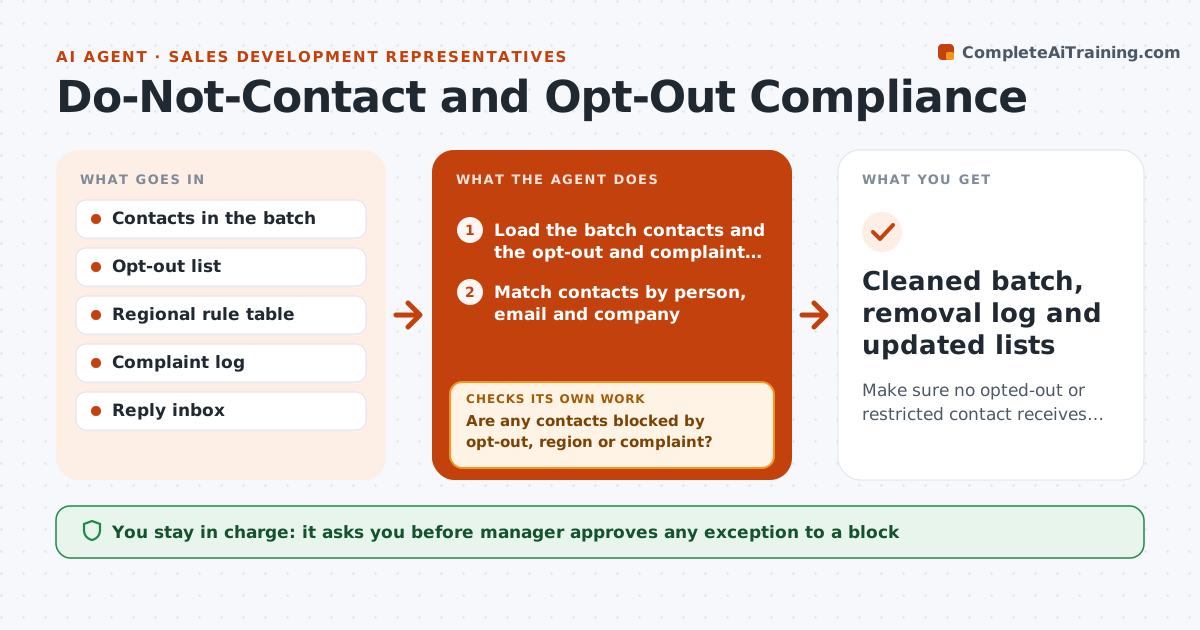
Do-Not-Contact and Opt-Out Compliance Agent
Make sure no opted-out or restricted contact receives a message
What it does
A prospect clicks unsubscribe, and two weeks later a different sequence emails them again. The complaint costs trust and may break regional rules. This agent acts as the gate before every send. Before each batch it checks every contact against the opt-out list, regional rules for the contact's country and past complaints, removes violations and logs the reason. After sending, it scans replies for unsubscribe requests written in plain words, such as please stop emailing me, and updates the list. It checks that the removal reached every connected tool. A manager approves any exception. Edge case: a contact has two email addresses and only one opted out. The agent matches by person and blocks both.
How it works
Follow the arrows from top to bottom. The orange dashed arrow is the loop: when a check fails, the agent goes back and tries again.
Read the steps as a list
- Send batch is queued
- Load the batch contacts and the opt-out and complaint lists
- Match contacts by person, email and company
- Check each contact against regional consent rules
- Are any contacts blocked by opt-out, region or complaint?If not: Pass the clean batch to the sender. Back to step 3.
- Remove blocked contacts and log the reason for each
- Manager approves any exceptionThe agent waits here for your OK.
- Release the cleaned batch for sending
- Scan replies after sending for unsubscribe wording
- Is every new opt-out removed from all connected tools?If not: Push the removal to the missing tools and recheck. Back to step 9.
- Cleaned batch, removal log and updated lists
How it decides
A contact is blocked if they opted out in any tool, are in a region that needs prior consent they lack, or have a complaint on file. Matches use person and company, not only email.
- Any opt-out in any tool blocks the person everywhere
- Regions needing prior consent require a recorded consent
- A complaint blocks contact until the manager clears it
- Plain-word unsubscribe replies are treated as opt-outs
Make it yours
Every agent is a starting point. You choose these settings for your own situation.
- Regional rules table
- Tools to sync the list with
- Words that count as an opt-out
- Exception approver
- Check timing before each batch
What keeps you in control
It always asks you first
- Manager approves any exception to a block
Hard limits
- Never sends a batch with a blocked contact
- Does not give legal advice on regional rules
It stops when
- Done: batch cleaned and opt-outs synced
- Stop: rules for a region are missing, hold those contacts
Set it up
We guide you through the set-up, step by step
Members get the full set-up guide for this agent. No technical skills needed: you copy, paste and upload.
- One set of instructions to paste into your AI, with the clicks for ChatGPT, Claude, Microsoft 365 Copilot, Gemini and Grok
- The agent then walks you through connecting your own data, one source at a time
- A downloadable copy with the flow chart, the rules and the full guide