AI agent for medical billers
Duplicate Charge Detection Agent
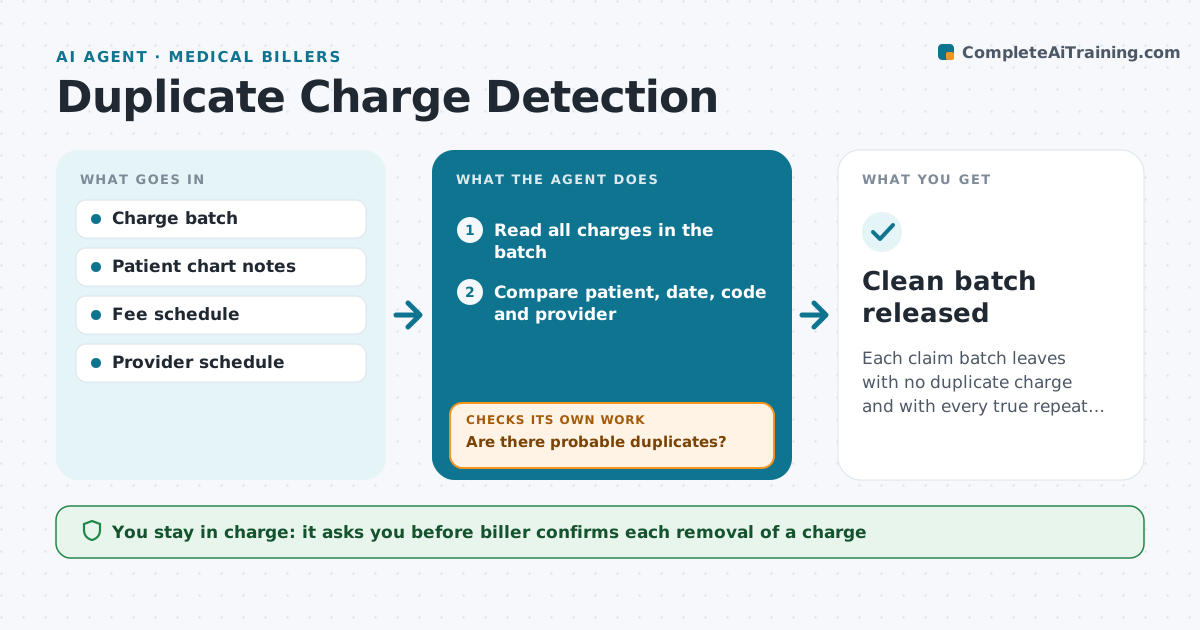
Each claim batch leaves with no duplicate charge and with every true repeat documented.
What it does
The same service is sometimes entered twice by different staff, and the claim is denied or overpaid. Before claims are released, the agent compares charges by patient, date, code and provider and flags probable duplicates. It then checks the chart to see if two services really took place, such as two units or two sites, and asks the biller to confirm. After removals, it rechecks the whole batch, because one edit can expose another pair. It never deletes a charge itself and it holds the batch back if duplicates are left. It also notes which staff members enter the most repeats, so the biller can fix the cause at the front desk. Edge case: a repeat injection on the same day that is correct and must stay.
How it works
Follow the arrows from top to bottom. The orange dashed arrow is the loop: when a check fails, the agent goes back and tries again.
Read the steps as a list
- Claim batch ready to release
- Read all charges in the batch
- Compare patient, date, code and provider
- Are there probable duplicates?If not: Mark the batch as clean and move on. Back to step 3.
- Open the chart for each pair
- Decide whether two services really happened
- Biller confirms which charges stayThe agent waits here for your OK.
- Remove or keep charges as confirmed
- Reread the batch after removals
- Are any duplicates left?If not: Return to the comparison and repeat. Back to step 3.
- Clean batch released
How it decides
It flags charges with matching patient, date, code and provider, and keeps a repeat only when the chart shows two separate services.
- Match on patient, date, code and provider
- Keep a repeat only with chart evidence
- Check units and sites before removing
- Stop release when duplicates remain
Make it yours
Every agent is a starting point. You choose these settings for your own situation.
- Fields used to match
- Services where repeats are normal
- When the check runs
- Who confirms removals
What keeps you in control
It always asks you first
- Biller confirms each removal of a charge
Hard limits
- Never delete a charge without the biller's approval
- Do not release a batch with open duplicates
It stops when
- Done: batch has no unexplained duplicates
- Stop: chart does not show what happened and the provider must clarify
Set it up
We guide you through the set-up, step by step
Members get the full set-up guide for this agent. No technical skills needed: you copy, paste and upload.
- One set of instructions to paste into your AI, with the clicks for ChatGPT, Claude, Microsoft 365 Copilot, Gemini and Grok
- The agent then walks you through connecting your own data, one source at a time
- A downloadable copy with the flow chart, the rules and the full guide