AI agent for podcasters
Episode Show Notes and Chapters Agent
Publish-ready show notes with accurate chapters and working links for each episode
What it does
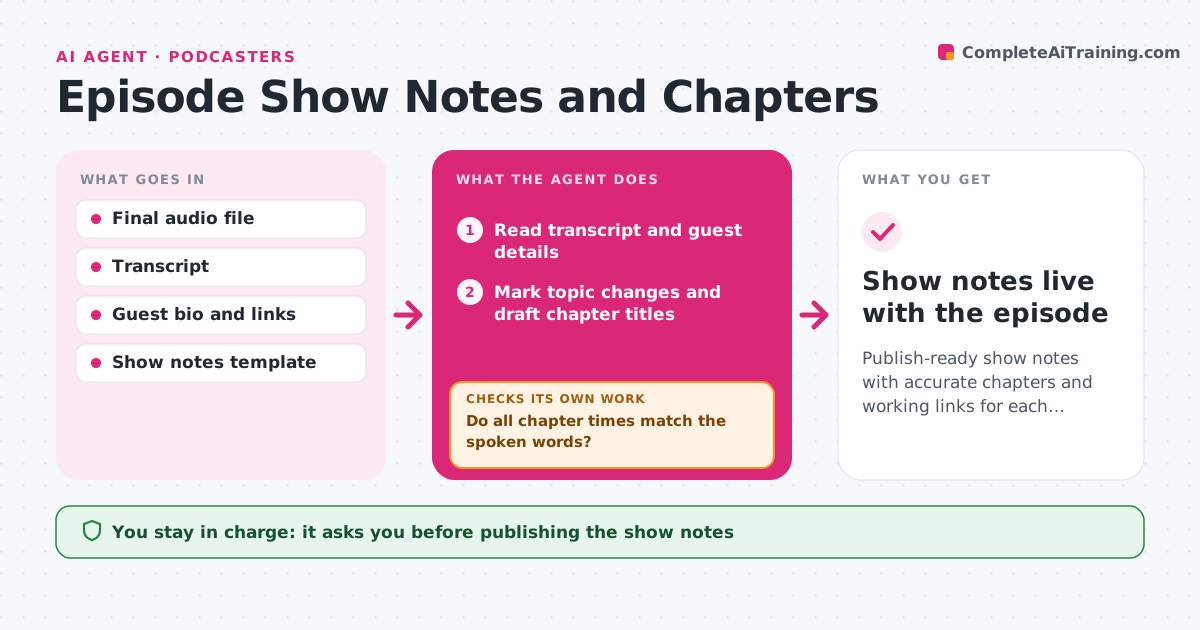
After every edit, show notes need a summary, chapter markers, guest links and resources, and it is easy to publish wrong times. This agent reads the final transcript and guest details, marks where topics change and drafts chapter titles. It then checks every chapter timestamp against the final audio file, because edits often shift times after the transcript was made. If times drift beyond the tolerance, it re-aligns the transcript to the final audio and recomputes them. It visits every link it plans to include and replaces dead ones with the current page from the same source, or drops them. It writes the summary in your show's template and style. You review the draft and publish it. Edge case: very short chapters below the minimum length are merged with the next one so listeners are not flooded.
How it works
Follow the arrows from top to bottom. The orange dashed arrow is the loop: when a check fails, the agent goes back and tries again.
Read the steps as a list
- Final episode audio is uploaded
- Read transcript and guest details
- Mark topic changes and draft chapter titles
- Match chapter times against the final audio
- Do all chapter times match the spoken words?If not: re-align the transcript to the final audio and recompute times. Back to step 4.
- Check every resource and guest link
- Write summary and notes in the show template
- Podcaster reviews and publishesThe agent waits here for your OK.
- Show notes live with the episode
How it decides
It places chapter breaks where the topic changes and keeps chapters at least a few minutes long. A timestamp passes only if the spoken words at that time match the chapter start.
- Merge chapters shorter than the minimum length
- Replace a dead link with the current page of the same source, or drop it
- Re-align when drift is above the tolerance
Make it yours
Every agent is a starting point. You choose these settings for your own situation.
- Minimum chapter length (default 3 minutes)
- Timestamp tolerance (default 2 seconds)
- Notes template and tone
- Whether to include a full transcript link
What keeps you in control
It always asks you first
- Publishing the show notes
Hard limits
- Never publishes on its own
- Does not invent resources the guest did not mention
It stops when
- Done: notes approved and published
- Stop: final audio missing or does not match the transcript; ask for the right file
Set it up
We guide you through the set-up, step by step
Members get the full set-up guide for this agent. No technical skills needed: you copy, paste and upload.
- One set of instructions to paste into your AI, with the clicks for ChatGPT, Claude, Microsoft 365 Copilot, Gemini and Grok
- The agent then walks you through connecting your own data, one source at a time
- A downloadable copy with the flow chart, the rules and the full guide