AI agent for help desk technicians
Escalation Handoff Package Agent
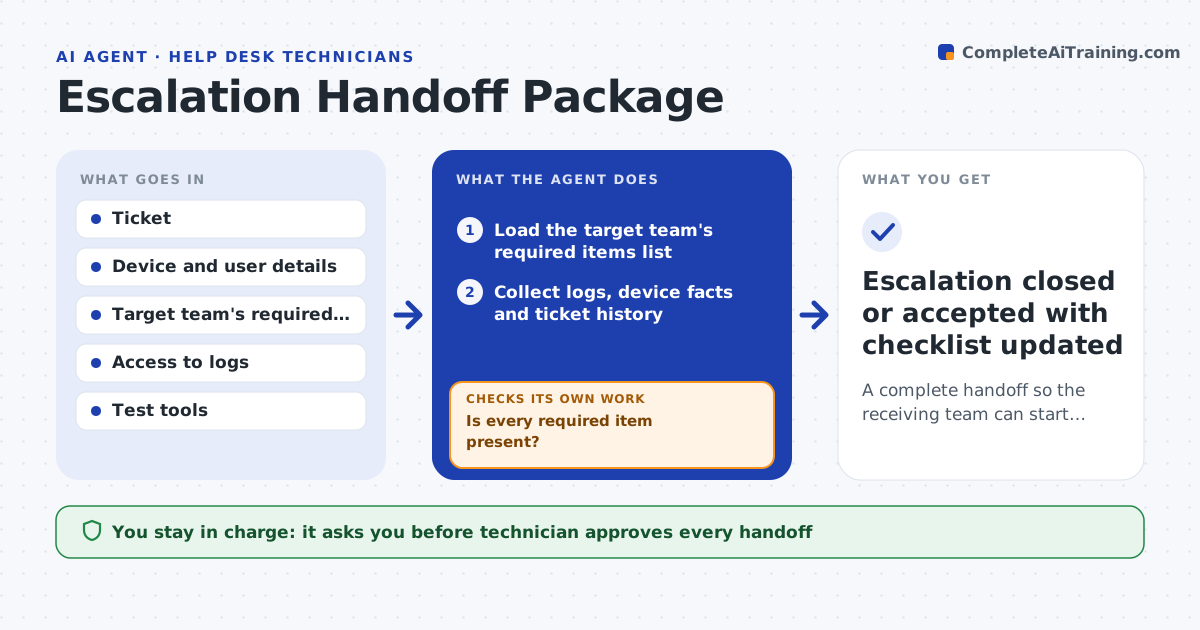
A complete handoff so the receiving team can start work without asking for more
What it does
Escalated tickets often come back with a request for logs because the first line missed something. Before escalation, this agent checks the ticket against the target team's list of required items. It collects the logs and device facts, runs the quick tests that team expects, and records the results. If anything is missing, it gathers it or asks the user for it, then checks the list again. The handoff package is a clear summary with the steps already tried and the evidence. A technician approves the handoff before the ticket moves. Edge case: the network team needs a trace from the user's home, so the agent asks for it instead of waiting for a bounce.
How it works
Follow the arrows from top to bottom. The orange dashed arrow is the loop: when a check fails, the agent goes back and tries again.
Read the steps as a list
- Technician decides to escalate
- Load the target team's required items list
- Collect logs, device facts and ticket history
- Run the quick tests the team expects
- Is every required item present?If not: gather the missing item or ask the user, then check again. Back to step 2.
- Write the handoff summary with steps already tried
- Technician approves the handoffThe agent waits here for your OK.
- Move the ticket to the target team
- Did the team accept without asking for more?If not: add the requested item and update the checklist for next time. Back to step 2.
- Escalation closed or accepted with checklist updated
How it decides
The package is complete when every required item for the target team is present. Missing items are collected or requested before the handoff.
- Use the target team's current required list
- Run only read-only tests
- Ask the user only for items it cannot collect
- Update the checklist after each bounce
Make it yours
Every agent is a starting point. You choose these settings for your own situation.
- Required item lists by team
- Tests to run automatically
- Log sources
- Where to send the handoff
What keeps you in control
It always asks you first
- Technician approves every handoff
Hard limits
- Never runs tests that change a system
- Never moves a ticket without approval
It stops when
- Done: the receiving team accepts the ticket
- Stop: the user cannot be reached for a needed item
Set it up
We guide you through the set-up, step by step
Members get the full set-up guide for this agent. No technical skills needed: you copy, paste and upload.
- One set of instructions to paste into your AI, with the clicks for ChatGPT, Claude, Microsoft 365 Copilot, Gemini and Grok
- The agent then walks you through connecting your own data, one source at a time
- A downloadable copy with the flow chart, the rules and the full guide