AI agent for chief digital officers
Executive KPI Dashboard Reconciliation Agent
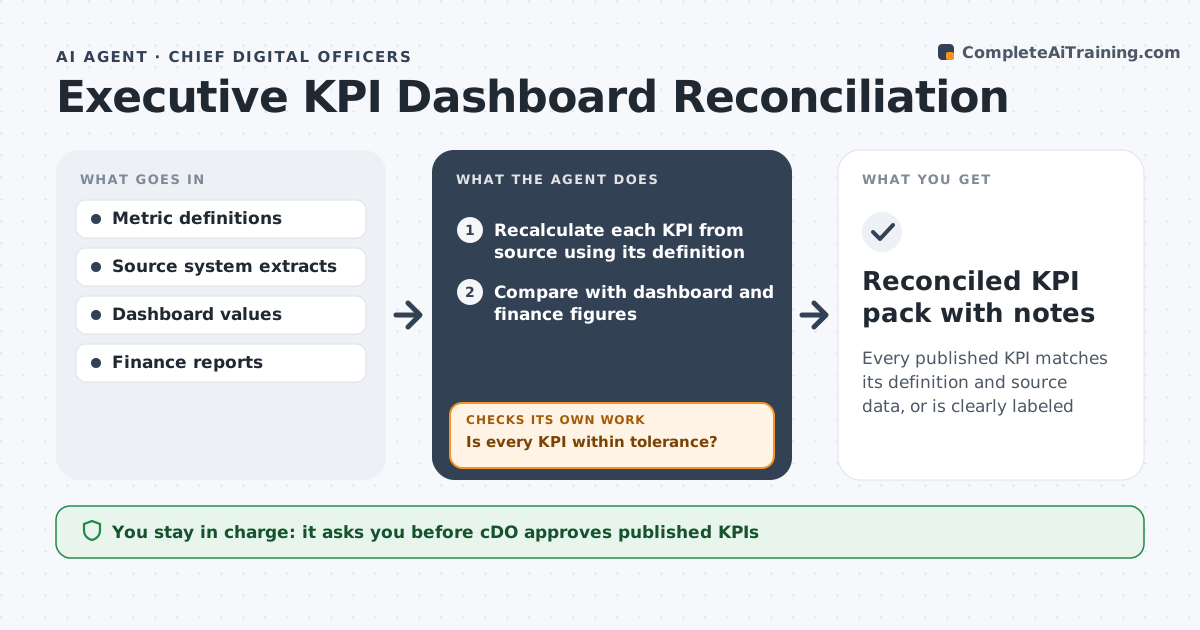
Every published KPI matches its definition and source data, or is clearly labeled
What it does
When the dashboard says revenue per customer is up but finance says it is flat, the meeting turns into a fight about numbers. This agent runs before each monthly executive pack. It recalculates every headline KPI from source systems using the written metric definition, then compares it to the dashboard value and the finance report. When the values differ by more than the tolerance, it traces the gap: filter differences, late data loads, changed definitions or duplicate records. It fixes what it can in a draft and reruns the comparison. Items it cannot explain go to the metric owner with the evidence. It decides whether a gap is a data problem or a definition problem by checking the definition history. The CDO approves the published numbers. Edge case: if a source load is late, it labels the KPI as provisional instead of showing stale numbers as final.
How it works
Follow the arrows from top to bottom. The orange dashed arrow is the loop: when a check fails, the agent goes back and tries again.
Read the steps as a list
- Monthly pack due in five days
- Recalculate each KPI from source using its definition
- Compare with dashboard and finance figures
- Is every KPI within tolerance?If not: trace the gap and correct the calculation in a draft. Back to step 2.
- Send unexplained gaps to metric owners with evidence
- Apply owner answers and rerun
- Are all source loads current for the period?If not: label affected KPIs provisional. Back to step 6.
- CDO approves published numbersThe agent waits here for your OK.
- Reconciled KPI pack with notes
How it decides
Gaps above tolerance are traced in order: load timing, filters, duplicates, definition change; the first cause that explains the gap is reported.
- Gaps over 1 percent of value are traced
- Definition changes are applied only after the metric owner confirms
- Late loads mean provisional labels, never stale finals
- A KPI unexplained after two cycles goes on the data quality backlog
Make it yours
Every agent is a starting point. You choose these settings for your own situation.
- Tolerance per KPI (default 1 percent)
- Days before pack to run (default 5)
- Metric owner list
- Provisional label wording
What keeps you in control
It always asks you first
- CDO approves published KPIs
- Metric owner approves any definition change
Hard limits
- Never edits production dashboards directly
- Never changes a metric definition without owner approval
It stops when
- Done: pack approved
- Stop: a core source system is down for the period
Set it up
We guide you through the set-up, step by step
Members get the full set-up guide for this agent. No technical skills needed: you copy, paste and upload.
- One set of instructions to paste into your AI, with the clicks for ChatGPT, Claude, Microsoft 365 Copilot, Gemini and Grok
- The agent then walks you through connecting your own data, one source at a time
- A downloadable copy with the flow chart, the rules and the full guide