AI agent for freight brokers
Export Filing Data Check Agent
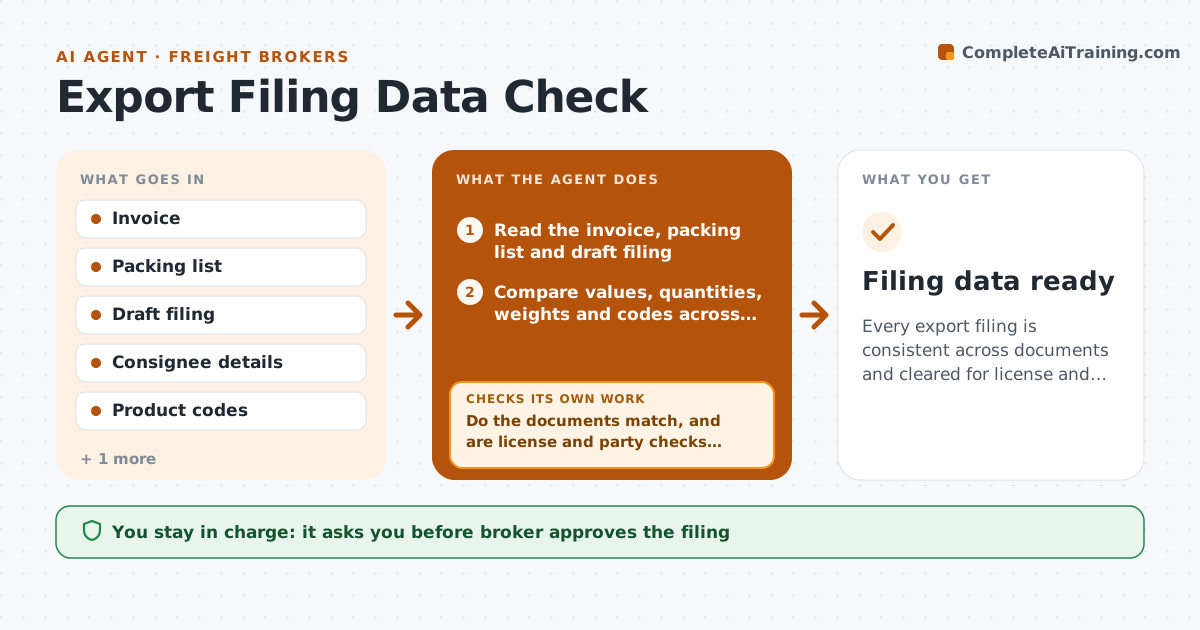
Every export filing is consistent across documents and cleared for license and party checks before filing.
What it does
An export is held at the port because the filing says 100 cartons and the packing list says 110, and no one checked whether a license was needed. Before each filing, this agent compares values, codes, quantities and consignee details across the commercial invoice, packing list and the draft filing. It checks whether the item and destination need an export license and runs the consignee and parties through restricted party lists. It lists every mismatch. Items that fail go back to the shipper for correction and the whole check reruns from the top. It prepares a clean data sheet. The broker approves the filing. Edge case: the destination is allowed, but the end user is on a restricted list.
How it works
Follow the arrows from top to bottom. The orange dashed arrow is the loop: when a check fails, the agent goes back and tries again.
Read the steps as a list
- Shipment ready for export filing
- Read the invoice, packing list and draft filing
- Compare values, quantities, weights and codes across the documents
- Check the license need for the item and destination
- Screen the consignee and parties against restricted lists
- Do the documents match, and are license and party checks clear?If not: list each failure, send them to the shipper for correction and rerun the whole check. Back to step 2.
- Check that the codes and values are reasonable for the product
- Do the values and codes look normal for this product?If not: ask the shipper to confirm and recheck. Back to step 7.
- Prepare the clean data sheet and a check report
- Broker approves the filingThe agent waits here for your OK.
- Filing data ready
How it decides
It blocks a filing on any mismatch of value, quantity or party, any missing license that is required, or any restricted party hit.
- Block on a value mismatch over 1 percent.
- Block on any quantity or weight mismatch.
- Block on a missing required license.
- Block on any restricted party match until reviewed.
Make it yours
Every agent is a starting point. You choose these settings for your own situation.
- Value tolerance (default 1 percent)
- Screening lists used
- License rules by destination
- Documents required
What keeps you in control
It always asks you first
- Broker approves the filing
Hard limits
- Never file itself
- Never clear a restricted party hit without the broker
It stops when
- Done: all checks pass and the filing is approved.
- Stop: a restricted party hit that the broker cannot clear.
Set it up
We guide you through the set-up, step by step
Members get the full set-up guide for this agent. No technical skills needed: you copy, paste and upload.
- One set of instructions to paste into your AI, with the clicks for ChatGPT, Claude, Microsoft 365 Copilot, Gemini and Grok
- The agent then walks you through connecting your own data, one source at a time
- A downloadable copy with the flow chart, the rules and the full guide