AI agent for aerospace engineers
Fatigue and Inspection Interval Review Agent
Keep inspection intervals consistent with how the structure is really used
What it does
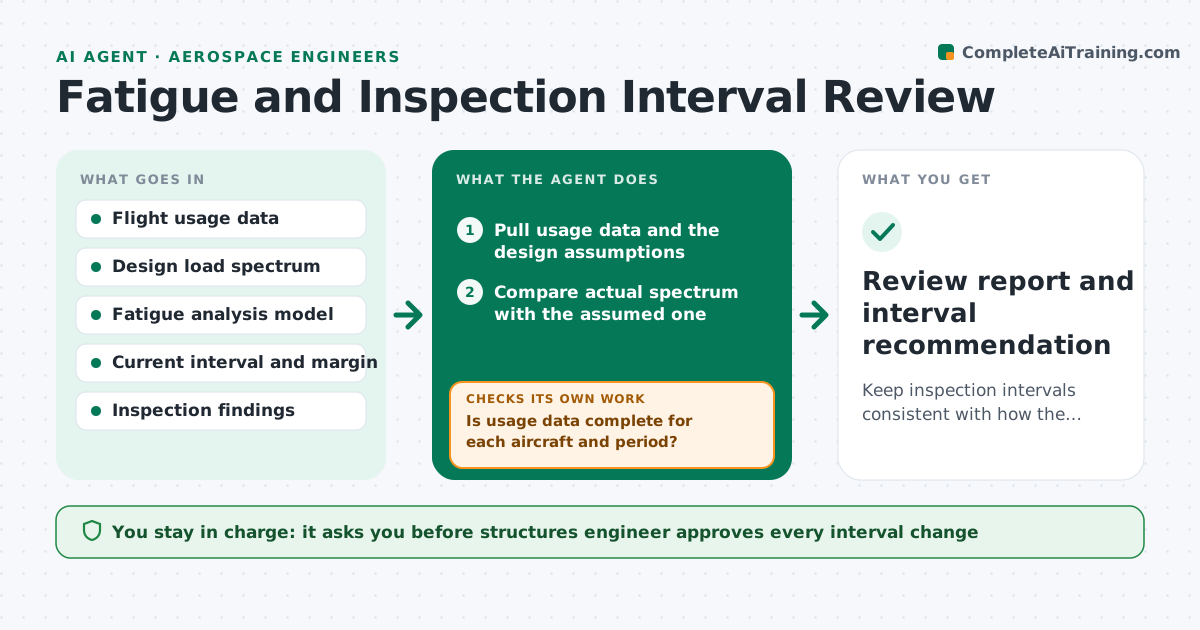
A fleet is designed for a certain mix of flights, and over the years actual use drifts toward shorter, harder cycles. The inspection interval stays the same and the margin shrinks without anyone seeing it. This agent reviews usage against the design assumptions. It reads the usage data, compares it with the load spectrum assumed in the fatigue analysis, recalculates damage and the remaining margin with the new data, and flags drift. It rechecks when new data arrives, and shows how the interval would change. The engineer approves any interval change. Edge case: usage data is missing for part of a fleet. The agent marks the gap and uses the worst case for that period.
How it works
Follow the arrows from top to bottom. The orange dashed arrow is the loop: when a check fails, the agent goes back and tries again.
Read the steps as a list
- Quarterly review or drift alert
- Pull usage data and the design assumptions
- Is usage data complete for each aircraft and period?If not: Mark the gaps and use the worst case for those periods. Back to step 2.
- Compare actual spectrum with the assumed one
- Recalculate damage per flight hour and remaining margin
- Check inspection findings for crack growth consistent with the calculation
- Is the margin above the required minimum at the current interval?If not: Compute a shorter interval and show its effect on the schedule. Back to step 4.
- Write the drift report with options
- Engineer approves any change to the intervalThe agent waits here for your OK.
- Review report and interval recommendation
How it decides
It calculates damage per flight hour from actual usage and compares it with the assumed value. If the actual rate is above the assumption by more than the allowed drift, the interval margin is re-evaluated.
- Drift over 10 percent in damage rate triggers recalculation
- Missing data uses the worst case
- Findings that disagree with the model trigger an engineering review
- Intervals are never extended without engineer approval
Make it yours
Every agent is a starting point. You choose these settings for your own situation.
- Drift threshold (default 10 percent)
- Minimum margin
- Review frequency
- Fleet groups
- Report template
What keeps you in control
It always asks you first
- Structures engineer approves every interval change
Hard limits
- Never extends an interval
- Does not replace the formal analysis, supports it
It stops when
- Done: report issued with recommendation
- Stop: model cannot represent the new usage, hand to the engineer
Set it up
We guide you through the set-up, step by step
Members get the full set-up guide for this agent. No technical skills needed: you copy, paste and upload.
- One set of instructions to paste into your AI, with the clicks for ChatGPT, Claude, Microsoft 365 Copilot, Gemini and Grok
- The agent then walks you through connecting your own data, one source at a time
- A downloadable copy with the flow chart, the rules and the full guide