
Learning path
Learning AI as a Structural Engineer
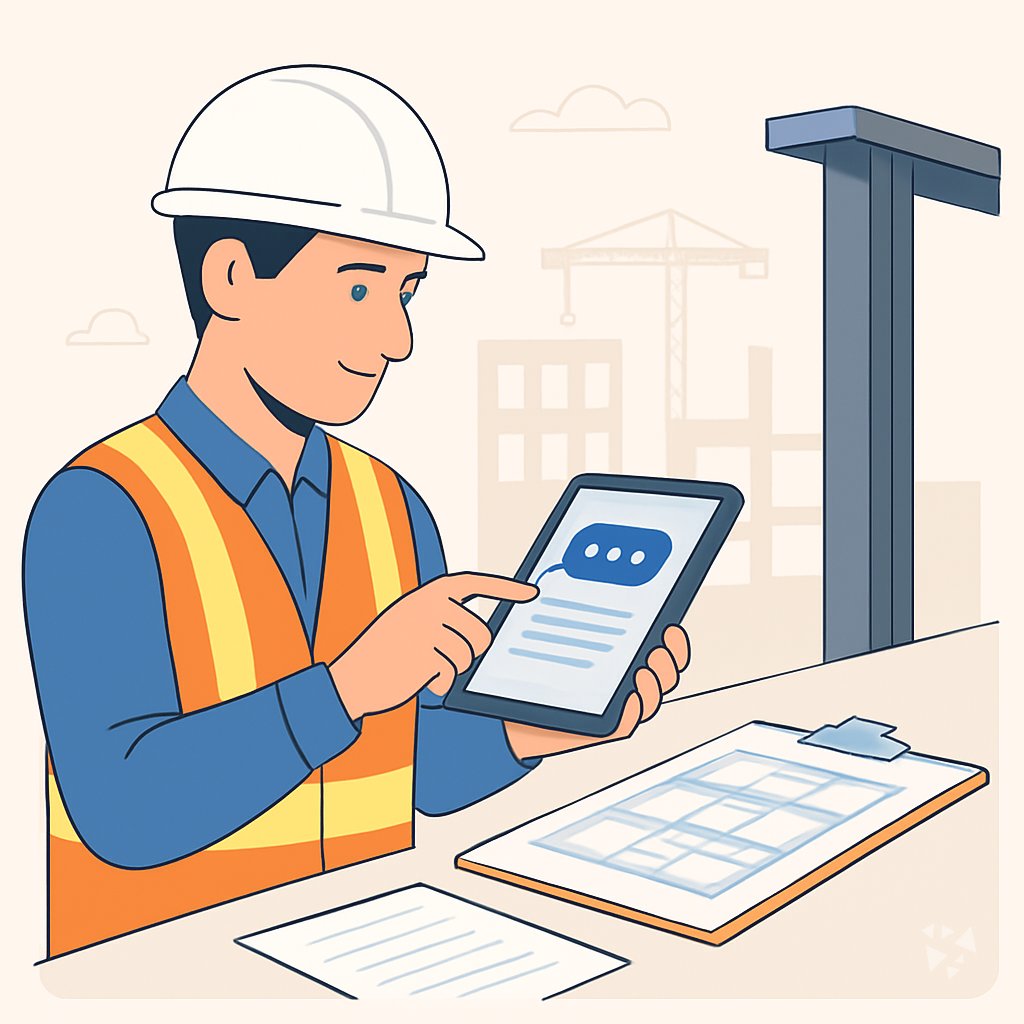
A guided path for structural engineers who want to use AI at work. It covers setup, connecting your AI, prompts for structural tasks, and video courses with certifications.
Your path
Everything in the Structural Engineer AI kit, in the order that makes sense. Members tick off each step and see their progress.
Set up your AI
We guide you through each click.
Let skills do your everyday tasks
Connect your apps and pick your AI apps
Hand whole tasks to AI agents
Build your own tools
Everything for structural engineers
All the courses, certifications, AI tools, MCP servers and apps for structural engineers, most relevant first. Open any list to see more.
Take the prompt courses
A short framework course to learn how to ask, then 8 lessons with ready-to-use prompts for structural engineers.
Start with this framework: how to talk to AI
RACE fits structural engineering by defining role, action, context, and expected quality, like beam load calculations with code checks.
Then your prompt course for structural engineers- 1Load Calculation Support3 prompts
- 2Structural System Design3 prompts
- 3Drawing and Blueprint Review3 prompts
- 4Material Selection Support3 prompts
- 5Code Compliance Checks3 prompts
- 6Construction and Site Coordination3 prompts
- 7Structural Assessment and Reporting3 prompts
- 8Client and Proposal Support3 prompts
Watch the video courses or add them to your Favorites for later
83 video courses our AI picked for structural engineers, most useful first. Save the ones you want to watch later with the heart.
Favorites are saved to your account: sign in or get your AI kit first.
Show all 83 video courses
Get certified, or add certifications to your Favorites
Every course ends in an exam and a certificate you can add to LinkedIn. Save the certifications you are aiming for with the heart.
Favorites are saved to your account: sign in or get your AI kit first.
More certifications for structural engineersShow all 24 certifications
Try the AI tools for structural engineers
3 AI tools our AI matched to the work of structural engineers, best fit first. Each review shows what it does, its alternatives and the jobs it suits.
Favorites are saved to your account: sign in or get your AI kit first.
Connect your AI to the apps structural engineers use
MCP servers let ChatGPT, Claude or Copilot look things up and get work done in other apps, like your email, calendar or bookkeeping software. These 11 fit the work of structural engineers best, well-known apps first.

den AEC Knowledge server
by odd-InnocentAsk your AI about Korean building codes, standards and construction practice, with sources.
Research Official
GNU Units MCP server
by laszlopereLets your AI convert between thousands of units and check unit math, all offline.

debim MCP server
by PRIDA-TAKONLet your AI build 3D building models from simple text files, calculate material amounts and costs, and make a viewable model.

lambdacad MCP server
by PsalmustrackLet your AI draw and model inside BricsCAD on Linux, from simple 2D plans to 3D solids.

Revit Model MCP server
by sharafutdinovdiLets your AI read a live Revit model and, if you allow it, make small changes like placing or moving elements.
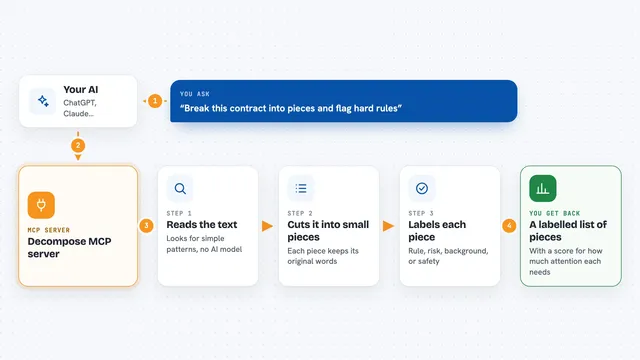
Decompose MCP server
by echology-ioYour AI can break any text into labelled pieces and show which parts are rules, risks, or just background.
Show all 11 MCP servers
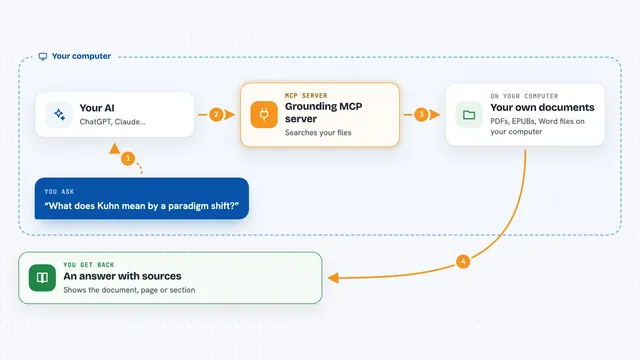
Grounding MCP server
by andyliszewskiSearch your own PDFs, EPUBs and Word files locally and get answers with page and section citations.

Calculator MCP server
by githejieLets your AI do exact math instead of guessing at numbers.
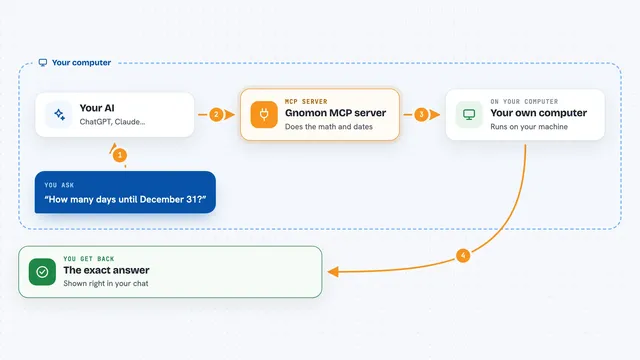
Gnomon MCP server
by lihtnessGives your AI a reliable calculator and calendar so dates, math, and unit conversions stop being guesses.
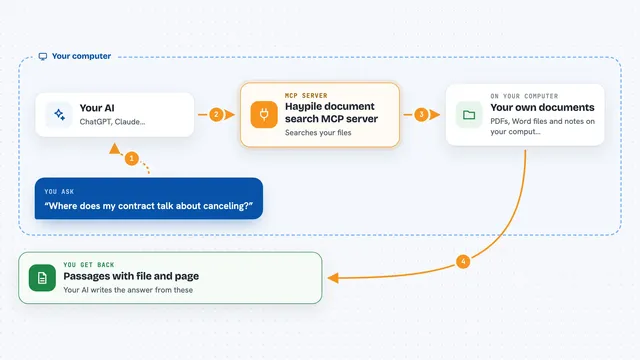
Haypile document search MCP server
by BenyDLets your AI search your own PDFs, Word files and notes by meaning, with file and page citations.

Local RAG MCP server
by shinprSearch your own PDF, Word, text and Markdown files from your AI chat, all on your own computer.



















































































About this learning path
7 topicsAI for Structural Engineers: A Practical Learning Path
Structural engineering runs on careful checks, clear drawings, and steady coordination. AI can help with the repetitive parts so you can spend more time on the judgment that keeps structures safe.
This path walks you through setup, connecting your AI, and prompts built for structural work. You also get video courses picked for your job, along with the certifications those courses offer.
Why AI matters for structural work
AI can help with load takedowns, code lookups, drawing reviews, and report drafts. It does not replace your stamp or your responsibility.
Used well, it gives you a faster first draft. That means more time for the engineering decisions that matter most.
What the path includes
You start with setup questions to get your tools ready. Then you connect your AI, learn skills for the job inside your AI, and work through this prompt course.
The path also points you to video courses chosen for structural engineers. Each course lists the certification you can earn.
How the path saves you time
Each lesson targets a task you already do: load calculations, system design, drawing review, material selection, code checks, site coordination, assessments, and proposals.
You practice prompts that produce checklists, memos, RFIs, and summaries in minutes instead of hours.
How it protects your career
You learn to check AI output, keep assumptions visible, and stay responsible for the final design. The path shows you where AI helps and where your professional judgment must lead.
That balance keeps you valuable and safe as tools change.
Video courses and certifications
The path includes video courses picked for structural engineering work. They cover topics that match your daily tasks.
Each course lists the certification you can earn, so you can show your growing skills to employers and clients.
How to get started
Begin with the setup questions, then connect your AI. Move through the prompt course at your own pace, one lesson at a time.
Try each prompt on a real project when you can. Small, steady practice builds confidence.
Frequently asked questions
Do I need to be technical to use this path?
No. The path is written for structural engineers who are not programmers. You will use plain language prompts in tools like ChatGPT, Claude, or Gemini.Will AI replace my engineering judgment?
No. AI can draft, summarize, and organize, but you remain the engineer of record. The course teaches you to review every output and keep your assumptions clear.How long does the path take?
You can move at your own pace. Most learners finish the prompt course in a few sittings and return to the video courses as needed.Is my project data safe to use with AI?
The safety and privacy lesson covers this for structural work. You will learn what to avoid sharing and how to keep client information protected.