AI agent for data scientists
Feature Pipeline Validation Agent
Training and serving features that match, with no data leakage
What it does
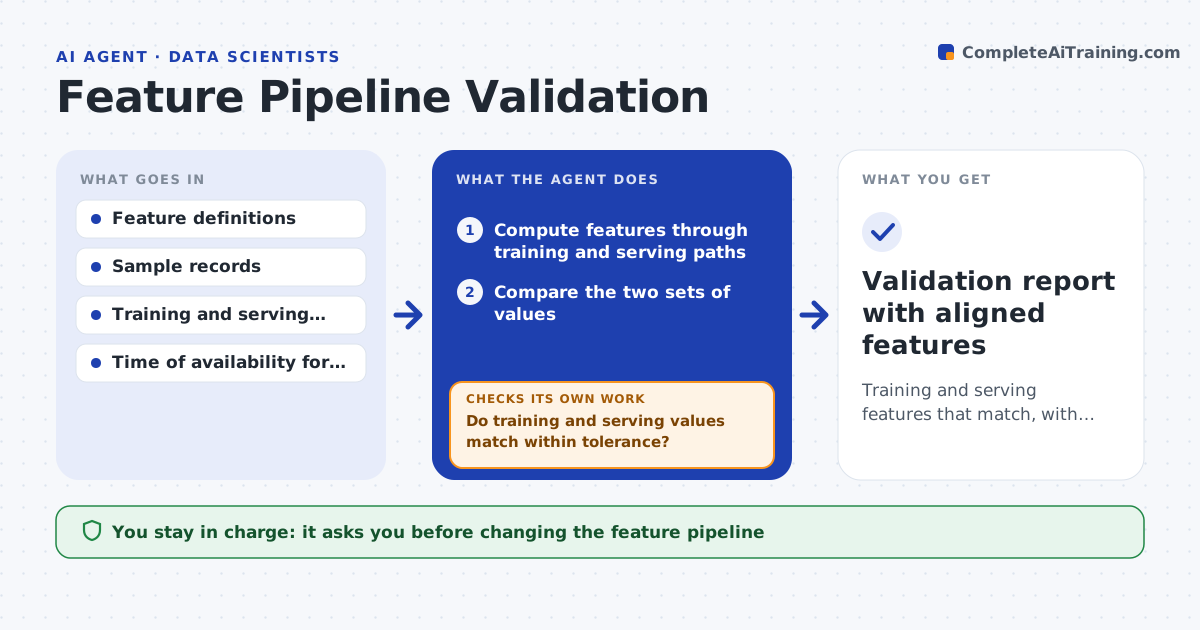
A common machine learning failure is that a feature is calculated one way in training and another way when the model runs live. This agent takes the feature definitions and computes each one through both the training path and the serving path on the same sample records, then compares the values. Where they differ beyond tolerance, it traces which step causes the gap, such as a different default for missing values or a time zone mismatch. It proposes a fix to align them and reruns the comparison. It also checks for leakage, where a feature uses information not available at prediction time. You approve changes to either pipeline. Edge case: a feature that depends on future data is flagged as leakage and blocked, not just aligned.
How it works
Follow the arrows from top to bottom. The orange dashed arrow is the loop: when a check fails, the agent goes back and tries again.
Read the steps as a list
- Feature added or scheduled check
- Compute features through training and serving paths
- Compare the two sets of values
- Do training and serving values match within tolerance?If not: find the differing step, propose an alignment fix and rerun. Back to step 2.
- Check each feature for use of future or unavailable data
- Is every feature free of leakage?If not: flag and block the leaking feature. Back to step 5.
- Engineer approves the pipeline fixThe agent waits here for your OK.
- Validation report with aligned features
How it decides
A feature passes only when training and serving values match within tolerance and no input uses information unavailable at prediction time.
- Match within tolerance for numeric features
- Block any feature using future data
- Align defaults and time zones across paths
Make it yours
Every agent is a starting point. You choose these settings for your own situation.
- Match tolerance
- Sample size
- Fields and their availability times
- Schedule for recurring checks
What keeps you in control
It always asks you first
- Changing the feature pipeline
Hard limits
- Does not change the pipeline without approval
- Blocks leaking features regardless of accuracy gain
It stops when
- Done: features aligned and leakage-free
- Stop: sample records unavailable
Set it up
We guide you through the set-up, step by step
Members get the full set-up guide for this agent. No technical skills needed: you copy, paste and upload.
- One set of instructions to paste into your AI, with the clicks for ChatGPT, Claude, Microsoft 365 Copilot, Gemini and Grok
- The agent then walks you through connecting your own data, one source at a time
- A downloadable copy with the flow chart, the rules and the full guide